ENGLISH
41
6. Connecting to the wireless network
There are two different ways of wirelessly connecting to the C150BRS4:
- Manually.
- Automatically using the WPS function.
Almost every brand/type wireless card uses a different client application. Please refer to the manual of
your wireless network card for information on how to create a connection with a wireless network.
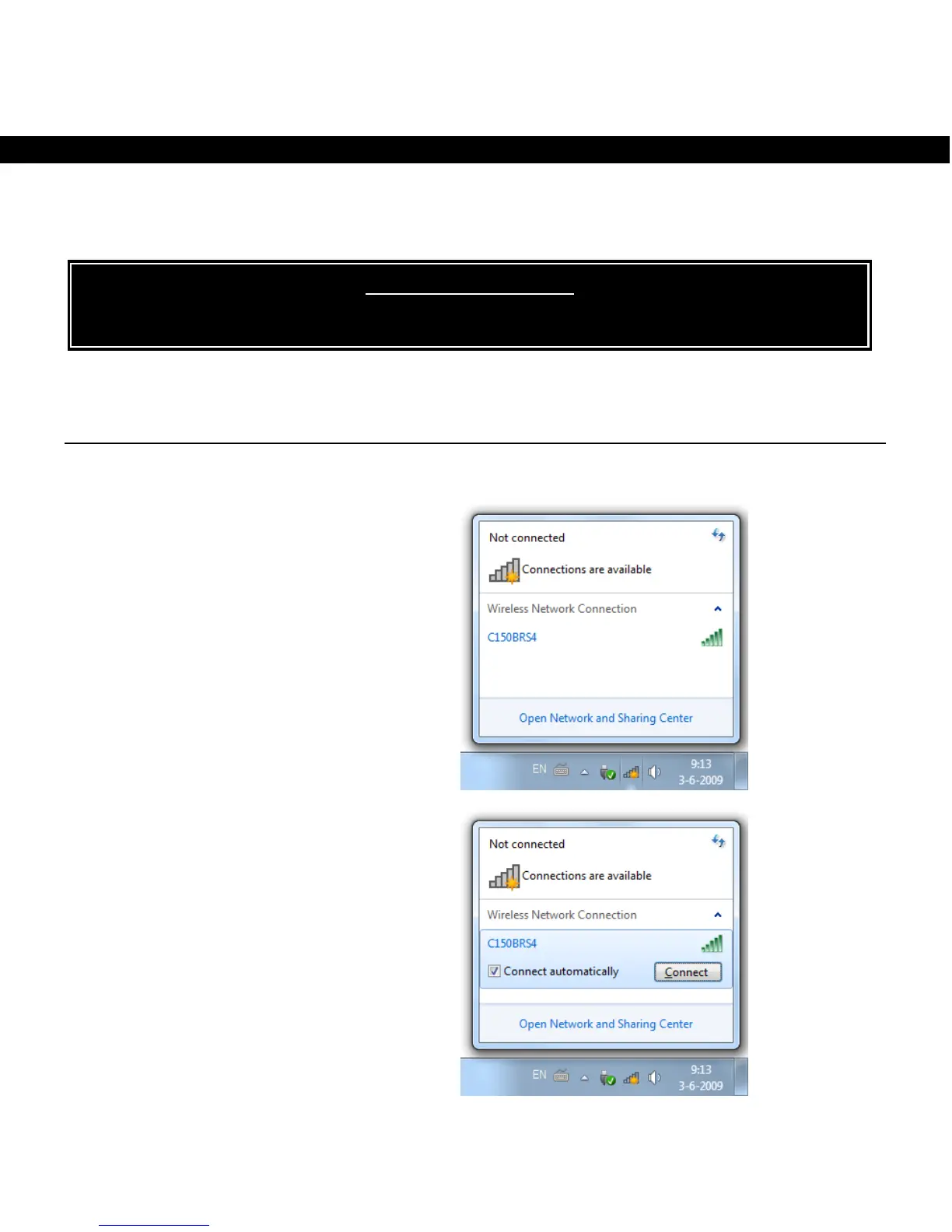
6.1 Connecting manually in Windows 7
In the following example the integrated “Connect to a Network” option from Windows 7 is used.
A Click on the ‘Network’ icon in the
taskbar to view the list of available
wireless network connections.
B Select the network “C150BRS4” from
the list and click on ‘Connect’.
By default the option “Connect
automatically” is selected. This makes
sure the connection is automatically
started each time your computer is
turned on. If you do not want this, you
can unselect this option before clicking
on ‘Connect’.
! IMPORTANT NOTE !
The C150BRS4 is secured with WPA-PSK/WPA2-PSK (mixed mode) encryption by default.
The unique WPA passphrase can be found on



 To Next Page
 Loading...
