EasyManua.ls Logo

Conceptronic CNB90 - Device Explanation

Conceptronic CNB90
Print Icon
To Next Page IconTo Next Page
To Previous Page IconTo Previous Page
Loading...
ENGLISH
6
3. Device explanation
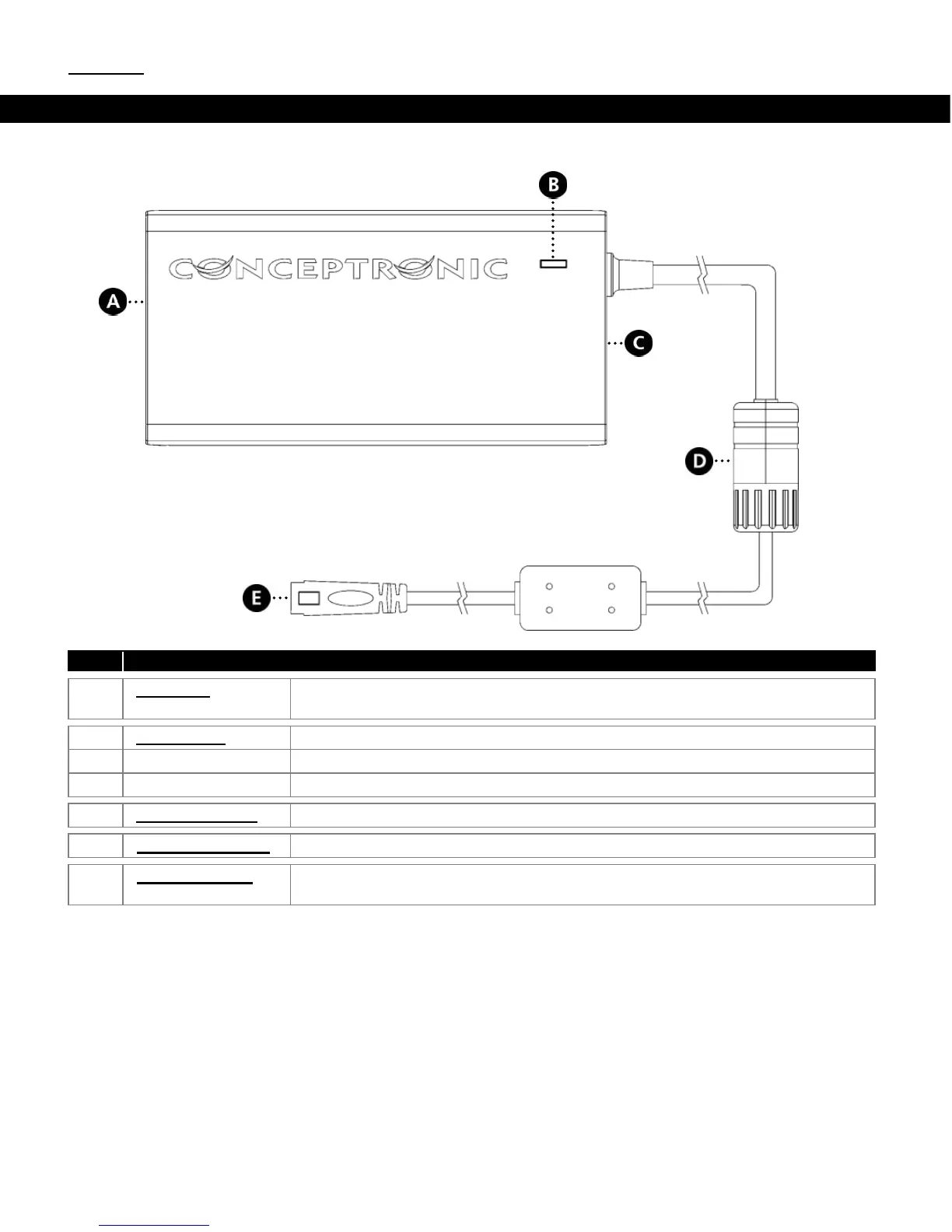
The device explanation picture below describes all elements of the notebook adapter:
Nr
Description
A.
AC input:
AC input connection to connect the power cable to the notebook
adapter.
B.
Power LED:
Show the power state of the notebook adapter.
Off
The notebook adapter is not powered.
On
The notebook adapter is powered and ready to use.
C.
USB connector:
USB connector to charge your USB devices.
D.
Voltage selector:
Selector to set the output voltage for your notebook adapter.
E.
Tip connector:
Connector for one of the notebook tips included with the notebook
adapter.

Other manuals for Conceptronic CNB90

Related product manuals