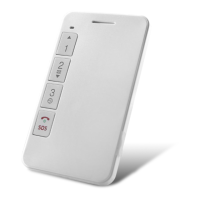
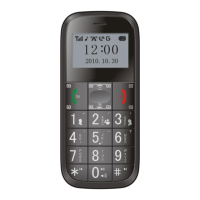
Dial
Pick up
At standby mode: Enter into calling log
At operation:To be a confirmation key
Power on/off
End/Delete Key
When power off: Long press to turn on
When power on: Long press to turn off
At operation: Return to upper menu interface / Long press to return at
standby interface
Navigation Up /
Main menu Key
At standby mode: Enter into main menu
At operation: Move up the cursor
At FM radio :Add 0.1MHz each time
Navigation Down /
Phone Book Key
At standby mode: Enter into phone book
At operation: Move down the cursor
At FM radio : Reduce 0.1MHz each time
When edit: Switch smart input
At FM radio: Switch to next channel
At standby mode: Switch to vibration mode or not
At FM channel edit interface: Input “.”
When edit: Insert common symbol
At FM radio: Switch to last channel
At dialing number interface: Press two times to input “+”
“+”Enhance volume
“-”Reduce volume
At standby mode: Turn on the radio
When radio on: Turn off the radio
Push up to turn on
Push down to turn off
Push up to unlock
Push down to lock
At operation: Long press to switch to Loudspeaker/Handset mode
At FM radio: When the earphone being installed, long press to switch from
earphone mode to hand-free model. Short press to pause it.
Long press to make an emergency call


 To Next Page