EasyManua.ls Logo

Connect IT CMO-2705-DD - User Manual

Connect IT CMO-2705-DD
12 pages
Print Icon
To Next Page IconTo Next Page
Loading...
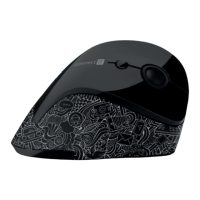
ERGONOMIC OPTICAL MOUSE
ERGONOMISCHE OPTISCHE MAUS
ERGONOMICZCNA MYSZ OPTYCZNA
ERGONOMICKÁ OPTICKÁ MYŠ
CMO-2705-DD
USER MANUAL
BENUTZERHANDBUCH
PODRĘCZNIK UŻYTKOWNIKA
UŽIVATELSKÝ MANUÁL
UŽÍVATEĽSKÝ MANUÁL
EN
DE
PL
CZ
SK
Question and Answer IconNeed help?

Do you have a question about the Connect IT CMO-2705-DD and is the answer not in the manual?

Summary

Specification

Installation

Installation of batteries

Details on how to insert the AA battery into the mouse and switch it on.

Installation of USB receiver to the computer

Instructions for connecting the USB receiver to the computer for driver installation.

Troubleshooting

Disposal and Environmental Information

Disposal of Used Packaging

Guidance on disposing of packaging materials at public waste sites.

Disposal of Electrical and Electronic Appliances

Instructions for recycling electronic waste according to regulations.

Disposal for Business Entities (EU)

Information for businesses on disposing of electrical/electronic devices in the EU.

Disposal Outside the European Union

Guidance on proper disposal methods for users outside the EU.

Connect IT CMO-2705-DD Specifications

General IconGeneral
BrandConnect IT
ModelCMO-2705-DD
CategoryMouse
LanguageEnglish

Related product manuals