EasyManua.ls Logo

Conotec FOX-2004 - User Manual

Conotec FOX-2004
2 pages
Print Icon
To Next Page IconTo Next Page
Loading...
Lock-OFF
to change
the program
setting
Lock-ON
to change
the program
setting
Output ON
time delay
hysteresis
(deviation)
temperature
setting
correction
setting
between
displayed
and
real value
FAN ON
delay time
If pressing the key for 2 seconds after finising all set programs, ending after OK letter or returning the present
value automatically in 10 seconds.
setting
COMP
delay time
after defrost
relay ON
stop
defrost
time
setting
relay OFF
stop
defrost
time
setting
o-k
Version 1.3(2015. 1.23)
FAN
operation
second
minute
hour
minute
Defrost Sensor
Question and Answer IconNeed help?

Do you have a question about the Conotec FOX-2004 and is the answer not in the manual?

Summary

Controller Connection Diagram

Component Identification

Setting Temperature Configuration

Program Setting Operations

Program Operation Chart

Chart detailing the operational states of COMP, Defrost, and FAN.

Mode Selection and Configuration

User Mode Settings (EU;E81)

Configuration for user mode parameters like HSP, LSP, DIS, DIF, DLT, COR, SER, DSP, LOCK.

Installer Mode Settings (E82)

Configuration for installer mode parameters including D.DE, D.OR, D.TP, D.OF, D.ON, D.DT, D.ST.

Installer Mode Settings (E83)

Configuration for installer mode parameters F.ST and F.DE.

Safety and Warning Information

General Safety Precautions

General warnings and cautions for safe operation and installation of the controller.

Danger of Electric Shock

Specific warnings regarding electric shock hazards during maintenance and operation.

Troubleshooting Error Indicators

Explanation of error codes (E1, E2, SE1, SE2, HH1, HH2, LL1, LL2) and their meanings.

Product Dimensions and Specifications

Physical Size and Panel Cutout

Diagrams showing the controller's physical dimensions and required panel cutout size.

Environmental Suitability

Recommended ambient temperature and humidity ranges for optimal operation.

Overview

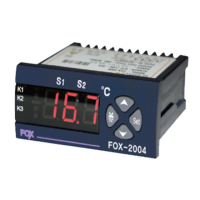
The CONOTEC FOX-2004 is a digital temperature controller designed for precise temperature management in various applications. It offers comprehensive control over temperature, defrost cycles, and fan operation, making it suitable for systems requiring accurate environmental regulation.

Function Description

The FOX-2004 primarily functions as a temperature controller, capable of managing both cooling (COMP control) and defrosting (Defrost control) processes. It also integrates a FAN control function to regulate air circulation. The device utilizes two NTC sensors to monitor temperatures, allowing for independent measurement of the main temperature and the defrost temperature.

The controller operates within a temperature range of -55.0°C to +99.9°C. It features a clear digital display that shows the current temperature and allows users to easily set desired parameters. Output relays are provided for connecting to external components such as compressors, defrost heaters, and fans, with a maximum output capacity of 250VAC 2A. For higher loads, the use of a power relay or magnet is recommended to ensure reliable operation.

Usage Features

The FOX-2004 offers a user-friendly interface with distinct modes for operation and configuration.

User Mode:

In the standard user mode, the device displays the current temperature. Pressing the "set" key allows the user to view and adjust the setting temperature. Once adjusted, pressing "set" again confirms the change, indicated by an "O-K" message, and the new setting is remembered. This mode is designed for quick and easy adjustments of the primary temperature setpoint.

Installer Mode:

For more advanced configuration, the installer mode provides access to a wide range of programmable parameters. This mode is accessed by pressing the "set" key for more than 5 seconds, which will display "E81," "E82," or "E83." Users can then navigate through these categories using the "up" and "down" arrow keys.

  • E81 Parameters (General Settings):

    • HSP (Highest Limit of User Setting Temp): Defines the upper boundary for the user-adjustable setting temperature, preventing settings that are too high.
    • LSP (Lowest Limit of User Setting Temp): Defines the lower boundary for the user-adjustable setting temperature, preventing settings that are too low.
    • DIS (Selection of Deviation Style): Configures how the temperature deviation is displayed (e.g., P for positive deviation, PN for positive/negative deviation).
    • DIF (Temperature Deviation Hysteresis): Sets the temperature differential (hysteresis) around the setpoint to prevent rapid cycling of the compressor.
    • DLT (Delay Time): Configures a delay time for output activation, useful for protecting compressors from short-cycling.
    • COR (Correction of Temp): Allows for calibration of the temperature sensor reading to match a known reference, correcting any discrepancies between the displayed and real values.
    • SER (Sensor's Error): Defines the controller's behavior in case of a sensor error (e.g., continuous ON or OFF of the output).
    • DSP (Display of Sensor Option): Selects which sensor's temperature is displayed (main temp, defrost temp, or alternating display).
    • LOC (Lock Function): Enables or disables the lock function, preventing unauthorized changes to the program settings.
  • E82 Parameters (Defrost Settings):

    • D.DE (Defrost Stop Temperature): Sets the temperature at which the defrost cycle will terminate, often used as an overheat prevention for the defrost heater.
    • D.OR (Correction of Temperature for Defrost Sensor): Calibrates the defrost sensor reading.
    • D.TP (Selection of COMP while Defrosting): Determines whether the compressor operates (COMP ON) or remains off (COMP OFF) during the defrost cycle.
    • D.OF (Defrost Stop Time): Sets the maximum duration for a defrost cycle.
    • D.ON (Defrost Time): Configures the interval between defrost cycles.
    • D.DT (Delay Time of COMP After Defrosting): Introduces a delay before the compressor restarts after a defrost cycle, allowing evaporator temperature to stabilize.
    • D.ST (Delay Time of Operating for Defrost): Sets a delay for the start of the defrost cycle.
  • E83 Parameters (FAN Settings):

    • F.ST (FAN Setting): Configures the fan operation mode (e.g., continuous ON, ON/OFF based on compressor, etc.).
    • F.DT (Delay Time of FAN ON After Defrosting): Sets a delay before the fan restarts after a defrost cycle.

Manual Defrost:

The FOX-2004 supports manual defrost initiation and termination. To start a manual defrost, press the "down" arrow key for more than 3 seconds. The K2 LED will flicker, indicating the defrost cycle has begun. To stop a manual defrost, press the "down" arrow key for more than 3 seconds again during an active manual defrost, or it will automatically stop after the configured defrost time.

Display Options:

The device can display the main temperature sensor reading, the defrost sensor reading, or alternate between the two every 2 seconds, depending on the DSP setting. Pressing the "up" arrow key for more than 1 second in the present temperature display mode will cycle through these display options.

Maintenance Features

The FOX-2004 is designed for reliability, but proper installation and handling are crucial for its longevity and accurate performance.

Error Indication:

The controller provides clear error codes on its display to assist in diagnosing issues:

  • E81: Indicates damage to memory data, likely due to strong external noise. This requires professional servicing.
  • E1/E2: Open error for temperature sensor (E1) or defrost sensor (E2).
  • SE1/SE2: Short error for temperature sensor (SE1) or defrost sensor (SE2).
  • HH1/HH2: Temperature sensor (HH1) or defrost sensor (HH2) reading exceeds the upper limit of the display range.
  • LL1/LL2: Temperature sensor (LL1) or defrost sensor (LL2) reading falls below the lower limit of the display range.

These error codes help users or technicians quickly identify the nature of a problem, facilitating troubleshooting and maintenance.

Wiring and Installation:

The manual emphasizes several precautions for installation and wiring to ensure optimal performance and safety:

  • Avoid connecting to motors or solenoids with large inductive loads directly without proper protection.
  • Use the same type of wire for sensor extensions and keep them as short as possible.
  • Keep power cables away from high-voltage lines and avoid installation in areas with excessive water, oil, or dust.
  • Protect the device from direct sunlight, rain, strong magnetism, noise, vibration, impact, and corrosive substances.
  • Do not disassemble or modify the product, as this may void servicing options.
  • Avoid using the device near strong high-frequency noise-emitting devices.

By adhering to these guidelines, users can ensure the FOX-2004 operates reliably and accurately, minimizing the need for frequent maintenance and extending its operational lifespan. The device is built to provide consistent temperature control, and proper care ensures its continued performance.

Conotec FOX-2004 Specifications

General IconGeneral
Control ModePID, On/Off
Input TypeThermocouple, RTD
DisplayLED
Dimensions48 x 48 x 100 mm
Number of Outputs2
OutputRelay, SSR
Power Supply100-240VAC, 50/60Hz
CommunicationRS-485

Related product manuals