GARAGE DOOR OPERATOR USER’S MANUAL
12
D
O
W
N
U
P
S
E
T
C
O
D
E
C
O
D
E
S
E
T
U
P
D
O
W
N
D
O
W
N
U
P
S
E
T
C
O
D
E
1 2
3
4
C
O
D
E
S
E
T
U
P
D
O
W
N
D
O
W
N
U
P
S
E
T
C
O
D
E
5 6
D
O
W
N
U
P
S
E
T
C
O
D
E
U
P
S
E
T
C
O
D
E
D
O
W
N
7
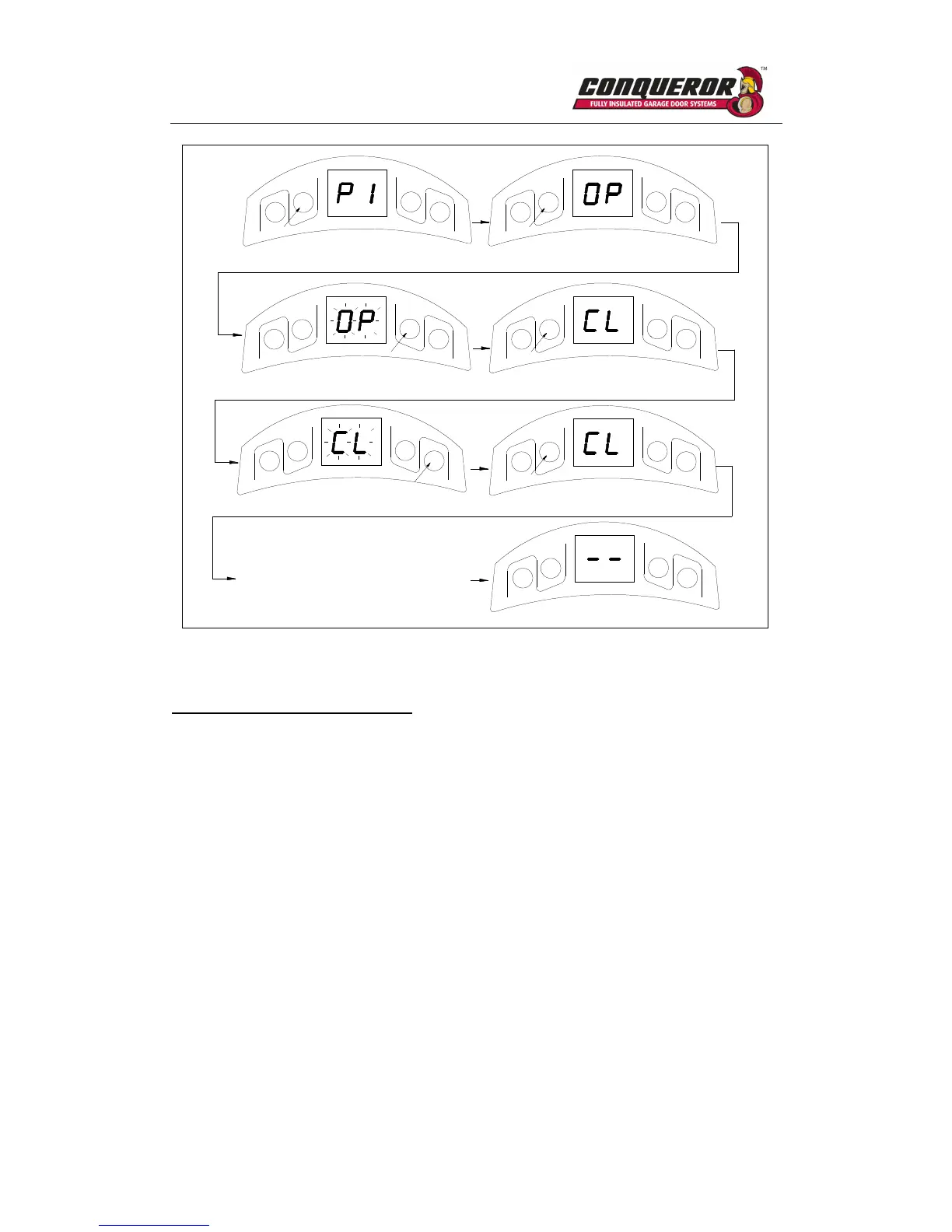
The door will do a complete open
&close cycle.
Fig.16
Adjusting obstruction force sensitivity
If the door meets an obstruction during closing, it will stop and reverse about 15cm~20cm.
1. Press and hold SET four seconds until ‘P1’ is indicated on the LED display.
2. Press UP button, ‘P2’ is indicated on the LED display.
3. Press the SET, the unit is now in force adjustment mode. Note: the factory preset is F5.
4. Press UP to increase force setting, maximum force setting is level 9 (F9). Press DOWN to
decrease force, minimum force setting is level 1(F1).
5. Press SET to confirm.



 To Next Page