Edition 11/2016 - CG200 OD
SACOME, Document CONFIDENTIEL,
Ne peut être reproduit ni communiqué sans notre accord préalable.
- 16 -
5. OPERATION
Grinding coffee with CG200 OD:
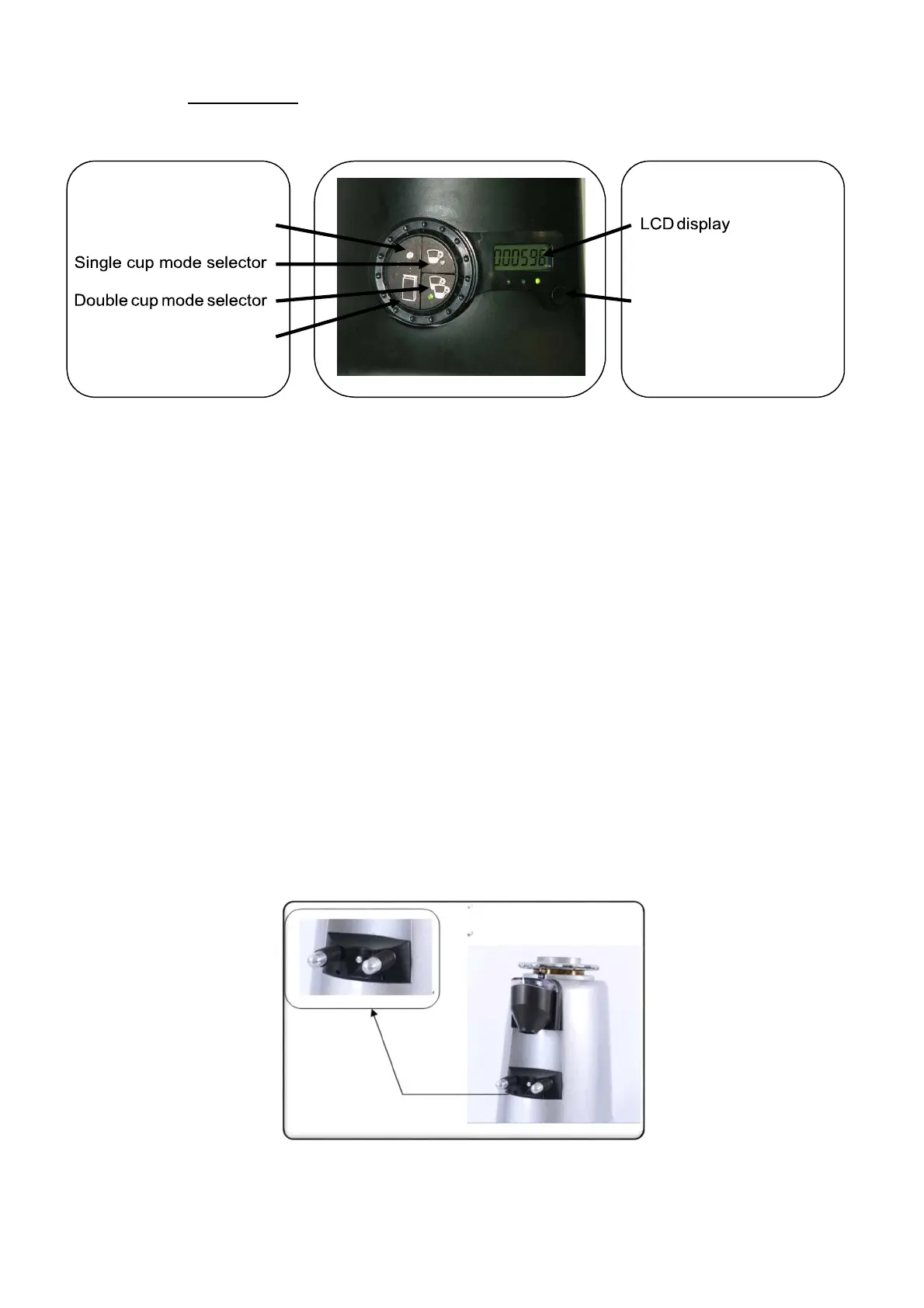
Fig.5.1
A.
Modes of operation:
The CG200 OD can be operated in 3 different modes (Fig.5.1)
Activating (or deactivating) each one of the modes, is achieved by single pressing on the relative mode
selector button. Once activated, a green LED will turn to ON state on each one of the selectors.
•
Continuous mode, while in continues mode pressing longer than 3 sec on continuous-mode
button will start the grinder (the relative LED will blink as long as the grinder is running) stopping
the grinder by another short press on continuous-mode button.
•
Single cup mode, while in single cup mode any press on the demand switch (fig.5.2) will
activate the grinder to grind a precisely timed dose (time can be programmed by user) into the
filter handle.
•
Double cup mode, while in double cup mode any press on the demand switch (fig.5.2) will
activate the grinder to grind a precisely timed dose (time can be programmed by user) into the
filter handle.
Remark: Stopping an undesired grinding operation (before reaching complete dose) by pressing
continuous mode button.
Fig.5.2


 To Next Page