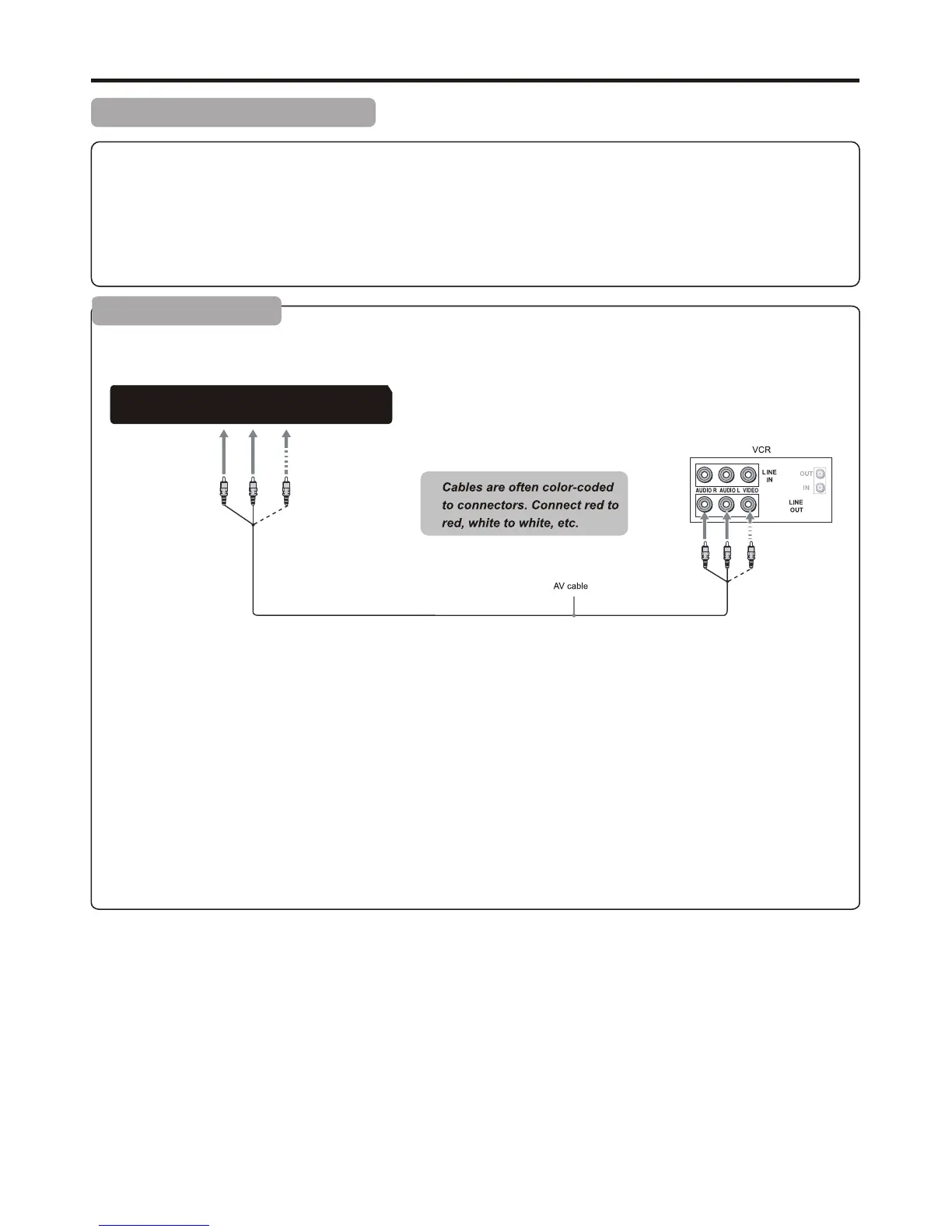
How to connect:
Connect the Audio/Video cables between the Audio (L/R)/Video jacks on the unit and VCR.
To play VCR
1. Turn on your TV, then press SOURCE button. The INPUT SOURCE menu opens.
2. Press ▲ or ▼ to select AV, then press ENTER to confirm.
3. Turn on your VCR , insert a videotape and press the Play button.
Connections
Cautions Before Connecting
● Carefully check the terminals for position and type before making any connections.
● The illustration of the external equipment may be different depending on your model.
● Loose connectors can result in image or colour problems. Make sure that all connectors are securely inserted into
their erminals.
● Refer to the operating manual of the external device as well.
● When connecting an external device, turn the power off to avoid any issues.
Connecting a VCR
TV REAR
Audio Out
R
L
Video
R
L
Y
Pb
Pr
10


 To Next Page