Connections (Continued)
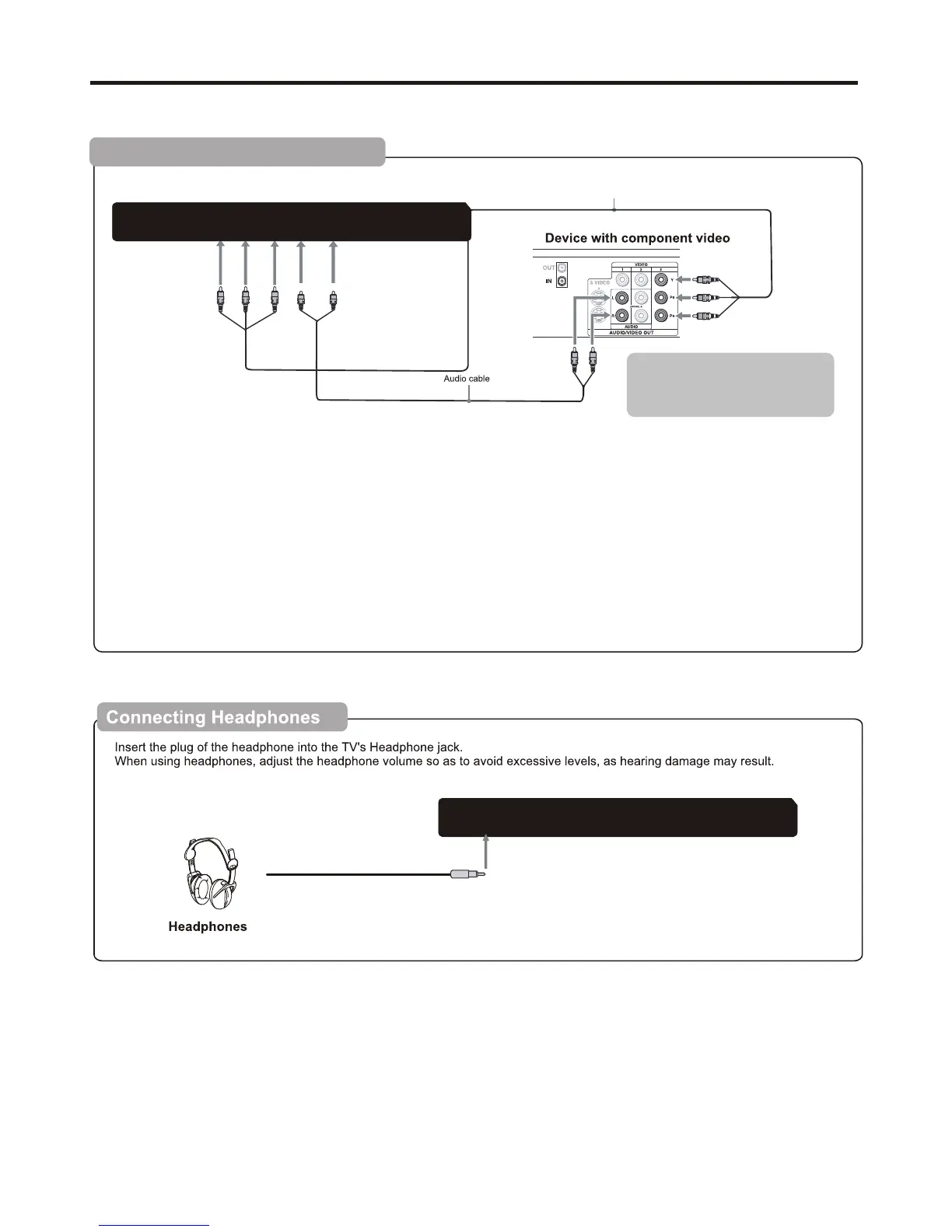
To connect a device using component video:
Connect the Component Video cable between the Y, Cb/Pb, Cr/Pr input jacks on the unit and Y, Cb/Pb, Cr/Pr output jacks
on the device .
Connect the Audio cable between the AUDIO input jacks on the unit and AUDIO output jacks on the device.
To play component video from an external device:
1. Turn on your TV, then press SOURCE button. The INPUT SOURCE menu opens.
2. Press ▲ or ▼ to select Component, then press ENTER to confirm.
3. Turn on your external device and set it to the correct mode. See the device's user guide for more information.
Connecting Component Video
TV REAR
Component video cable
Cables are often color-coded
to connectors. Connect red to
red, white to white, etc.
Audio Out
R
L
Video
R
L
Y
Pb
Pr
Headphone
Audio Out
R
L
Video
R
L
Y
Pb
Pr
Headphone
11


 To Next Page