Need help?
Do you have a question about the Continu.us EasyMote DT-R08 and is the answer not in the manual?
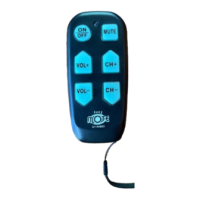
Controls virtually any television and is designed for ease of use, operation, programming, touch, visibility, handling, and carrying.
Ensure the remote has properly installed batteries and a functional TV remote is available for learning mode.
Search for TV codes by pressing CH+ repeatedly until channels change, then save with the Mute button.
Teach the remote functions from another remote by aligning them and pressing corresponding buttons.
Restore the remote to its original factory settings by pressing Power and Mute, then Mute again.
Turn the remote's backlight on or off by holding the Mute and CH— buttons.
 General
| Device Type | Remote Control |
|---|---|
| Brand | Continu.us |
| Model | DT-R08 |
| Category | Remote Control |
| Power Source | 2 AAA batteries |

 To Next Page