Boot
Long Press Power
Button to turn on.
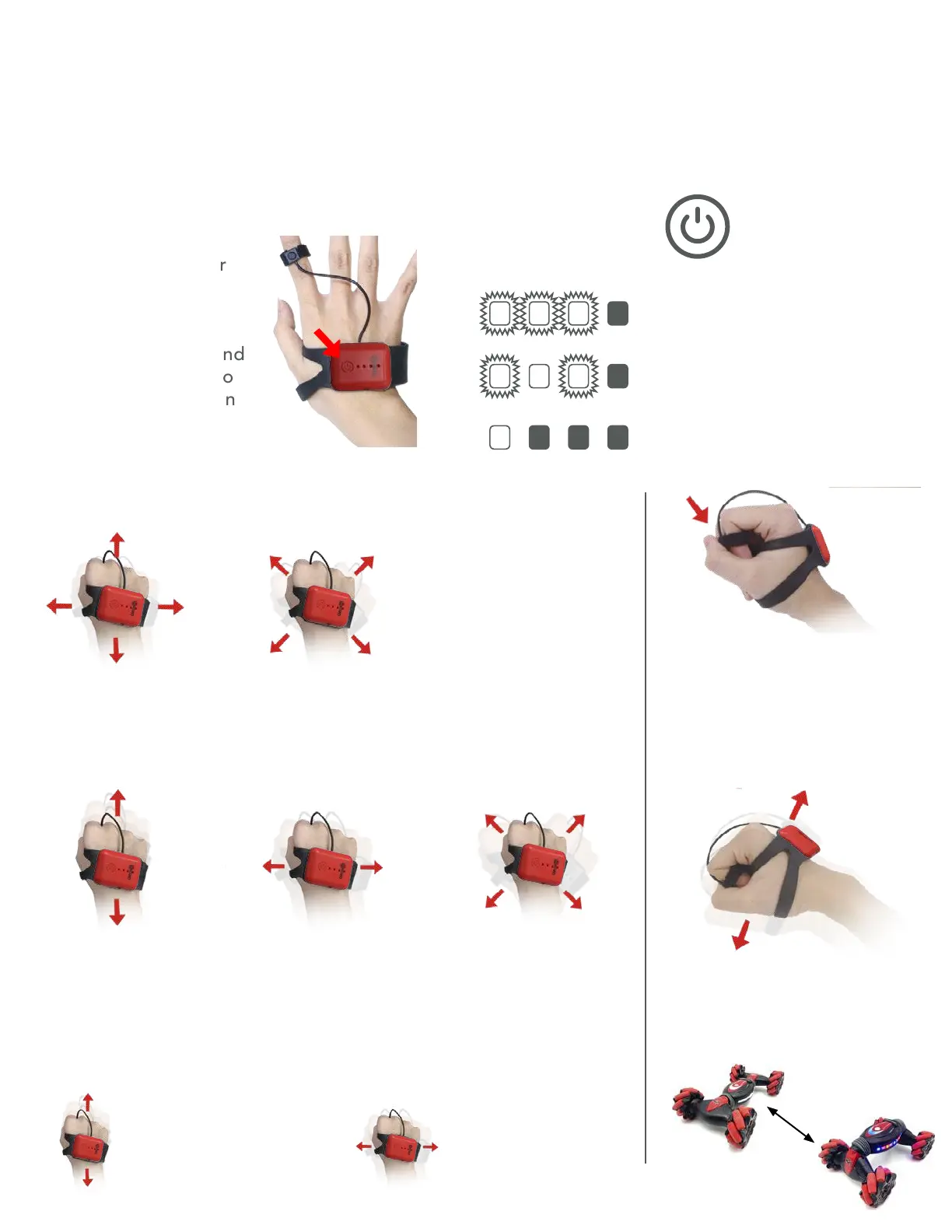
Put it on
Put your thumb
through the rubber
loop and strap it
around your palm.
Attach the mode-
switch button around
your index finger so
that your thumb can
press it easily.
Mode 1: Default mode when device is turned
Mode 2: Alternate Controls
3 LED’s blinking 3 times fast
indicate the remote is booted
Remote is looking for
SC1
Remote is connected, and in
Mode 1
Mode 3: Music Player
Move SC1 forward,
back, left, and right
Move SC1
forward/back
Car leans and
lurches left/right
Toggle between
Stealth Formation
and Truck Formation
in Mode 1 and Mode 2
• Click once to switch
to Mode 2
• Double click to switch
to Mode 3
Rotate SC1
left/right
SC1 leaning
left and right
Tilt Forward: Next song
Tilt Back: Previous song
Tilt Forward/Back and
Hold 3 seconds: Spray On/Off
Tilt Left: Volume down
Tilt Right: Volume up
SC1 Wrist Remote
How to use


 To Next Page