WARNING:
• The lancing device is intended for self-testing by a single patient. It must not be used on more than one person
due to the risk of infection.
•
Use a new lancet each time you test because it is no longer sterile after use.
• All parts of the kit are considered biohazardous and can potentially transmit infectious diseases, even after you
have performed cleaning and disinfection.
• Always wash your hands well with soap and water before and after testing, handling the meter, lancing device,
or test strips.
For complete instructions on cleaning and disinfecting your meter, please see your meter user guide.
Press Send
or Don't Send.
BG
9.3 mmol/L
Calibrate Sensor
Bolus
Done
The lancing device graphics are for illustration
purposes only. Your lancing device may look different.
Refer to your lancing device insert for detailed
instructions on preparing the lancing device.
9.3
mmol
L
SentSent
10:30PM l 11/1310:30PM l 11/13
9.3
mmol
L
YOUR RESULTSYOUR RESULTS
BolusBolus
Reminder Reminder
NotesNotes
2
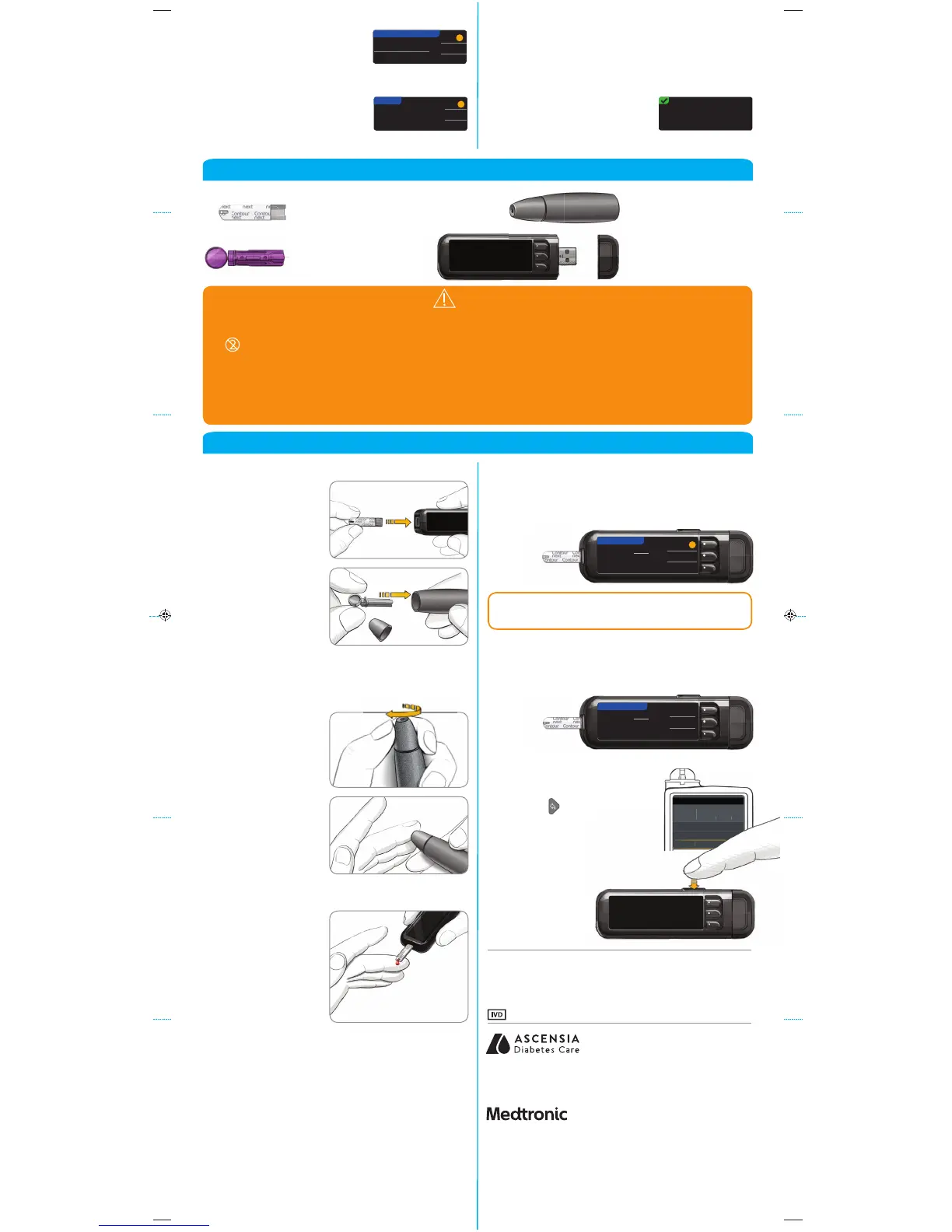
Remove the lancing
device endcap.
Insert the lancet
firmly into the
lancing device
until it comes to
a full stop.
1
Insert the test
strip and wait for
the APPLY BLOOD
message.
3
Replace the
endcap. Rotate
the endcap dial
to adjust the
puncture depth.
4
Obtain your
blood drop.
5
Touch the tip of
the test strip to the
drop of blood. If
the first blood drop
is not enough, the
meter will beep
twice and display
STRIP UNDERFILLED.
You have about
30seconds to
apply more blood
to the same strip.
7
Select Bolus to send a bolus to your pump. Select
Reminder to set a reminder for your next test. Select
Notes to add more information to the result.
9
Remove the test strip and the meter
will turn off in
3 minutes. Or
hold down the
Menu button
to turn off
themeter.
8
Pick up your pump.
Press and hold the Back
button
to get to the home
screen. Your blood sugar
result should display on the
pump screen.
Obtain Blood Drop
Testing Blood Drop
Bolus, Reminder and Notes
Turn Meter Off
Confirm That Result Was Sent to Pump
See your CONTOUR
®
NEXT LINK 2.4 user guide,
lancing device insert and MiniMed pump user
guide for full instructions.
6
If Always was selected in Send Options during Setup,
results will be sent directly to your pump. If Ask
Me was selected in Send Options during Setup, you
can choose to send your result to your pump after
eachblood
sugar test.
Testing Your Blood
Sending Results to Your MiniMed Pump
20
Accept or Change your Target
range.
The Target range is your goal
for your blood sugar test
results.
?
AcceptAccept
ChangeChange
TARGETTARGET
3.9 - 10.03.9 - 10.0
21
Your system setup is now
complete and ready to run a
blood sugartest.
Go to Step 1 below.
Setup is complete.
Insert strip to start a
test.
?
SendSend
Don't SendDon't Send
19
Accept or Change High and
Low Alerts.
The meter alerts you with
a sound when your blood
sugar level is above or below your set levels.
AcceptAccept
ChangeChange
?
HIGH AND LOW ALERTSHIGH AND LOW ALERTS
High: 13.9 High: 13.9 mmol/Lmmol/L
Low: 3.9 Low: 3.9 mmol/Lmmol/L
NOTE: If AutoLog is ON, you are asked to mark your
result as Fasting, Before Meal, or After Meal before
your result displays. If your result is above your
High Alert setting or below your Low Alert setting,
you willsee your result without having to make an
AutoLog selection.
NOTE: Alerts can only be set outside your selected
Target Range(s). Targets can only be set inside your
selected Alert level(s). For additional information,
you may contact Customer Service. See contact
information for Customer Service below.
CAUTION: Always check the display on your pump to
ensure that the glucose result shown agrees with the
glucose result shown on the meter.
For more information, go to www.diabetes.ascensia.com
or contact Customer Service at: 1-800-268-7200
For In Vitro Diagnostic Use
Ascensia, the Ascensia Diabetes Care logo, Clinilog, Contour, Glucofacts,
and the No Coding logo are trademarks and/or registered trademarks of
Ascensia Diabetes Care Holdings AG.
TM see www.ascensiadiabetes.ca/en/tm-mc
www.diabetes.ascensia.com
Bolus Wizard, CareLink, Guardian, MiniMed, and Paradigm are trademarks
and/or registered trademarks of Medtronic MiniMed, Inc.
© 2016 Ascensia Diabetes Care Holdings AG. All rights reserved.
For information on patents, and
related licenses, see:
www.patents.ascensia.com



 To Previous Page
 Loading...

