Screen
Description
Button functions
Not Logging
Displays when the
logger is not armed or
logging.
Short press: will check for a reading from the Smart probe and
flash a reading on the screen.
Running
Displays when the
device is logging. Refer
to “Getting to know
your VFC 311-USB” for
a description of the
segments on the screen.
A short press of the button cycles between selecting the Max/Min
values, the Daily Audit check boxes, and the main reading.
When the maximum and minimum values are flashing, a 3s push of
the button will clear them. The values will show as ‘—’ until the next
reading is taken.
When an Audit box is flashing, a 3s push of the button will check
the Audit box. Note it is not possible to complete two audits within
one hour of each other. The audits clear every day at midnight.
If the sounder is active because an alarm has been triggered, an
initial short press of the button will mute the sounder until a new
alarm is triggered.
USB
Displays when the
device is connected to a
computer.
N/A
Push to Start
When the logger is
armed in Push to Start
mode.
Any button press will start logging
Delay to Start
Displays when logger is
set to begin a logging
session at a set time.
N/A
Trigger to Start
Displays when logger
is set to begin logging
when a certain
temperature is read. A
reading is taken every 5
seconds in this mode.
N/A
Screens
Batteries
The rechargeable battery should only be replaced
by the manufacturer. All internal components are
non-serviceable. Contact us for details of our battery
replacement service.
Repairing or modifying
Never attempt to repair or modify this products.
Dismantling these products, including the removal
of external screws, may cause damage that is not
covered under the warranty. Servicing should only be
provided by the manufacturer. If the product has been
submerged in water, punctured, or seriously damaged
do not use it and return it to the manufacturer.
Charging
Only use a USB Power Adaptor or a USB port to charge
this products. Read all safety instructions for any third
party products and accessories before use with this
product. We are not responsible for the operation of
any third party accessories or their compliance with
safety and regulatory standards. For safety, it is not
possible to charge the battery if the temperature
exceeds 40°C. It may take up to 8 hours to charge a
at battery.
Using connectors and ports
Never force a connector into a port; check for
obstruction in the port, make sure that the connector
matches the port and that you have positioned the
connector correctly in relation to the port. If the
connector and port do not join with reasonable ease
they probably do not match and should not be used.
Disposal and recycling
You must dispose of this products according to
relevant laws and regulations. This products contains
electronic components and lithium polymer batteries
and therefore they must be disposed of separately
from household waste.
WARNING: Failure to follow these safety instructions could result in re, electrical shock, other injury or damage.
Important safety information
Issue 2 05_2024
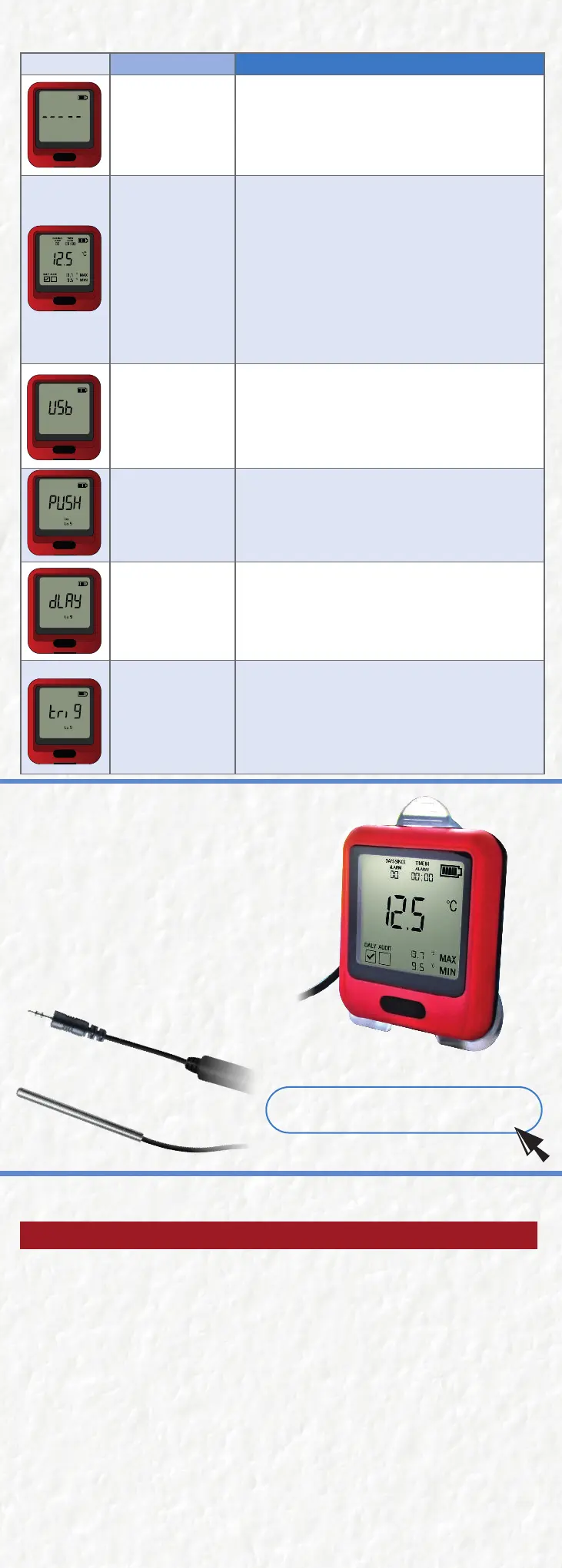
Did you know that with the VFC 311-USB, you can easily
swap out the probe for a newly calibrated one without
taking your device out of service?
Our innovave hot-swappable probe data loggers oer
unmatched exibility and eciency, allowing for seamless
probe replacement without powering down or disrupng
the logging process.
Simply swap out the old probe for the new one upon
arrival—no need to worry about missed data or service
interrupons.
Learn more about probes here:
Hot Swappable Probes
hps://www.vfcdataloggers.com/
product/10-vfc311-calibrated-smart-probe/


 To Previous Page
 Loading...


