Pushtheheaterbackontothe2topwall
brackettabs,ensuringthey ‘click’ into
therearpanelslots(Fig8). Tightenthe
2screwstolockthebracketintoplace.
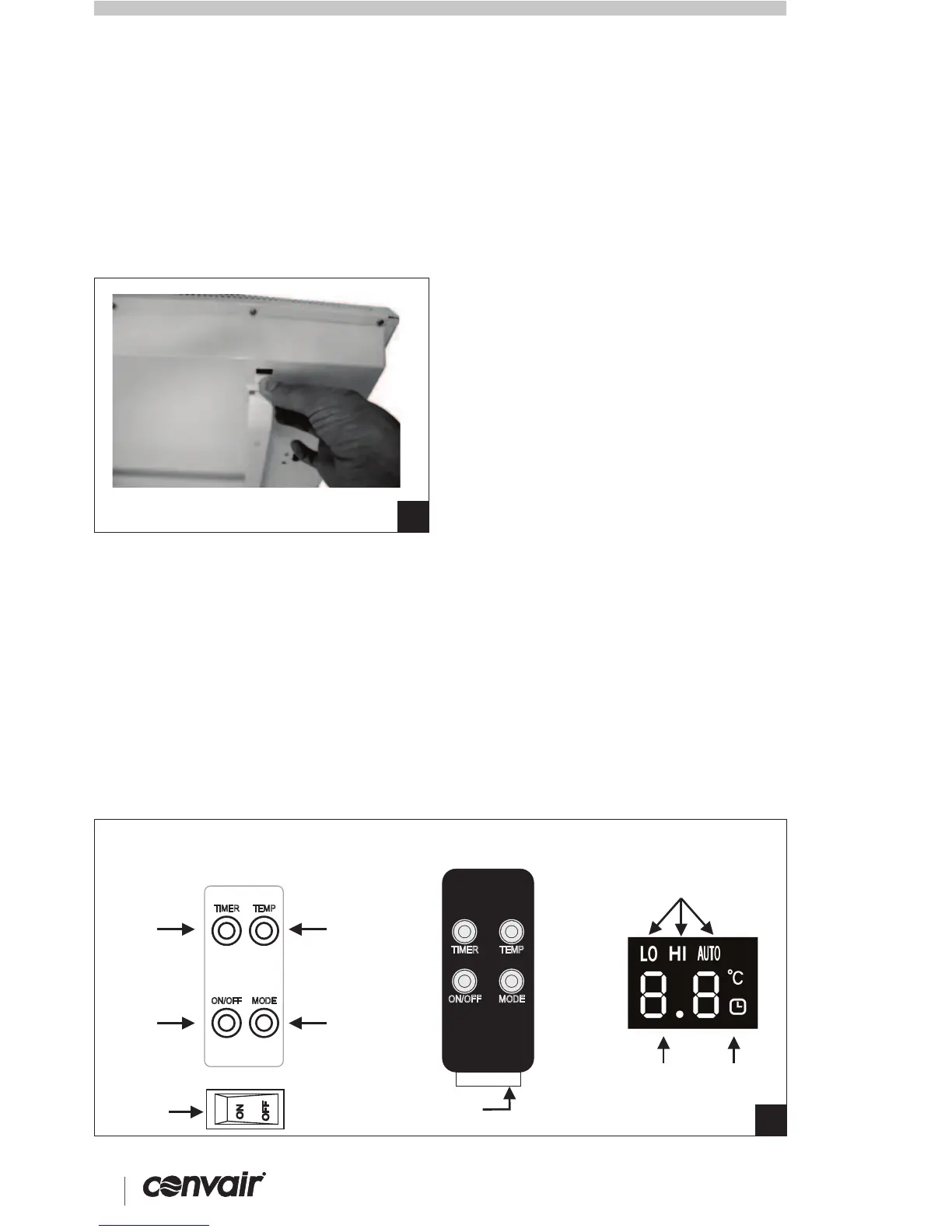
• Removethebatteryprotectortab(Fig
9).
• Whentheheater’spowerison,the
remotecontrolcanbeusedtooperate
theheaterfromupto6maway.
Note:iftherearetwoormoreheaters
withinthisdistance,bothwillbe
operatedbythesameremotecontrol.
RemoteControlSetup
Heateroperation
TousetheTHERMOSTAT:-
• Activatetheheaterforuseby
pressingthe “ON/OFF” remoteisolate
buttonontheunit(seeFig9). The
heaterwill ‘beep’ andtheroom
temperaturewillbedisplayedonthe
LEDdisplay.
• TurntheheaterONbypressingthe
“ON/OFF” buttonontheunitorthe
remotecontrol.Pressthe “MODE”
buttonontheunitortheremotecontrol
tochangetheheatsettingfromLO
(1000Wheating)toHI(2000W).
• TurntheheaterOFFbypressingthe
“ON/OFF” buttonatanytime.
Yourheaterwilloperatemostefficiently
whenutilisingthethermostattoturn
yourheateroffwhenyourdesiredheat
settingisreached. Tooperateyour
thermostat:
• Pressthe “MODE” buttonontheunit
orremotecontroltoselect “AUTO”
setting.
• Selectthetemperaturesettingyou
wantbypressingthe “TEMP” buttonon
theunitorremote. Youcanselectinthe
rangeof5°-35°C.
• Whentheroomtemperatureis
belowtheselectedsettemperature,the
unitwillheattheroom.Iftheroomis
abovethesettemperature,theheat
elementwillturnoff.
Donotsetthethermostat
temperaturetoohigh. Thiswillconsume
morepower.23°Cistherecommended
settemperature.
The TIMERfunctioncanbeusedtoturn
theheaterOFFautomatically.
• Pressthe “TIMER” buttonontheunit
orremotecontrol- “0.0” and symbol
willappearonthedisplay.
• Continuallypressthe “TIMER” button
toadjustthesettimeby0.5hr
incrementsupto8hrs. Youcanchange
thetimeremainingatanypointby
repeatingtheabovesteps.
• Leaveatthedesiredtime. Thetimer
willbegintocountdownuntiltheheater
turnsitselfoff.
• Tocancelthetimer,setthetimeto
“0.0”.
The symbolwillnolongerbelit.
Tip!
TousetheTIMERfunction:-
Tomaximisetheefficiencyoftheheater,
cleantheinletandoutletgrilles
regularly.
• Unplugtheheaterfromthemains
powersupplybeforecleaning.
• Useasoft,dampclothtowipethe
outside.Neverusethinnersorother
strongchemicalsontheheater
surfaces.
• Useavacuumcleanertoremovedirt
anddustfromthebackpanelventslots.
• Ensuretheheaterisdrybefore
pluggingbackintothemainspower
supply.
®
4
SEELEY INTERNATIONAL – OWNER’SMANUAL 5
OPERATION cont. MAINTENANCE
CPHSeriesPortableHeaters
ASSEMBLY cont. OPERATION
8
9
REMOTECONTROLHEATERCONTROLS HEATERDISPLAY
POWER
ON/OFF
BATTERY
PROTECTOR
TAB
MODE
SELECT
PULL THIS TAB
TIMER
ADJUST
TEMP
ADJUST
MODESETTING
ROOM TEMP/
SET TEMP/
TIMERSETTING
TIMER
INDICATOR
TIMER
ON/OFF
TEMP
MODE
REMOTE
ISOLATE
BUTTON
TIMER
ON/OFF
ON
OFF
TEMP
MODE


 To Next Page
 Loading...