PAGE TITLE maintenance
Cleaning & Maintenance ∙ 13 12 ∙ Charging & Melting Chart
Always disconnect the appliance from the power outlet and allow it to cool completely before cleaning.
The Butter Sprayer is not dishwasher safe.
Never immerse the Power Cord or Charging Base in water or other liquids, or allow moisture to contact these
parts.
To clean the exterior of the Butter Sprayer, wipe the Main Body with a damp cloth. Never use rough, abrasive,
or poisonous cleaners.
To clean the lter of the Butter Sprayer, soak and wash with hot water.
To clean the interior of the Butter Sprayer remove any excess butter with a nylon, silicone, or rubber utensil.
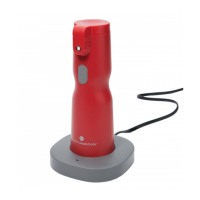
Once the butter sprayer is emptied, place it on the charger with the power cord plugged in. When the
indicator light begins ashing blue, ll the butter sprayer with hot water and spray into a sink. Repeat until the
interior chamber is clean.
The Butter Sponge is included to prevent butter from dripping onto the sprayer. Extra sponges are included
as replacements.
A spare Spray Nozzle is included as a replacement for a clogged, damaged or lost Spray Nozzle. To
replace the Spray Nozzle, rst, remove the Nozzle Cap and Butter Sponge. Then, unscrew the Spray Nozzle
counterclockwise. Then, unscrew the Spare Nozzle from the Charging Base by unscrewing counterclockwise.
Then, screw the Spare Nozzle clockwise onto the Main Body.
It is recommended to place the Butter Sprayer on the Charging Base for an hour after rst use. This will fully
charge the Butter Sprayer for future use.
Your Butter Sprayer comes with an automatic shut-off feature that will activate if the Butter Sprayer is left
unused for 20 minutes, or if the Butter Sprayer is left charging for more than an hour. This will turn the
heating element off and your butter will cool.
Cleaning & Maintenance
Below are two charts to help you read the Charging Indicator Light and Melting Indicator Light.
BASE LIGHT
BUTTER SPRAYER LIGHT
LIGHT COLOR solid or BLINKING INDICATION
Blue Solid Power on
Orange Solid The Butter Sprayer is connected to the base
LIGHT COLOR solid or BLINKING INDICATION
Orange Blinking The Butter Sprayer needs to be heated
Orange Solid The Butter Sprayer is heating
Blue Blinking
The butter is melting and the Butter Sprayer is ready
for use
Blue Solid
The butter is completely melted and the Butter
Sprayer is ready for use
Red Blinking Low battery, charge the sprayer
Red Solid
This indicates that there is an issue with the battery.
Stop use immediately and contact customer service
Charging & Melting Chart


 To Next Page