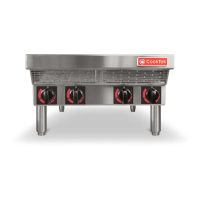
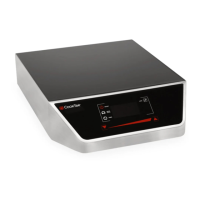
The CookTek Induction Cooktop is a commercial-grade appliance designed for efficient and precise cooking using induction technology. This owner's manual covers single hobs, double hobs, and woks, providing comprehensive instructions for installation, operation, and maintenance.
Function Description:
The CookTek Induction Cooktop is primarily used for heating food through electromagnetic induction. It offers two distinct cooking modes: Power Mode and Temperature Mode. Wok units are designed to operate exclusively in Power Mode. The cooktop is suitable for commercial use, having been tested and approved to UL 197, CSA C22.2, and European Economic Area (CE) standards.
Important Technical Specifications:
- Model Numbers:
- Countertop Single Hobs: HTF-9500-SH18-1, HTF-9500-SH25-1, HTF-9500-SH35-1
- Drop-in Single Hobs: HTD-9500-SH18-1, HTD-9500-SH25-1, HTD-9500-SH35-1
- Countertop Double Hobs (Front-to-Back): HTF-9500-FB25-1, HTF-9500-FB35-1
- Countertop Double Hobs (Side-to-Side): HTF-9500-SS25-1, HTF-9500-SS35-1
- Drop-in Double Hobs (Front-to-Back): HTD-9500-FB25-1, HTD-9500-FB35-1
- Drop-in Double Hobs (Side-to-Side): HTD-9500-SS25-1, HTD-9500-SS35-1
- Countertop Woks: HTF-9500-WK18-1, HTF-9500-WK25-1, HTF-9500-WK35-1
- Drop-in Woks: HTD-9500-WK18-1, HTD-9500-WK25-1, HTD-9500-WK35-1
- Electrical Requirements:
- Voltage: 100-120VAC (up to 1800W depending on model) or 200-240VAC (maximum 3500W per hob depending on model).
- Circuit: Requires a dedicated electrical circuit for each unit, protected by a minimum 20 amp circuit breaker (30A for double hobs).
- Grounding: Must be properly grounded with a 3-prong grounding plug.
- Clearance and Dimensions:
- All units: Minimum 2" (51 mm) clearance on all sides of the housing from any surface or obstacle.
- Drop-in units: Minimum 6" (152 mm) open space below the unit for cool air circulation (ambient temperature not to exceed 50°C/122°F). This can be reduced with additional fans and ducting for forced ventilation.
- Airflow: Single units require a minimum 70CFM (2.0m³/min) of fresh air; double units require 140CFM (4.0m³/min).
- Cookware: Designed for use with CookTek recommended induction compatible cookware only. Wok units are intended for 14” induction compatible wok pans.
- Control Box: Drop-in cooktops and woks come with a stand-alone control box.
Usage Features:
- Power Mode: Ideal for high-intensity heat or quick temperature increases. Users can adjust power percentage using a control knob on the user interface.
- Temperature Mode (Single and Double Hobs Only): Designed for precise and even temperature maintenance over time. The unit monitors the pan's bottom temperature. Users can set the desired cooking temperature via the control knob.
- User Interface: Features a power button to turn the unit ON/OFF, a control knob for adjusting power or temperature, and toggle arrows (on single and double hobs) to switch between Power and Temperature Modes. Double hobs have separate controls and indicators for each hob, with active hobs highlighted in green.
- Settings Menu: Accessible via a gear icon, allowing users to:
- Choose temperature scale (Fahrenheit or Celsius).
- View the error log.
- Adjust screen brightness.
- Check firmware versions.
- Access performance data.
- Safety Features:
- Automatic shut-off in case of overheating (e.g., empty pan left on cooktop).
- Error codes displayed on the interface with corresponding beeps to indicate malfunctions (e.g., RTD sensor issues, high current, overheating, high input voltage, hardware failure, zero cross error, system error).
- Internal cooling fan continues to run for a short period after power-off to ensure proper cooling.
- Important Operational Guidelines:
- Always place the unit on a dry, level, hard, stable, and non-flammable surface.
- Keep the unit away from other heat sources, excessive heat-generating equipment (griddles, fryers), and steam-generating items (pasta cookers, dishwashers).
- Never leave an empty pan on the unit as it can cause overheating and damage.
- Always turn the unit off when not in use.
- Do not use extension cords or power strips.
- Do not place aluminum foil or plastic objects on the cooktop/wok surface.
- Do not immerse cords, plugs, or the appliance in water.
- Do not obstruct, block, or alter openings/holes in the housing.
- Users with pacemakers should consult their doctor before operating due to electromagnetic fields.
Maintenance Features:
- Cleaning:
- Turn off and unplug the unit before cleaning.
- Wipe the surface and body with a damp cloth when cool.
- Use a mild scouring agent (e.g., Bon Ami, Barkeeper's Friend) for stainless steel housing.
- Use a mild detergent or glass cooktop cleansing cream for the glass surface.
- Never use lye-based cleaners (e.g., oven cleaner) as they can damage the cooktop.
- Never immerse the cooktop in water or place it in a dishwasher.
- Grease Filter Maintenance:
- Units equipped with grease filters protect electronics from contaminants.
- Filters should be removed and cleaned every two weeks, or more frequently in heavy grease environments.
- To clean, slide filters out, rinse with hot water to remove dirt/grease, shake out excess water, and let dry completely before reinstalling (ensure arrow on filter edge points into the unit).
- Filters are dishwasher safe.
- Caution: Do not operate the unit without grease filters installed. A clogged filter can cause an "E4" (overheat) error; follow cleaning procedure and allow unit to cool for 5 minutes before resuming operation.
- General Maintenance:
- Regularly check for debris around intake and exhaust vents on the bottom of the unit. Unplug and clean with a dry cloth if debris is found to ensure proper airflow.
- If the power cord is damaged, it must be replaced by the manufacturer, its service agent, or a similarly qualified person.
- Any installation not matching manual specifications voids the product's warranty.



 To Next Page
 General