DUST SCREEN & SIDE PANEL
ACCESSING THE DUST SCREEN AND SIDE PANEL
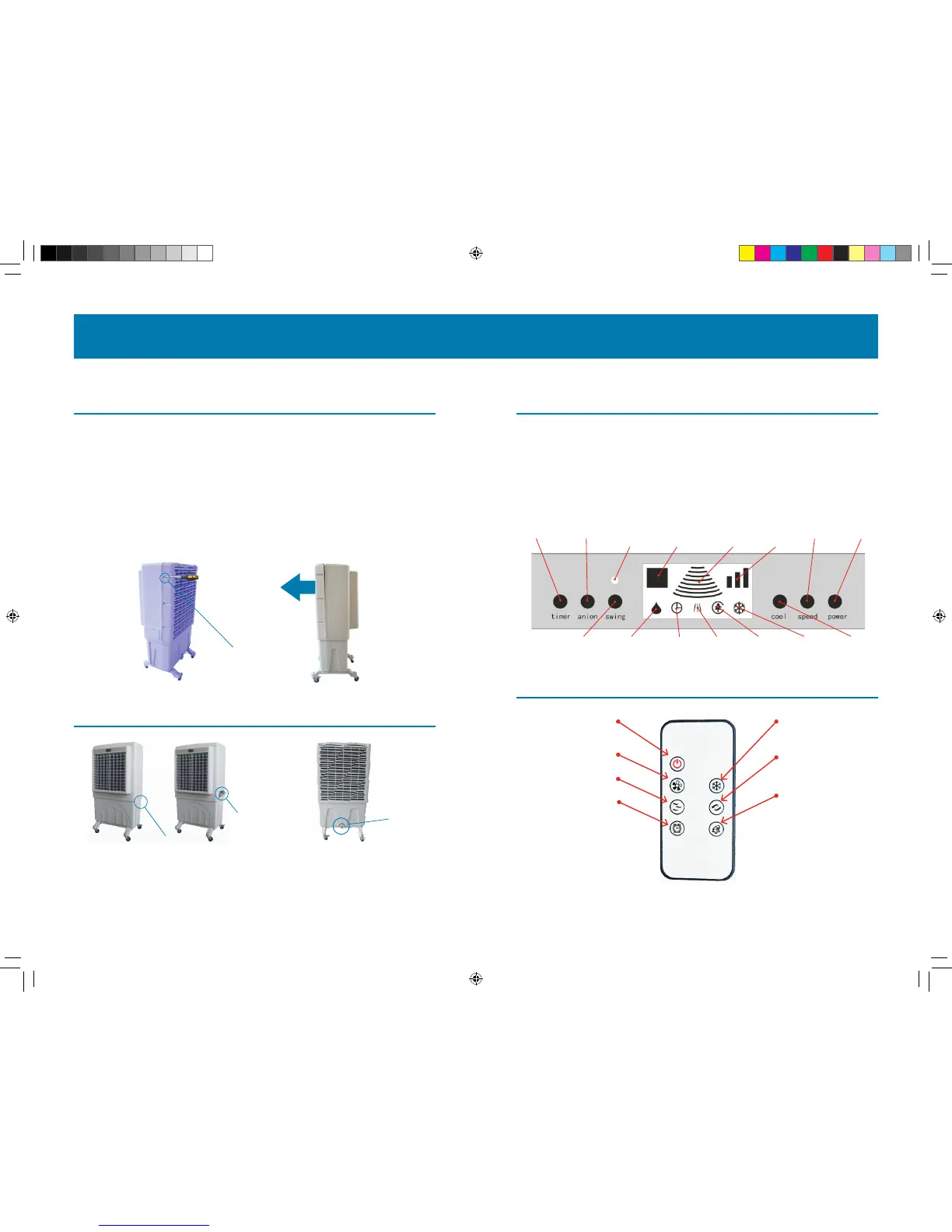
If you need to access the Dust Screen and Side Panel on your CoolBox, follow the instructions
below.
Using a Phillips (“crosshair”) Screwdriver, as follows:
A. Take the eight screws o the dust screen housing as shown in the picture below (left).
B. Once the eight screws are removed, gently remove the housing and side panel to access
the two (2) dust screens.
C. Reverse the steps above and securely replace the housing to again use your Cool-A-Zone
CoolBox.
LCD BUTTON PANEL
THE LCD BUTTON PANEL
The Cool-A-Zone CoolBox has a user-friendly and easy-to-use LCD indication panel with
one-touch button features for activating, timing, setting, and full control of your CoolBox. The
diagram below outlines what the various buttons and indicators mean. Note that the central
area (in white below) is an indication panel, whereas the grey area denotes the buttons.
Pages 7 & 8 will go into detail on the various Buttons & Indicators.
3 4
EVAPORATIVE AIR COOLER
...then gently
remove the panel
Remove all
attaching screws...
MANAGING THE WATER RESERVOIR
Ausion Panel
Drain Valve
To fill your Cool-A-Zone CoolBox, simply open the Ausion
Panel (above) and fill with water or attach a garden hose to
the hose attachment and turn on faucet–the internal oat
valve will regulate water ow.
Draining is just as easy: turn the unit o, unplug,
then turn the drain valve knob counter clockwise to
empty the reservoir.
REMOTE CONTROL
Not sure if you hit the right button?
Always check the CoolBox LCD indicator
panel status lights to see.
If the remote appears to not work,
check to see if you have a clear line of
sight to the CoolBox.
POWER:
Turn the device on/o
AIR SPEED CONTROL:
Increase or decrease air flow
NO FUNCTION ON THIS MODEL
TIMER BUTTON:
Activates Timer feature
COOL:
Start or stop the Cool function
SWING:
Turns Swing function on/o
NO FUNCTION ON THIS MODEL
Hose Attachment
Show
Ventilation
Show
Airow
Show
Temperature
Show
swing
Show
timer
Water
shortage
Show anion Show
cooling
SPEED
COOL
ON/OFF
SWING
Remote
receiver
TIMER ANION
CZ-C100 Manual-rev.indd 3 8/1/12 10:48 AM


 To Next Page