BASIC OPERATION
INITIAL OPERATION
After ensuring the unit has adequate water for operation and that your CoolBox has been
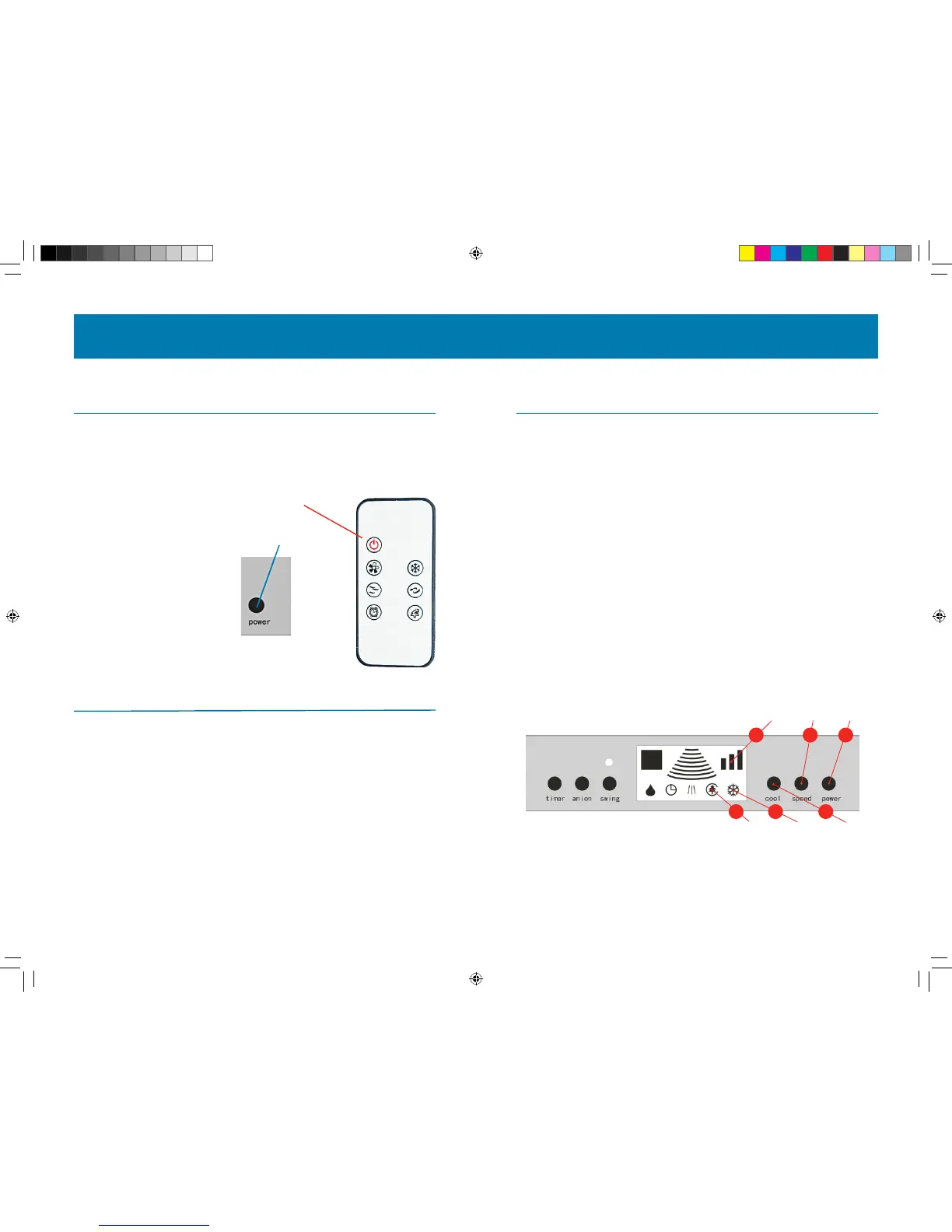
plugged in, turn the Cool-A-Zone CoolBox on by pressing the power button either on the LCD
Panel face or as shown on the remote control on Page 5 of this manual.
COOLBOX CONTROLS
USING YOUR COOLBOX
1. Power Button: turns the unit ON or OFF.
2. Speed Button: this controls the airow. On rst operation, the CoolBox will be at
SPEED 2 (there are three Speeds, 1 being the lowest and 3 being the highest).
Pressing again will take you up to SPEED 3, then pressing it again will bring you down to
SPEED 1. The rate of speed will be re ected on the Airow Indicator. If using the remote
control, the Speed Button works in the same way.
3. The Cool Button: switches the Cool-A-Zone CoolBox from COOL to VENTILATION mode.
One press will switch between the two functions. The COOL mode will activate the
pump and water will be used to evaporatively cool, whereas the VENTILATION mode will
simply circulate the air and deactivate the pump. If using the remote control, pressing the
COOL button will turn the pump on or o.
4. The Cool Indicator: When lit, this indicates that the Cool-A-Zone CoolBox is in COOL
mode. When unlit, this indicates the Cool-A-Zone CoolBox is in VENTILATION mode.
5. The Airow Indicator: The lowest bar indicates SPEED 1, the middle bar indicates
SPEED 2, and the highest bar indicates SPEED 3.
6. The Anion Indicator: When lit, the Anion function is ON, when unlit, the Anion function
is OFF.
5 6
EVAPORATIVE AIR COOLER
Before powering up, check the following:
- Is the unit level?
- Is the unit’s air fl ow unobstructed?
POWER:
Turn the device on/o
POWER
(ON/OFF)
Power Buttons may be found either on the
right of on the right of the LCD Panel or on the
Red Button of the remote control.
NOTES ON POWERING “ON”
TURNING THE COOLBOX ON THE FIRST TIME
The CoolBox Speed will be at Level 2 and the Cool Function will be listed as “On” the rst time
you power up your Cool-A-Zone CoolBox.
PRESSING “ON” DURING STANDBY
Turning the unit on during a state of stand-by will power up the CoolBox in the same mode
and airow setting in which it entered the stand-by mode. Make sure to adjust the settings
as appropriate for your comfort after coming back from stand-by.
SHOW
AIRFLOW
ANION
INDICATOR
COOL
INDICATOR
SPEED
BUTTON
COOL
ON/OFF
POWER
ON/OFF
1 2 5
6 4 3
CZ-C100 Manual-rev.indd 4 8/1/12 10:48 AM


 To Next Page
 Loading...