EN-2
1
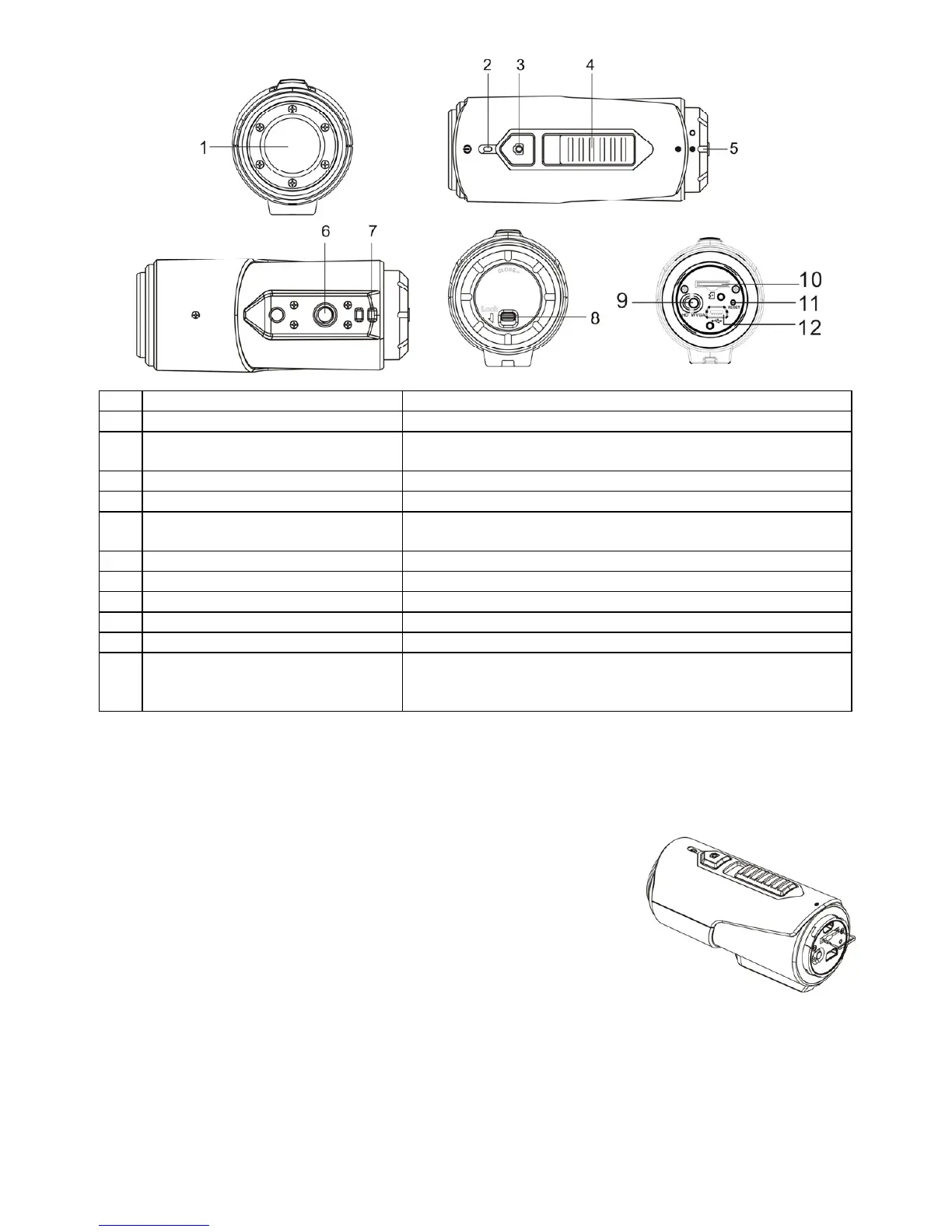
Cover Lens High quality lens
2
LED Indicator Show the camera status
3
Power / Shutter Button
1. Turns the camera on or off
2. Takes single photograph
4
Record & Stop Slide Switch Slide to start or stop video recording
5
Camera Back Cover Rotate to seal the camera for waterproofing
6
Tripod Socket
Attaches the Cam Locker or other mounts using similar
tripod screw
7
Strap Vent Loop with wrist or secure strap
8
Cover Latch Locks the back cover
9
Video Resolution Slide Switch Select video resolution: HD or WVGA
10
MicroSD Card Slot Micro SD card storage location.
11
Reset Resets the camera
12
Mini USB Slot
1. Connects to your computer for data transfer or camera
setup
2. Charge your camera
4. Using the Camera
4.1 Charging up Your Camera
Charge your camera with either USB cable (included) or AC/DC adapter (not included). The red LED
lights up to indicate the camera is charging and it will turn off as soon as the camera has been fully
charged. It takes about 2 hours to fully charge the camera.
4.2 Inserting a Memory Card
Insert a MicroSD card (not included) before using your camera. Ensure
that the camera power is turned OFF before inserting the card into the
slot.
Notes
1. There is only one correct direction to insert the MicroSD card into
the slot. Do not force the card into the card slot as it may damage
both the camera and the MicroSD card.
2. A new MicroSD card should be formatted before using. For more information, please see section 5
4.3 Setting Date and Time
You can set the camera’s clock with the software to ensure that your video and photo files are saved with
the correct date/ time information.
To set up the camera clock
1. Connect your camera to a computer with the USB cable. Run Cool- iCam.exe from your MicroSD
card folder. If you are a MAC user, run Cool- iCam.app instead
2. Find the “Date and Time” and click “SET”.


 To Next Page