
 Need help?
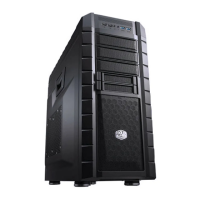
Do you have a question about the Cooler Master HAF XM and is the answer not in the manual?
Important warnings regarding CPU cooler and GPU card size limitations.
Instructions for safely removing the computer case side panel.
Step-by-step guide for installing the PC power supply unit.
Procedure for mounting the motherboard inside the computer case.
Guidance on installing expansion cards like GPUs or sound cards.
Instructions for installing optical drives and hard drives in various bays.
Detailed steps for fitting 3.5" and 2.5" hard disk drives.
Guide to connecting front panel I/O connectors to the motherboard.
 General
| Model | HAF XM |
|---|---|
| Case Type | Mid Tower |
| Material | Steel, Plastic |
| Motherboard Compatibility | ATX, Micro-ATX, Mini-ITX |
| Expansion Slots | 8 |
| Internal 3.5" Drive Bays | 6 |
| Front Ports | 2 x USB 3.0, 2 x USB 2.0, Audio In/Out |
| Color | Black |
| Internal 2.5" Drive Bays | 2 |
| Cooling System Front | 1 x 200mm fan (included) |
| Cooling System Rear | 140mm fan x 1 (optional: 120mm x 1) |
| Radiator Support | Top: 240mm |

 To Next Page