Need help?
Do you have a question about the Coolmay EX3G Series and is the answer not in the manual?
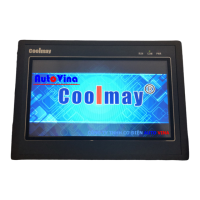
Details the physical layout and component arrangement of the EX3G HMI/PLC.
Describes the dedicated port for programming the PLC via USB connection.
Lists the number of digital input and output points for different EX3G models.
Details the available output types, including relay and transistor outputs.
Illustrates equivalent circuits for relay and transistor outputs.
Shows circuit diagrams for absorbing inductive load voltage.
Provides wiring diagrams for pulse output signals.
Illustrates typical input wiring configurations for the PLC.
Details wiring methods for analog input signals.
Details device allocation and power-down retention for PLC elements.
Explains analog input registers and their direct/FROM demand read methods.
Specifies analog output registers and their configuration for voltage/current.
Provides methods for processing PLC inputs to prevent jamming and interference.
Offers essential safety advice for installation and operation.
Guides on proper wiring, cable separation, and grounding for anti-interference.
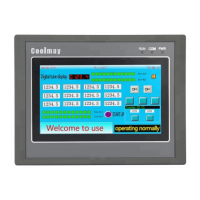
This manual provides a comprehensive guide to the EXIG HMI PLC, an all-in-one device designed for industrial automation. It combines the functionalities of a Human-Machine Interface (HMI) and a Programmable Logic Controller (PLC) into a single unit, offering a streamlined solution for various control applications. The EXIG HMI PLC is compatible with FOGL, FOGU, FOGL II, and operates best when paired with these systems.
The EXIG HMI PLC serves as a central control unit, integrating display, input, and output functionalities. It supports a wide range of digital and analog inputs and outputs, allowing for flexible connectivity with various sensors, actuators, and other industrial devices. The device can be configured to handle up to 32 digital inputs and 30 digital outputs, with the option to select either 485 or 232 communication protocols. This flexibility allows the EXIG HMI PLC to adapt to different communication requirements within an industrial environment.
The device also features a built-in real-time clock (RTC), which can be used for time-based control and data logging. The RTC is particularly useful for applications requiring precise timing and scheduling. The EXIG HMI PLC supports various communication protocols, including Modbus RTU, which enables seamless integration with other Modbus-compatible devices.
The HMI component provides a user-friendly interface for monitoring and controlling industrial processes. It features a graphical display that can be customized to show various process parameters, alarms, and control elements. The HMI supports touch input, allowing operators to interact with the system intuitively. The PLC component executes control logic based on programmed instructions, enabling automated control of machinery and processes. It supports various programming languages, including ladder logic, which is widely used in industrial automation.
The EXIG HMI PLC is designed to be a robust and reliable solution for industrial control. It features a durable enclosure that protects the internal components from harsh industrial environments. The device is also equipped with various safety features, including overcurrent protection and short-circuit protection, to ensure safe and reliable operation.
The EXIG HMI PLC offers several features that enhance its usability and flexibility. The device supports multiple communication channels, allowing for simultaneous communication with various devices. This is particularly useful in complex industrial systems where multiple devices need to be controlled and monitored. The EXIG HMI PLC also supports remote access, allowing operators to monitor and control the system from a remote location. This feature is especially beneficial for applications requiring remote monitoring and control, such as distributed control systems.
The device's programming environment is user-friendly, allowing for easy configuration and programming of the HMI and PLC components. The programming software provides a graphical interface that simplifies the creation of control logic and HMI screens. The software also includes various debugging tools, which help in identifying and resolving programming errors.
The EXIG HMI PLC supports a wide range of power supply options, allowing it to be used in various industrial environments. The device can be powered by either DC or AC power, depending on the specific model. This flexibility ensures that the EXIG HMI PLC can be integrated into existing power systems without requiring significant modifications.
The device's compact design makes it suitable for installation in space-constrained environments. The EXIG HMI PLC can be mounted on a DIN rail, which simplifies installation and reduces wiring complexity. The device also features a modular design, allowing for easy expansion and customization. This modularity enables users to add or remove modules as needed, adapting the EXIG HMI PLC to evolving application requirements.
The EXIG HMI PLC is designed for easy maintenance and troubleshooting. The device features diagnostic indicators that provide visual feedback on its operational status. These indicators help in quickly identifying and resolving issues, reducing downtime and improving overall system reliability. The device also supports firmware updates, allowing users to keep the system up-to-date with the latest features and bug fixes.
To ensure optimal performance and longevity of the EXIG HMI PLC, regular maintenance is recommended. This includes periodic cleaning of the device to prevent dust and debris buildup, which can affect its performance and lead to overheating. It is also important to regularly check the wiring connections to ensure they are secure and free from damage. Loose or damaged connections can lead to intermittent operation or system failures.
The EXIG HMI PLC's modular design simplifies component replacement. If a module fails, it can be easily replaced without requiring the replacement of the entire device. This reduces maintenance costs and minimizes downtime. The device also supports hot-swapping of certain modules, allowing for replacement without powering down the system.
For software maintenance, it is recommended to regularly back up the device's configuration and program files. This ensures that in case of a system failure or data loss, the configuration can be restored quickly. It is also important to keep the programming software updated to the latest version, as updates often include bug fixes and performance improvements.
The EXIG HMI PLC is designed to be a reliable and durable device, but in case of any issues, the user manual provides detailed troubleshooting guides. These guides help in diagnosing common problems and provide step-by-step instructions for resolving them. If the issue cannot be resolved using the troubleshooting guide, it is recommended to contact technical support for further assistance.
The device also features self-diagnostic capabilities, which can help in identifying internal faults. These diagnostics provide error codes or messages that can be used to pinpoint the cause of the problem. By understanding these error codes, users can take appropriate corrective actions or seek professional help if needed.
Regular calibration of analog input and output modules is also recommended to ensure accurate measurements and control. Over time, the accuracy of these modules can drift, leading to inaccurate readings or control actions. Calibration helps in restoring the accuracy of these modules, ensuring reliable system operation.
Finally, it is important to follow all safety guidelines and precautions when performing maintenance on the EXIG HMI PLC. This includes disconnecting power before performing any maintenance tasks and using appropriate personal protective equipment. Adhering to these safety guidelines helps in preventing accidents and ensuring a safe working environment.
 General
| Series | EX3G Series |
|---|---|
| Power Supply | DC 24V |
| Operating Temperature | 0°C to 50°C |
| Type | Controller |
| Communication Ports | RS232, RS485 |
| Ports | Ethernet, RS232, RS485 |

 To Next Page