Frequently Asked Questions
Can I keep breast milk in my Cooluli unit?
Yes! Many new parents and families use our units to store breast milk conveniently in
nurseries or nearby bedrooms.
Can I store insulin in my Cooluli unit?
Yes, many of our customers use our units to store medications and other essentials.
Can my Concord-20LDX keep things frozen?
It is not suggested that the Concord be used as a freezer. Please refer to page 7 for more
information on effective interior temperatures.
What is the cooling temperature of the Concord-20LDX?
Please refer to pages 6 and 7 of this Instruction Manual for more information on effective
interior temperatures.
Can I adjust the thermostat on the Concord-20LDX?
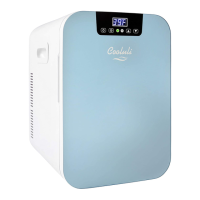
Yes, the Concord-20LDX has a digital-display thermostat that can be set. Performance and
results may vary depending on environmental conditions. Please refer to pages 6 and 7 of
this Instruction Manual for more information.
Does the Concord-20LDX have a lock?
The Concord-20LDX does not have a lock but it does feature a tight-fitting, magnetic seal
that secures and protects contents.
Are interior shelves removable?
Yes, the shelves and container baskets on the Concord-20LDX are removable. To remove
shelves, gently push the shelves up and slide out. To remove container baskets, gently push
baskets up and remove.
The back of my Concord-20LDX feels warm. Is this normal?
Yes, this is normal. While in cooling mode, your Concord-20LDX Thermoelectric
Cooler/Warmer moves heat from inside the unit to the back of the unit (vent area). Make
sure there is at least a 2-inch clearance for necessary air flow and circulation. If the back of
your Concord-20LDX gets very hot, turn off the unit, and contact Customer Support.
8


 To Next Page