EasyManua.ls Logo

Coolworks MWDCK-10CRN1-BK3 - User Manual

Default Icon
21 pages
Print Icon
To Next Page IconTo Next Page
Loading...
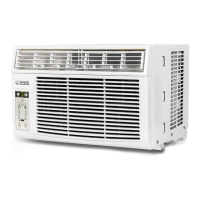
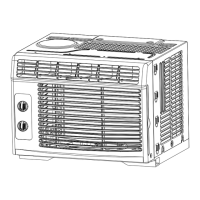
WINDOW AIR CONDITIONER
s
Model: MWDCK-06CRN1-BK2; MWDCK-08CRN1-BK3
MWDCK-10CRN1-BK3; MWDCK-12CRN1-BK3
Question and Answer IconNeed help?

Do you have a question about the Coolworks MWDCK-10CRN1-BK3 and is the answer not in the manual?

Summary

Safety Precautions

Understanding Safety Symbols

Explains symbols indicating death, serious injury, or property damage.

General Electrical Safety Guidelines

Covers plug use, cord modification, grounding, and circuit breakers.

Safety Precautions

Safe Unit Handling and Placement

Advises on filter removal, cleaning, and avoiding obstacles.

Environmental and Usage Precautions

Discusses ventilation, avoiding improper use, and water handling.

Safety Precautions

Power Cord Safety Features

Details power cord safety features and grounding importance.

Electrical System Requirements

Covers electrical service adequacy and proper grounding.

Operation of Current Device

Testing the Power Cord Functionality

Step-by-step guide to test the power cord's current detection function.

Operating Instructions

Normal Operational Sounds Explained

Identifies common sounds like rushing air, chatter, and gurgling.

Basic Cooling Operation Steps

Outlines steps for initial operation and thermostat settings.

Recommended Operating Conditions

Specifies ideal temperature and humidity ranges for cooling.

Operating Instructions

Key Pad Features Overview

Describes the functions of main control panel buttons.

Understanding Operating Modes

Explains Auto, Fan Only, and Dry modes of operation.

Operating Instructions

Fan Speed and Energy Saver Functions

Details fan speed selection and the Energy Saver function.

Sleep Mode and Timer Settings

Explains the Sleep mode and timer settings for auto start/stop.

Check Filter Indicator Function

Describes the filter reminder light and how to reset it.

Operating Instructions

LED Display and Error Code Interpretation

Explains display indicators and common error codes.

Fresh Air Vent and Louver Controls

Guides on using fresh air vents and adjusting louvers.

Installation Instructions

Window Fit and Unit Requirements

Specifies window dimensions and BTU compatibility.

Mounting Hardware and Top Rail Installation

Lists necessary hardware and top rail installation steps.

Installation Instructions

Side Panel Installation Procedure

Provides a detailed guide for installing side filler panels.

Installation Instructions

Unit Placement and Securing in Window

Covers positioning the unit and securing it with frame locks.

Installation Instructions

Final Securing and Storm Window Fitment

Describes attaching sash locks, seal foam, and storm window considerations.

Removing the Air Conditioner Unit

Step-by-step instructions for safely removing the unit.

Care And Cleaning

Air Filter Maintenance and Cleaning

Instructions for checking and cleaning the air filter.

Cabinet Cleaning and Winter Storage

Guides on cleaning the cabinet and preparing for winter storage.

Troubleshooting Tips

Unit Fails to Start Troubleshooting

Solutions for power and control issues preventing startup.

Cooling Performance and Ice Issues

Addresses problems with insufficient cooling or ice buildup.

Operational and Noise Troubleshooting

Covers rapid cycling, noise, and water dripping problems.

Remote Control Operating Instructions

Remote Handling and Battery Replacement

Guidance on remote use, location, and battery replacement.

Remote Control Operating Instructions

Remote Control Technical Specifications

Lists technical details of the remote control.

Remote Control Function Buttons Explained

Explains the purpose of each button on the remote.

Remote Control Operating Instructions

Remote Operation Modes Explained

Details how to use Auto, Cool/Fan, and Dry modes with the remote.

Remote Control Operating Instructions

Remote Sleep and Timer Functions

Explains how to use Sleep mode and set timers via remote.

Remote Control Operating Instructions

Combined Timer Operation Guide

Instructions for setting simultaneous Auto-start and Auto-stop timers.

Air Conditioner Limited Warranty

Warranty Coverage and Period

Outlines the warranty period and what is covered.

Consumer Responsibilities and Exclusions

Lists consumer duties and conditions that void the warranty.

Overview

This document is an instruction manual for a Cool Works window air conditioner, covering models MWDCK-06CRN1-BK2, MWDCK-08CRN1-BK3, MWDCK-10CRN1-BK3, and MWDCK-12CRN1-BK3. It provides comprehensive information on safety precautions, operating instructions, installation, care and cleaning, troubleshooting, remote control operation, and warranty details.

Function Description:

The Cool Works window air conditioner is designed to provide cooling and dehumidification for indoor spaces. It features multiple operating modes including Auto, Cool, Dry, and Fan Only, allowing users to select the most suitable setting for their comfort needs. The unit can also be used for room air circulation or to exhaust stale air in Fan Only mode. In Dry mode, it functions as a dehumidifier, reducing humidity in a closed space while providing some degree of cooling. The air conditioner includes an Energy Saver function, a Sleep mode for optimized night-time operation, and a Timer function for scheduled auto-start and auto-stop.

Important Technical Specifications:

The manual specifies operating temperature ranges for cooling:

  • Outdoor temperature: 18-43°C (64-109°F)
  • Indoor temperature: 17-32°C (62-90°F)
  • The relative humidity of the room should be less than 80% for optimal performance. If humidity exceeds 80%, condensed water may appear on the unit's surface.
  • The Cool circuit has an automatic 3-minute time-delayed start to prevent compressor overheating and circuit breaker tripping.
  • The control maintains any set temperature within 1°F/1°C.
  • The unit can display temperature in Fahrenheit or Celsius, switchable by pressing and holding the Left and Right Temp/Timer buttons simultaneously for 3 seconds.
  • The power supply cord includes a current detection device to reduce fire risk. If damaged, the cord must be replaced by the manufacturer or an authorized service center.
  • Installation requires a standard double-hung window with opening widths of 23 to 36 inches (584 mm to 914 mm). The vertical opening height (H) varies by model: 14 inches (356 mm) for 6000-8000 BTU/hr units and 15-1/2 inches (394 mm) for 10000-12000 BTU/hr units.
  • The unit must be properly grounded with a three-prong grounding plug.
  • The remote control (Model RG32A/E) operates on 3.0V (2 AAA batteries), with a lowest CPU emitting signal voltage of 2.4V and a signal receiving range of 16 ft (5 m). Its operating environment is -5°C to 60°C (23°F to 140°F).

Usage Features:

  • Control Panel and Remote Control: The unit can be controlled via its integrated keypad or a remote control.
  • Temperature Adjustment: Users can set the desired temperature between 62°F (17°C) and 86°F (30°C) using the UP/DOWN buttons. In Fan Only mode, the display shows the actual room temperature, and temperature cannot be adjusted.
  • Mode Selection: The Mode button cycles through Auto, Cool, Dry, and Fan modes.
  • Fan Speed: The Fan Speed button allows selection of Auto, Low, Med, or High fan speeds. In Dry mode, the fan speed is automatically controlled at a low speed. In Auto mode, fan speed is also automatically controlled.
  • Energy Saver: This function, available in Cool, Dry, and Auto modes, runs the fan for 3 minutes after the compressor shuts off, then cycles the fan on for 2 minutes at 10-minute intervals until the room temperature rises above the set temperature, restarting cooling.
  • Sleep Mode: In Cool, Heat (selected models only), or Auto mode, the selected temperature increases by 2°F/1°C after 30 minutes, and again after another 30 minutes. This new temperature is maintained for 6 hours before reverting to the original setting. Sleep mode can be canceled at any time.
  • Timer Function: Allows scheduling of auto-start and auto-stop programs up to 24 hours in advance, with 0.5-hour increments up to 10 hours, then 1-hour increments.
  • Fresh Air Vent Control (selected models): The vent can be set to recirculate indoor air (Vent Closed), draw fresh air into the room (Vent Open), or exchange air from the room while drawing fresh air in (Vent and Exhaust Open).
  • Air Directional Louvers: Horizontal louvers can be pivoted to direct airflow Up or Down, and levers moved side-to-side for Left/Right direction.
  • Current Device Test: The power supply cord has a TEST and RESET button to check the current detection device.

Maintenance Features:

  • Air Filter Cleaning: The air filter should be checked at least once a month. Trapped particles can cause frost accumulation on cooling coils. To clean, push the vent handle to closed, open the front panel, grasp the filter, and pull it out. Wash with liquid dishwashing detergent and warm water, rinse thoroughly, and dry completely. Alternatively, vacuum the filter. Do not use hot water over 40°C (104°F) or operate the unit without the filter.
  • Check Filter Reminder: An LED light illuminates after 250 hours of operation to remind users to clean the air filter. Press the Check Filter button to reset the light after cleaning.
  • Cabinet Cleaning: Unplug the unit before cleaning. Dust the cabinet and front with an oil-free cloth or wipe with a cloth dampened in warm water and mild liquid dishwashing detergent. Rinse thoroughly and wipe dry. Avoid harsh cleaners, wax, or polish. Wring excess water from the cloth before wiping controls to prevent damage.
  • Winter Storage: If storing the unit for winter, remove it from the window according to installation instructions, cover it with plastic, and store it in its original carton.
  • Battery Replacement: The remote control uses two AAA batteries. Remove the cover, replace old batteries with new ones, ensuring correct polarity, and reattach the cover. Replacing batteries erases all programming, requiring reprogramming. Do not mix old and new batteries or different types. Dispose of used batteries in special containers.

Coolworks MWDCK-10CRN1-BK3 Specifications

General IconGeneral
BrandCoolworks
ModelMWDCK-10CRN1-BK3
CategoryAir Conditioner
LanguageEnglish

Related product manuals