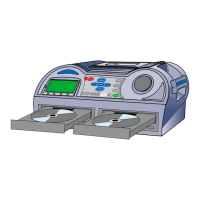
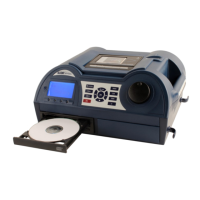
You can switch the unit into standby mode (where it powers down and consumes minimal
electricity) by pressing the green ON/STANDBY switch. Remember though, that it is still
connected to the mains power supply and the red LED gives an indication of this.
For safety always unplug the unit from the wall overnight or if not in use for long periods!
We have found from experience that even though
we provide instructions for Coomber equipment,
they are rarely at hand when needed. This is
especially true in schools where equipment is
used by different people and in different rooms.
A Reference Manual for this model is available for download from our website at
www.coomber.co.uk (see Product Support and Operating Instructions).
With this consideration in mind, our “Real Time”
CD Recorders have been designed for simplicity.
This Quick Start guide will help you get going,
though we feel that the best way to learn how
to use the equipment is to just fiddle with it!
Operating Instructions: “Real Time” CD Recorders
6020 & 6030 CD Recorders, 6021 & 6031 CD Cassette Recorders
SWITCHING ON
Plug the CD Recorder into a wall socket
and switch the socket on.
The CD Recorder will
start up automatically.
2
2
INSERTING A CD
Press on the keypad
to open the CD tray.
Press again or push the
tray lightly to make it close.
3
3
THE ROTARY CONTROL
The rotary control adjusts
the volume. Volume settings
show up in the display.
Press or buttons
and adjust them with the rotary control.
WHAT CDs CAN I PLAY
The 6000 series plays audio CD’s
(as found in record shops) or
educational audio CDs
intended for schools use.
You can also play CD-R
and CD-RW discs.
1
1
PLAYING CDs
Press to play the CD.
Press again to pause the CD.
Press to stop the CD.
Press to eject the CD.
4
4
GETTING AROUND
Press or keys to go back-
wards or forwards through the tracks.
Press key and twist rotary control
to scan back or forth across a track -
allowing you to cue up any section.
Press to cancel the cue mode.
6
6
On startup, the CD recorder will detect
whether a CD has been left in the drive or not.
5
5
TIP: press the key a second time or leave the rotary control
for a few seconds to re-enable volume adjustment.
GETTING STARTED!
You can also use the CD drive button
to open or close the tray. Neither
button works in play or record mode!
A CD-R is a recordable CD.
A CD-RW is a recordable and erasable CD.


 To Next Page
 Need help?
 General