Need help?
Do you have a question about the Coomber 6100 Series and is the answer not in the manual?
Lists the necessary equipment, including a blank CD-R and the master CD for the splicing process.
Details the procedural steps for splicing tracks, including inserting CDs, navigating menus, setting start and end points, and executing the splice.
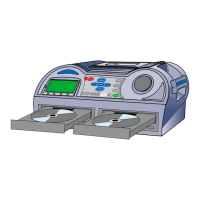
Illustrates and briefly describes the different models within the Coomber 6100 Series, such as 6120, 6121, 6130, and 6131.
The Coomber 6100 Series devices are specialized sound solutions designed for audio professionals and enthusiasts, primarily focusing on CD recording and playback with advanced track manipulation capabilities. The series includes four distinct models: the 6120, 6121, 6130, and 6131, each offering a unique combination of features to cater to different user needs.
The core function of the Coomber 6100 Series is to provide robust and precise CD recording, particularly emphasizing the ability to "splice" tracks. This splicing feature allows users to select specific segments from a master CD and record them onto a blank CD-R, effectively creating custom compilations or editing existing audio. Beyond splicing, the devices also support standard CD-to-CD copying, making them versatile tools for audio duplication.
The 6120 model is equipped with a single CD recorder, making it suitable for basic CD recording and playback tasks without integrated cassette functionality. The 6121 expands on this by adding a single cassette deck alongside the CD recorder, offering backward compatibility and the ability to work with cassette tapes, which can be useful for archiving older audio formats or integrating with existing cassette-based systems. The 6130 features two CD recorders, which suggests enhanced duplication capabilities or the ability to handle more complex CD-based workflows. Finally, the 6131 combines the dual CD recorders of the 6130 with a single cassette deck, representing the most comprehensive model in the series, capable of handling both advanced CD operations and cassette integration.
The primary use case highlighted in the manual is the "splicing" of tracks. This involves a detailed process of selecting specific audio segments from a master CD. Users can define a start point (Mark 1) and an end point for a desired audio segment, which can span across parts of a single track or multiple tracks. Once the segment is defined, the device copies only that selected portion to a blank CD-R. This feature is particularly useful for creating custom mixes, extracting specific musical passages, or compiling spoken word segments without including unwanted material.
While explicit technical specifications like frequency response, signal-to-noise ratio, or power output are not detailed in the provided manual, several aspects can be inferred from the device's functionality and design:
The Coomber 6100 Series offers a user-friendly interface designed for precise audio manipulation. The step-by-step guide for splicing tracks illustrates the intuitive workflow:
This detailed control over start and end points makes the devices highly effective for creating custom audio content. The inclusion of a display provides visual feedback on marker placement and menu navigation, enhancing usability. The YouTube channel integration (www.youtube.com/user/CoomberAudio) further supports users by providing video tutorials, indicating a commitment to user education and ease of use.
The manual does not explicitly detail maintenance features. However, based on the nature of CD recorders and audio equipment, general maintenance practices would apply:
In summary, the Coomber 6100 Series provides a specialized and precise solution for CD recording and track splicing, catering to users who require detailed control over audio segments. The range of models, from basic CD recording to integrated cassette functionality, ensures versatility for various audio tasks, supported by an intuitive interface and online resources.
 General
| Brand | Coomber |
|---|---|
| Model | 6100 Series |
| Category | Recording Equipment |
| Language | English |

 To Next Page