Modbus Gateway(Mini)
19
7.2.3 Setting of Communication Connection
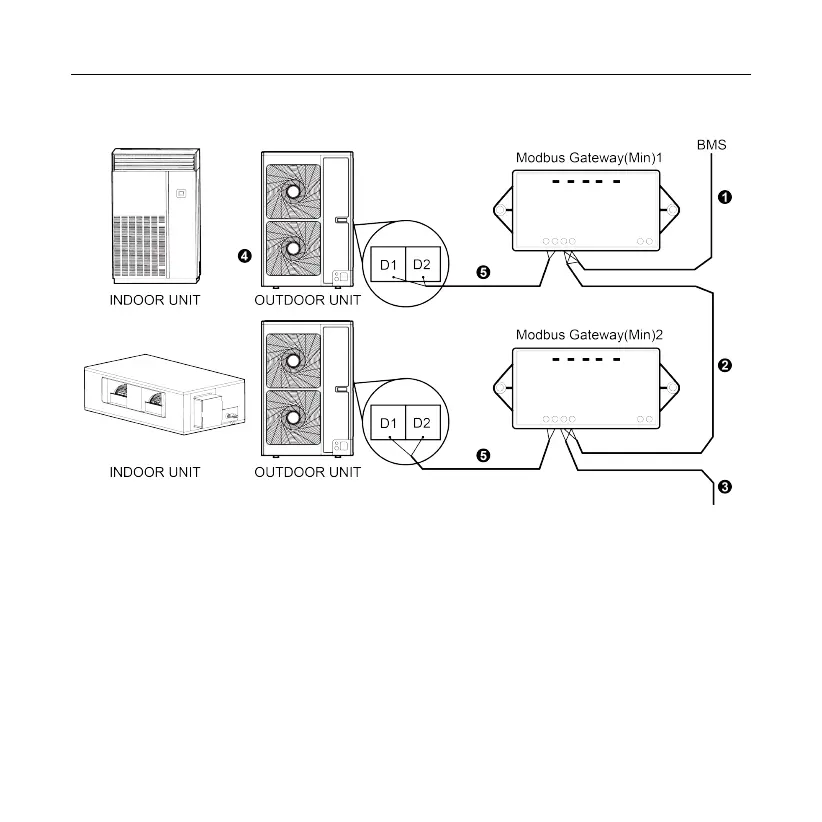
(1) Communication wire connection between Modbus Gateway(Mini) and
BMS:
Step 1: Confirm the first Modbus Gateway(Mini) (Modbus Gateway(Mini)1 as
shown in the figure) that needs to be connected to BMS. Connect the port of RS485
of this gateway and the BMS with communication cable, as shown in step
①
in the
figure.
Step 2: Connect the RS485 communication port of Modbus Gateway(Mini) (-
Modbus Gateway(Mini)1) with the RS485 communication port of the second Modbus



 To Next Page