EasyManua.ls Logo

Cooper Lighting MS600 - User Manual

Cooper Lighting MS600
6 pages
Print Icon
To Next Page IconTo Next Page
Loading...
Instruction Manual/Instrucciones
Questions?/¿Preguntas? 1-800-334-6871 ConsumerProducts@cooperlighting.com
1
Always replace bulb with the same wattage or lower wattage than included. Installing
a bulb of a higher wattage could create a fire hazard. Use of a higher wattage bulb will
void the warranty. (Maximum 150 watt halogen bulb.)
CAUTION
Connect fixture to a 120 volt, 60 Hz power source.
Any other connection voids the warranty.
Fixture must be mounted to a grounded recessed
junction box marked for use in wet locations.
Suitable for wall mount only. NOT suitable for
eave or ground mount installation.
Fixture must be mounted horizontally, not
vertically (Fig. 1).
Keep away from flammable objects. Do not position fixture within
2 inches of any combustible materials.
Do not position lamp housing within 2 inches of house.
Do not use this apparatus near water.
Clean only with a dry cloth.
Do not block any ventilation openings. Install in accordance with the manufacturer’s
instructions.
Do not install near any heat sources such as radiators, heat registers, stoves or
other apparatus (including amplifiers) that produce heat.
Only use attachments/accessories specified by the manufacturer.
MINIMUM 90° C SUPPLY CONDUCTORS.
This device complies with Part 15 of the FCC Rules. Operation is subject to the
following two conditions: (1) This device may not cause harmful interference, and
(2) this device must accept any interference received, including interference that
may cause undesired operation. Under Part 15 of the FCC Rules, any changes or
modifications to the motion detector described in this instruction sheet that are
not expressly approved by Cooper Lighting, LLC could void the user’s authority to
operate the equipment.
NOTE: This equipment has been tested and found to comply with the limits for
a Class B digital device, pursuant to Part 15 of the FCC Rules. These limits are
designed to provide reasonable protection against harmful interference in a
residential installation. This equipment generates, uses and can radiate radio
frequency energy and if not installed and used in accordance with the instructions,
may cause harmful interference to radio communications. However, there is no
guarantee that interference will not occur in a particular installation. If this equipment
does cause harmful interference to radio or television reception, which can be
determined by turning the equipment off and on, the user is encouraged to try to
correct the interference by one or more of the following measures:
- Reorient or relocate the receiving antenna.
- Increase the separation between the equipment and receiver.
- Connect the equipment into an outlet on a circuit different from that to which the
receiver is connected.
- Consult the dealer or an experienced radio/TV technician for help.
PACKAGING CONTENTS/CONTENIDO DEL PAQUETE
MS600 (Black)
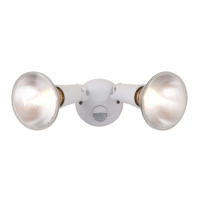
MS600W (White)
A. Light fixture and
motion detector
Accesorio y detector
de movimiento
ENGLISH
B. Coverplate gasket
Junta de la placa
de cubierta
E. (2) Wire nuts
(2) Conectores de cable
ITEMS REQUIRED
(Purchase separately)
Phillips screwdriver
Flathead screwdriver
Outdoor weatherproof silicone caulking
(2) 150 watt (MAX) PAR 38 floodlight bulbs
NOTE: This fixture was designed to work with up to 150 watt maximum PAR halogen flood
bulbs. For improved energy efficiency, lower wattage PAR halogen flood bulbs may be used.
Compact Fluorescent (CFL) bulbs contain electronics which may interfere with the motion
sensing function of your fixture and are not recommended.
HOW IT WORKS
Your motion activated floodlight senses heat images
from objects such as people, large animals and
automobile engines. When motion is detected, the
lights will automatically turn on. Once motion has
stopped, the lights will turn off after a preselected
time delay. Your motion activated floodlight may
also be used as a standard floodlight.
IMPORTANT SAFETY INSTRUCTIONS
When using product, basic precautions should always be followed, including the following:
Heed all warnings, including below warnings AND those included on product.
For outdoor use only.
cULus LISTED for wet location.
Suitable for wall mount only. NOT suitable for eave or ground mount installation.
Disassembling your fixture will void the warranty.
Your fixture is prewired and preassembled for easy installation.
Read and follow these instructions.
To reduce the risk of a burn during relamping, disconnect power supply to the unit
before relamping.
Bulb gets HOT quickly!
The bulb and fixture get extremely hot during use. Disconnect power and allow fixture
to cool before changing bulb or handling fixture.
Fixture should be installed by persons with experience in household wiring or by a
qualified electrician. The electrical system, and the method of electrically connecting
the fixture to it, must be in accordance with the National Electrical Code and local
building codes.
110 degrees
Up to 70 feet
WARNING
G. (2) Lampholder gaskets
(2) Juntas obturadoras
del receptáculo
D. (2) #6 and (2) #8 mounting screws
(use the size that fits your junction box)
(2) Tornillos #6 y (2) tornillos #8 de
montaje (utilice el tamaño que mejor
se adecue a su caja de conexión)
F. (2) Fixture mounting screws
(2) Tornillos de montaje
del accesorio
C. Mounting bracket
Soporte para montaje
Fig. 1
Incorrect
Correct

Questions and Answers

  • D
    davidortegaAug 15, 2025
    Why Cooper Lighting Home Lighting doesn't come on with motion at night?
    • M
      Michael WashingtonAug 15, 2025
      If your Cooper Lighting Home Lighting doesn't activate with motion at night, several factors could be at play. First, check if the circuit breaker has tripped or if the wall switch is turned off, as the unit might not be receiving power. A faulty bulb could also be the reason, so try replacing it. Additionally, bright surrounding light can interfere with the sensor; try re-aiming the head or repositioning the unit away from the light source. Finally, loose wiring can prevent the unit from functioning correctly; inspect the wiring and reconnect if necessary using the provided wire connectors.
  • H
    haley09Aug 18, 2025
    What to do if Cooper Lighting Home Lighting stays on at night?
    • G
      Gilbert HernandezAug 18, 2025
      If your Cooper Lighting Home Lighting stays on continuously at night, it might be due to a few reasons. The sensor may be detecting motion from objects like trees or traffic; ensure the sensor isn't picking up unintended movement, and relocate or reposition the unit if needed. Alternatively, the unit could be in override mode. To resolve this, turn the light switch off for at least 10 seconds, then turn it back on.
  • P
    Patricia WilliamsAug 21, 2025
    Why Cooper Lighting Home Lighting is on during the day?
    • J
      Jeremy StuartAug 21, 2025
      If your Cooper Lighting Home Lighting is on during the day, there are a few potential causes. Check if the time adjustment knob on the motion sensor is set to the test (“T”) mode and ensure that it is not. Also, the unit might be in override mode, so try turning the light switch off for at least 10 seconds and then back on. Lastly, if the motion detector is shadowed, relocate or reposition the unit.
  • J
    Jamie ChungAug 25, 2025
    Why Cooper Lighting MS600 Home Lighting comes on for no reason at night?
    • C
      Clifford MckinneyAug 26, 2025
      If your Cooper Lighting Home Lighting activates for no apparent reason at night, it's likely due to motion being detected within the sensor's range. Ensure the sensor isn't picking up movement from trees or traffic. If it is, relocate or reposition the unit to avoid these false triggers.
  • A
    Alan PhillipsAug 27, 2025
    How to fix blinking Cooper Lighting MS600 Home Lighting at night?
    • Y
      yandersonAug 27, 2025
      If your Cooper Lighting Home Lighting continuously blinks on and off at night, it could be that the light emitted from the unit's own lamp is affecting the motion sensor. To resolve this, try re-aiming the lamp or relocate/reposition the unit.
  • P
    Pamela DavisAug 30, 2025
    How to fix Cooper Lighting Home Lighting that doesn't turn on with motion at night?
    • S
      Steven LutzAug 30, 2025
      If your Cooper Lighting Home Lighting doesn't activate with motion at night, several factors could be at play. First, ensure the fixture has power by verifying that the circuit breaker hasn't tripped and the wall switch is in the ON position. A faulty bulb could also be the culprit, so try replacing it. If the surrounding ambient light is too bright, the unit might mistakenly think it's daytime; try re-aiming the head or relocating the unit away from the light source. Lastly, check the wiring to the unit and reconnect if necessary using the provided wire connectors.
  • C
    cameronwagnerSep 2, 2025
    Why does my Cooper Lighting MS600 Home Lighting stay on at night?
    • J
      Jeffrey DavisSep 3, 2025
      If your Cooper Lighting Home Lighting stays on at night, preventing it from turning off, it could be due to a few reasons. Check if the sensor is detecting motion from objects like trees or traffic within its detection zone. Relocate or reposition the unit to avoid such triggers. Also, if the unit is stuck in override mode, try turning the light switch off for at least 10 seconds and then back on to reset it to 'Auto' mode.
  • R
    rogerwhiteSep 5, 2025
    What to do if Cooper Lighting MS600 Home Lighting comes on for no reason at night?
    • M
      Mark McdonaldSep 5, 2025
      If your Cooper Lighting Home Lighting activates for no apparent reason at night, it might be triggered by motion within its detection zone. Ensure the sensor isn't picking up moving objects like trees or traffic. To troubleshoot, cover the sensor lens with cardboard to prevent motion detection. If the light stays off, something in the detection zone is the cause. If the light remains on even with the lens covered, relocate or reposition the unit.
  • B
    brogersSep 8, 2025
    Why is my Cooper Lighting MS600 Home Lighting on during the day?
    • D
      Donna KelleySep 8, 2025
      If your Cooper Lighting Home Lighting is on during the day, check the time adjustment knob on the motion sensor to ensure it is not set to the test (“T”) mode. Also, the unit might be in override mode; try turning the light switch off for at least 10 seconds and then back on to return it to “Auto” mode. Another potential issue is if the motion detector is shadowed, so relocating or repositioning the unit might resolve the problem.
  • M
    munozmeganSep 12, 2025
    Why does Cooper Lighting MS600 Home Lighting blink on and off at night?
    • T
      Travis BrockSep 12, 2025
      If your Cooper Lighting Home Lighting continuously blinks on and off at night, it could be that the light emitted from the unit's own lamp is affecting the motion sensor. Try re-aiming the lamp or relocate/reposition the unit to prevent this interference.

Summary

Items Required

Important Safety Instructions

General Safety Precautions

Basic precautions for product use, outdoor use, wet location listing, wall mount suitability, and warranty.

Electrical Safety and Installation Warnings

Warnings regarding electrical shock, hot bulbs, proper installation by qualified personnel, and bulb wattage limits.

For Best Results

Mounting and Wiring Your Fixture

Operating Your Fixture

Time Adjustment Knob

How to set the duration the light stays on after motion is detected (5 seconds to 12 minutes).

LUX Adjustment Knob

Setting the light level for automatic operation based on ambient light conditions.

Selecting Your Desired Feature

Troubleshooting

Light Does Not Come On With Motion

Diagnosing issues with no power, tripped breaker, faulty bulb, or bright ambient light.

Light Stays On Continuously

Troubleshooting when the light stays on at night or does not turn off.

Cooper Lighting MS600 Specifications

General IconGeneral
BrandCooper Lighting
ModelMS600
CategoryHome Lighting
FinishWhite
Voltage120 VAC