- 9 -
EN
Connect to CoospoRide APP
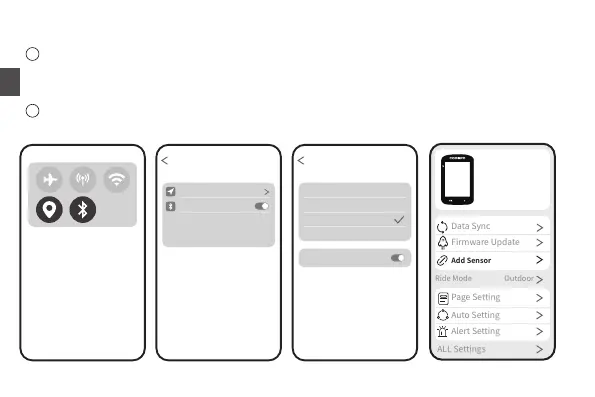
Please do not pair the bike computer at your phone's Bluetooth settings.
Please download CoospoRide APP in Apple Store or Google Play;
Enable the Bluetooth and location permissions on your phone;
CoospoRide APP > Bike Computer > Add Device > CS300 > Click on Device ID to connect the bike computer.
Please ensure that Bluetooth and location permissions are enabled for the app before connecting. Some phone
models may not be able to search for Bluetooth devices without authorization.
Settings
Location While Using
CoospoRide
ALLOW COOSPORIDE TO ACCESS
Bluetooth
Location
Never
CoospoRide
ALLOW COOSPORIDE TO ACCESS
Ask Next Time Or When I Share
While Using the App
Alawys
Precise Location
!
!
CS300
CS300-xxxxxxx



 To Next Page