Need help?
Do you have a question about the COOSPO BC107 and is the answer not in the manual?
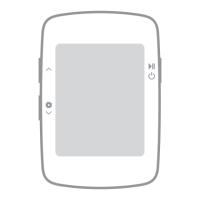
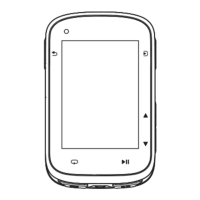
Short press to mark a lap, hold to power off or on.
Short press to pause/continue, hold to save/exit exercise.
Short press to turn pages, hold to enter setting mode.
Icons for satellite signal, accessory connection, battery, and exercise/pause states.
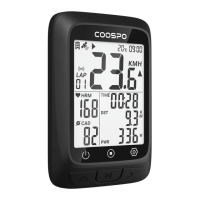
Explains metrics like time, distance, speed, heart rate, cadence, and power.
Defines units (MPH/KMH) and explains time zone display.
Lists main device, charging cable, user manual, bike mounts, and rubber rings.
Step-by-step guide for securely installing the device mount on a bicycle.
Instructions for charging the device using a DC 5V power adapter.
Details how the backlight automatically adjusts based on ambient light and activity.
Instructions on ensuring outdoor placement for optimal GPS signal acquisition.
Explains how time is set via satellite signals or through the companion app.
Ensures ANT+ sensors are in wake-up mode for successful connection.
How to enter the ANT+ peripheral search and connection mode.
Device automatically searches and connects to compatible ANT+ sensors.
Confirms and saves connected ANT+ accessories for future use.
How to switch between different setting pages (P1 to P5).
Steps to select digits and accurately set the wheel size.
How to confirm settings changes and exit the configuration menu.
Steps to enter the menu for configuring the device's time zone.
How to select specific digits to set the correct time zone.
How to confirm the selected time zone and exit the settings.
Steps to enter the menu for selecting metric or imperial units.
How to toggle between Kilometer per Hour and Mile per Hour.
How to confirm the unit selection and exit the settings.
How to enter the power calibration mode on the device.
Steps for performing a recalibration of the power meter.
How to save the calibration results and exit the mode.
Explains different satellite signal strength icons and their meaning.
What happens to speed data display when GPS is not acquired.
Tips and advice for obtaining a better and more stable GPS signal.
How to start, pause, and resume a cycling activity.
How to mark laps and switch between different data display screens.
How to end an activity and save the recorded ride data.
Instructions for downloading the official CoospoRide companion application.
Lists the required iOS and Android versions for app compatibility.
Step to turn on the device to prepare it for pairing.
Process of connecting the bike computer to the CoospoRide app.
How to authorize and sync recorded cycling activities to Strava.
How to select, sync, and delete activity records from the device.
Details on the IPX7 water resistance rating and usage guidelines.
Warnings against product modification and advice on safe operation.
Legal notice regarding manual information accuracy and product liability.
Details on compliance with FCC Part 15 rules for digital devices.
States the two required conditions for compliance with FCC rules.
Details compliance with Innovation, Science and Economic Development Canada.
Guidelines for recycling electronic waste and contacting local authorities.
Prohibitions against opening, modification, and advice on proper operation.
 General
| Battery Life | 28 hours |
|---|---|
| Water Resistance | IP67 |
| GPS | Yes |
| Brand | COOSPO |
| Model | BC107 |
| Type | Bike Computer |
| Wireless | Yes |
| Compatibility | iOS, Android |
| Display | LCD |
| Connectivity | Bluetooth |
| Functions | Speed, Distance, Time, Cadence, Heart Rate |

 To Next Page