- 9 -
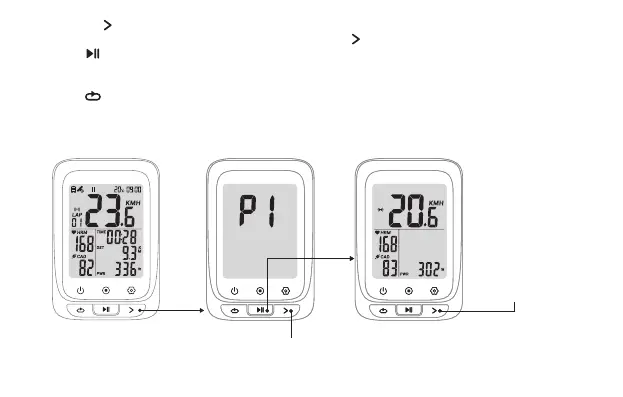
Press
Hold
Save and get back
to the last pages(if
no device found in
20 seconds, the
device will get back
to the last pages
automatically)
2.1 Hold the to get into setting mode;
2.2 There are 5 settings pages available (P1 ~ P5), press the to switch to P1;
2.3 Press to select to enter;
2.4 The computer automatically searches for ANT+ peripherals, and automatically connects after searching
for ANT+ peripherals;
2.5 Press to save the found accessories and return. If no ANT+ accessory is found, the device will return
to the last pages automatically (When a power device is connected during riding, the computer will
display power data first, and when there is no power device, it will display GRA slope data).
Press: Switch between P1~P5


 To Next Page