CHAIR INSTALLATION CHAIR INSTALLATION
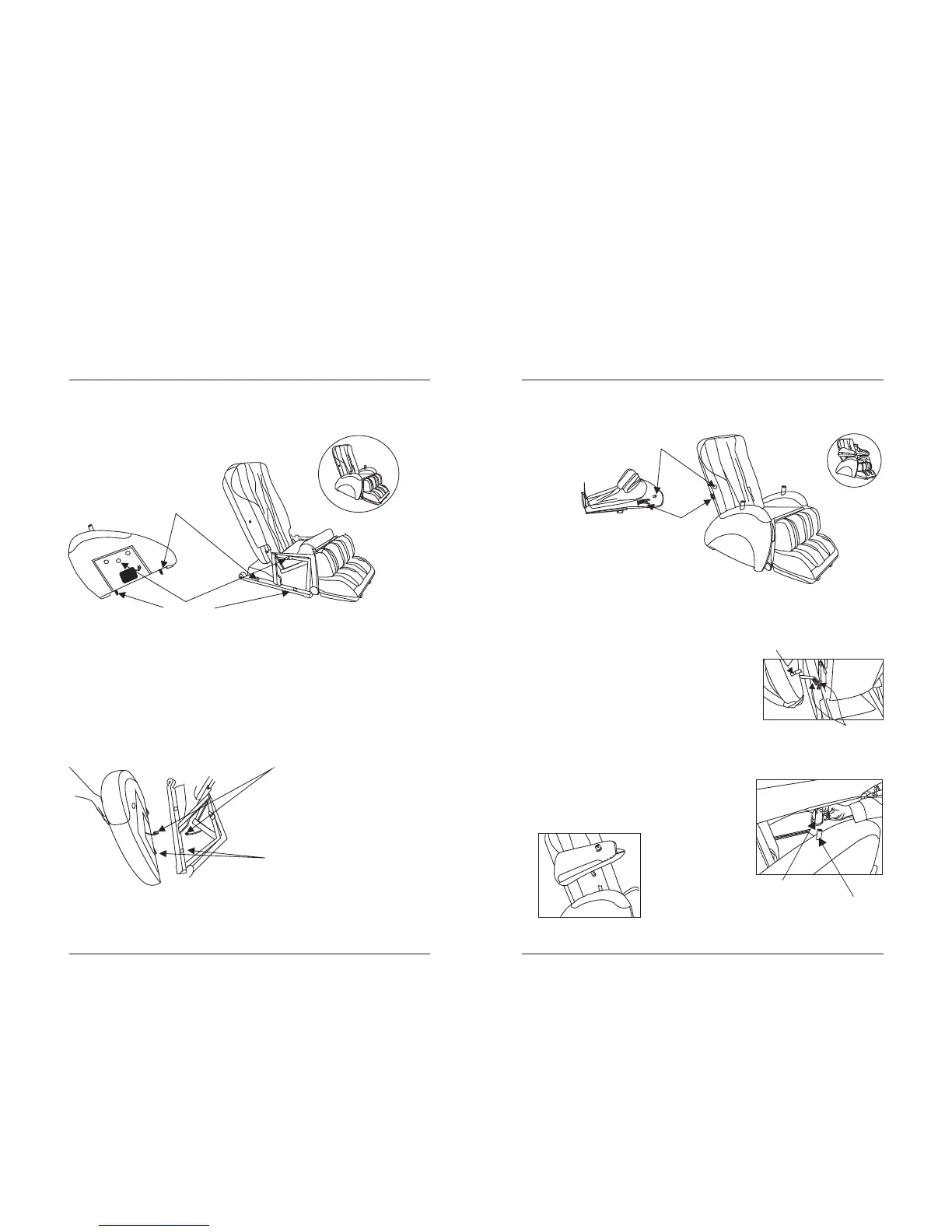
Insert the two pins of the left armrest into the left side of the main body.
Push the armrest towards the main body until it locks into place. Repeat
this step for the right armrest.
Hold the left arm massager up and connect its air hose to the left
armrest’s matching color air hose.
armrest speaker cord
armrest pin & hole
Connect the left armrest air
hose to the left arm massager
and by lifting it up and
connecting its air hose to the
left armrest’s matching colored
air hose (See Figure 4).
Next, insert the left arm
massager connector into the
left armrest connector until it
locks into place (see Figure 5).
STEP 6: Install the Armrest.
STEP 7: Install the Arm Massager.
armrest pin & hole
armrest pin
right armrest installation
after installation
air hoses
arm massager connectors
air hoses
Figure 4
arm massager connector
arm massager connector
Figure 5
armrest connector
1009



 To Next Page