14
Corinex HD200 CableLAN Wall Mount
Starting Up the Modem
3 Starting Up the Modem
It is recommended to run Wireshark during the start-up and configuration of the
modem in order to ascertain the correct execution of this process and diagnose
potential configuration problems.
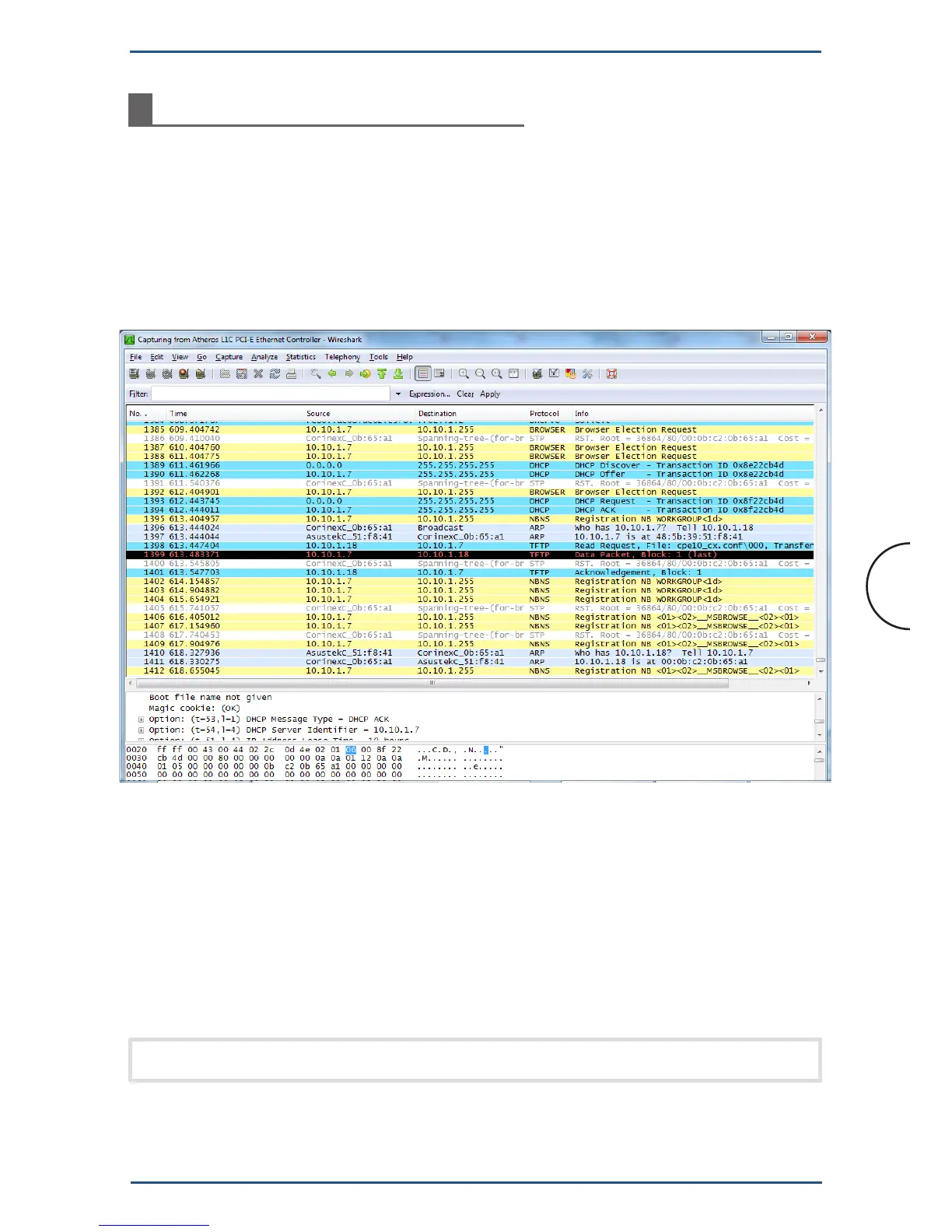
Once the modem boots, it will start transmitting Spanning Tree Protocol (STP)
packets. After a few STP packets, the modem will issue a DHCP discovery packet,
as shown in Figure 1.
Figure 1: Packet trace of the startup of the modem
If you cannot see the DHCP packets coming from the modem, a couple of possible
causes are:
• Thefirewallisfilteringoutthesepackets
• YouarenotrunningWiresharkonthecorrectEthernetinterface
• Theadapterdoesnothavethefactory-defaultconfiguration
• TheadapterisbootinginNVRAMmodeandisusingstaticIPsettings.
Note: In order to see the DHCP discovery, a factory reset is suggested.


 To Next Page