Instruction Manual 5
CORNING DIGITAL HOT PLATES, STIRRING HOT PLATES, STIRRERS
AND EXTERNAL TEMPERATURE CONTROLLER
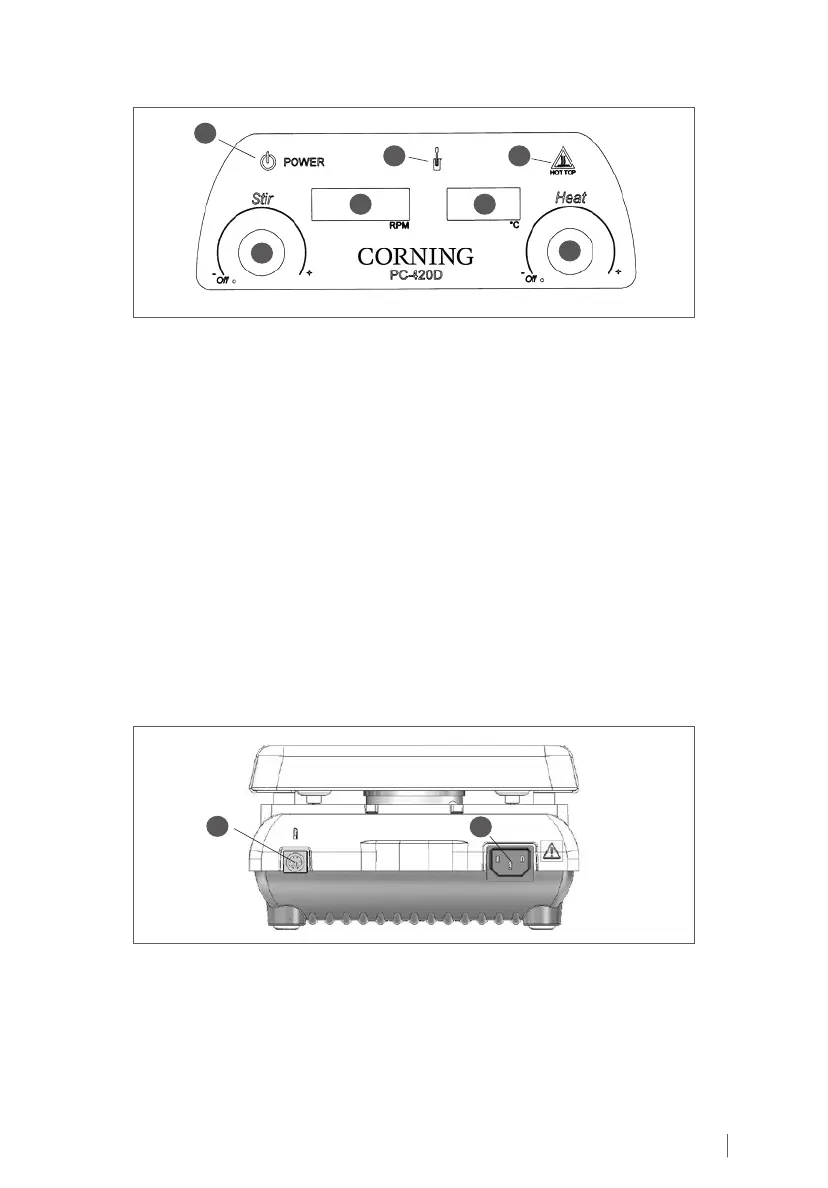
3.0 Product Controls and Indicators
1
2
3 5
4
67
1. Power Indicator: Illuminates at all times when the product is properly connected to input power.
2. Stir Control Knob: Turn the knob all the way counterclockwise to turn off stirring function.
Turn the knob clockwise to set desired stirring speed.
3. Stirring Speed Display: Shows the speed set for stirring.
4. Heat Control Knob: Turn the knob all the way counterclockwise to turn off heating
function. Turn the knob clockwise to set the desired heating temperature.
5. Heating Temperature Display: Shows the temperature set for heating.
6. Hot Top Indicator: Illuminates when the temperature of the top is too hot to touch
(greater than approx. 60°C).
7. Temperature Probe In-Use Indicator: Illuminates when the external temperature probe
is connected to the unit.
4.0 Product Connections
1. Power Cord Input: Connect the supplied power cord into this connector.
2. External Temperature Controller Input: Connect the optional External Temperature
Controller (Cat. No. 6795PR) into this connector.
1
2
To Connect/Disconnect the External Temperature Controller
1. Turn the Stir Control Knob and Heat Control Knob to the OFF position.
2. Disconnect power cord.
3. Insert/remove external temperature controller connector into/from the input connector.
4. Reconnect power cord.
5. Product is now ready for use.


 To Next Page