Standard Recommended Procedure 003-892-AEN | Issue 5 | November 2020 | Page 2 of 4
3. Installation
NOTE: Sections 3.2 and 3.3 only apply to EDGE-SMH.
3.1 EDGE™ or EDGE8® MTP® Connector Module into SMH
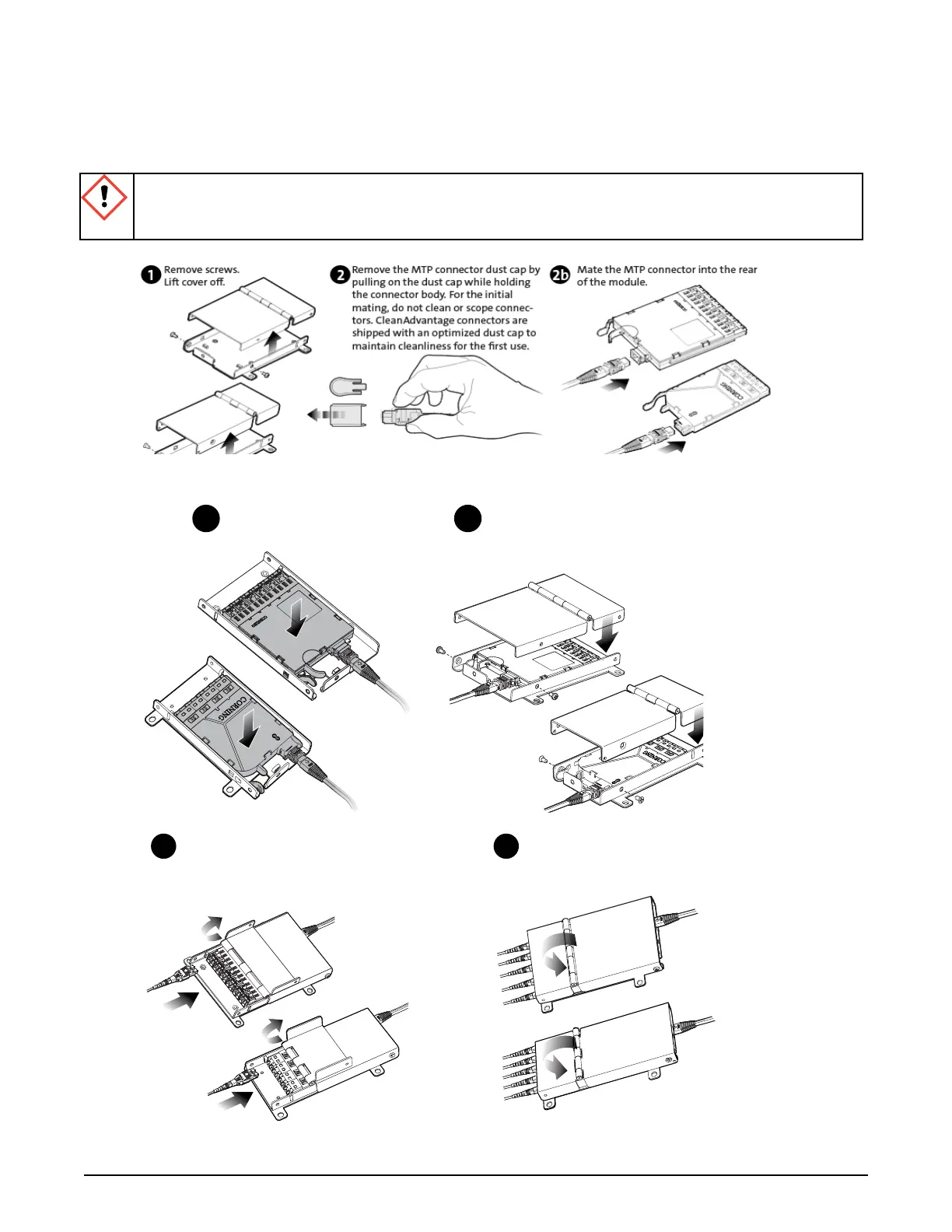
1
Remove screws.
Lift cover o.
2b2
For initial mating, remove the dust
cap from the MTP® connector and
dustcap by pulling on the dust cap
while holding the connector
body/housing/shroud.
Mate the connector into the rear of
the module.
TPA-5692
3
Install module
into SMH.
4
Replace cover.
Reinsert and
tighten screws.
TPA-5693
For the initial mating, remove the dust
cap from the LC connectors and mate
the connector into the front of the
module.
6
Close hinged lid.
TPA-5694
5
CAUTION: Scoping Corning CleanAdvantage connectors increases the risk of adding contamination
to the system. CleanAdvantage technolog is designed for mating connectors without cleaning or
scoping before the initial installation.



 To Next Page