Standard Recommended Procedure 003-892-AEN | Issue 5 | November 2020 | Page 4 of 4
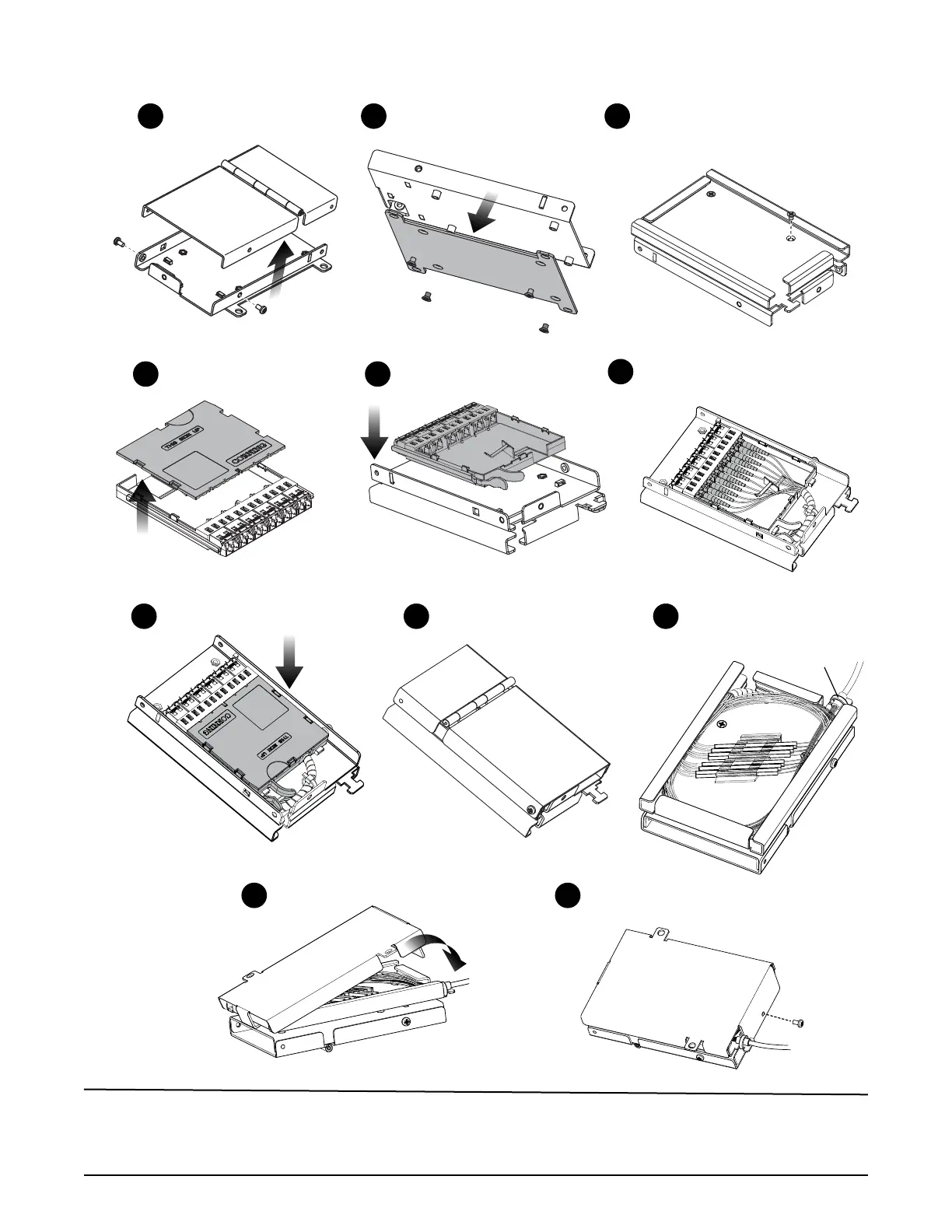
1
Remove screws.
Lift cover o.
2
Remove screws and remove
mounting bracket.
4
Remove cover from
empty module.
Replace housing cover
and tighten screws.
8
5
Install empty
module into SMH.
6
Wrap pigtail bers in spiral
wrap; clean and mate
connectors and adapters.
7
Replace module cover.
TPA-3863
Splice pigtail to bers;
store in splice tray.
9
Install cover on
splice tray.
10
Secure splice tray
with screw.
11
Cable tie
3
Attach slack storage/splice
housing attachment with
screws just removed.
3.3 EDGE™(empty) Module with Spliced Pigtail into SMH
Corning Optical Communications LLC • 4200 Corning Plce • Charlotte, NC 28216 USA
800-743-2675 • FAX: 828-325-5060 • International: +1-828-901-5000 • www.corning.com/opcomm
Corning Optical Communications reserves the right to improve, enhance, and modify the features and specications of Corning Optical Communications products without
prior notication. A complete listing of the trademarks of Corning Optical Communications is available at www.corning.com/opcomm/trademarks. All other trademarks are the
properties of their respective owners. Corning Optical Communications is ISO 9001 certied. © 2011, 2016, 2020 Corning Optical Communications. All rights reserved.


 To Previous Page
 Loading...