STANDARD RECOMMENDED PROCEDURE 003-825-AEN | ISSUE 7 | NOVEMBER 2020 | PAGE 2 OF 11
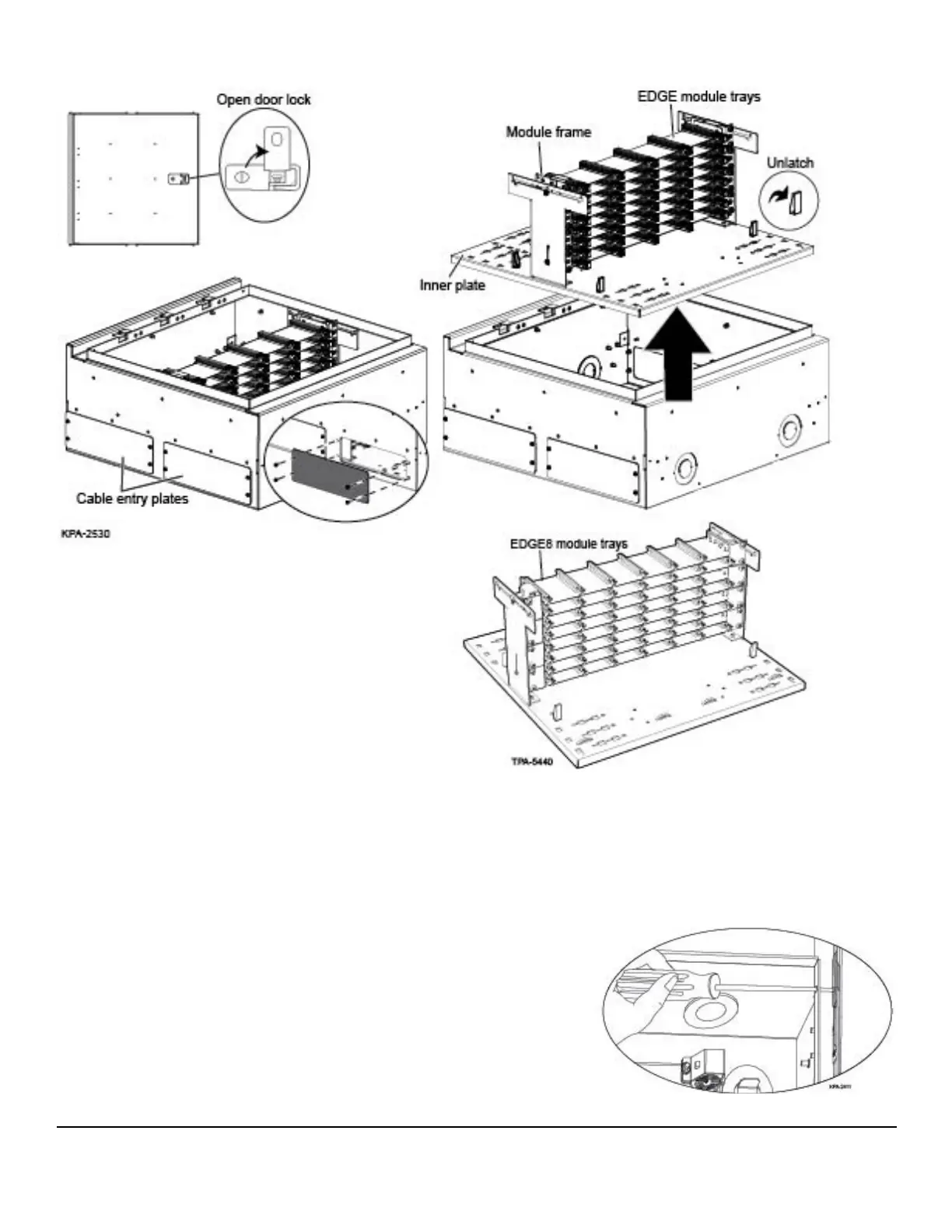
3.2. To Access Interior of FZB for Cable and Module Installation
Step 1: Remove the plates covering the cable entry locations to be used (Figure 2).
Step 2: Remove the two packing screws next to the latches to enable the inner tray to be removed;
then lift the four latches on the inner plate. Lift the plate out of the box.
Note: The FZB may have either the EDGE™ or the EDGE8™ module trays installed.
3.3. To Remove the Door
Step 1: Remove the hole plug and insert a screwdriver
through the hole.
Step 2: Loosen the screw on the hinge bracket shown in
Figure 3.
Step 3: Slide the hinge bracket out of the way.
Step 4: Slide the door up to disengage the hinge pin.
Step 5: Lift door o the cabinet.
Figure 3
Figure 2



 To Next Page