STEP ONE
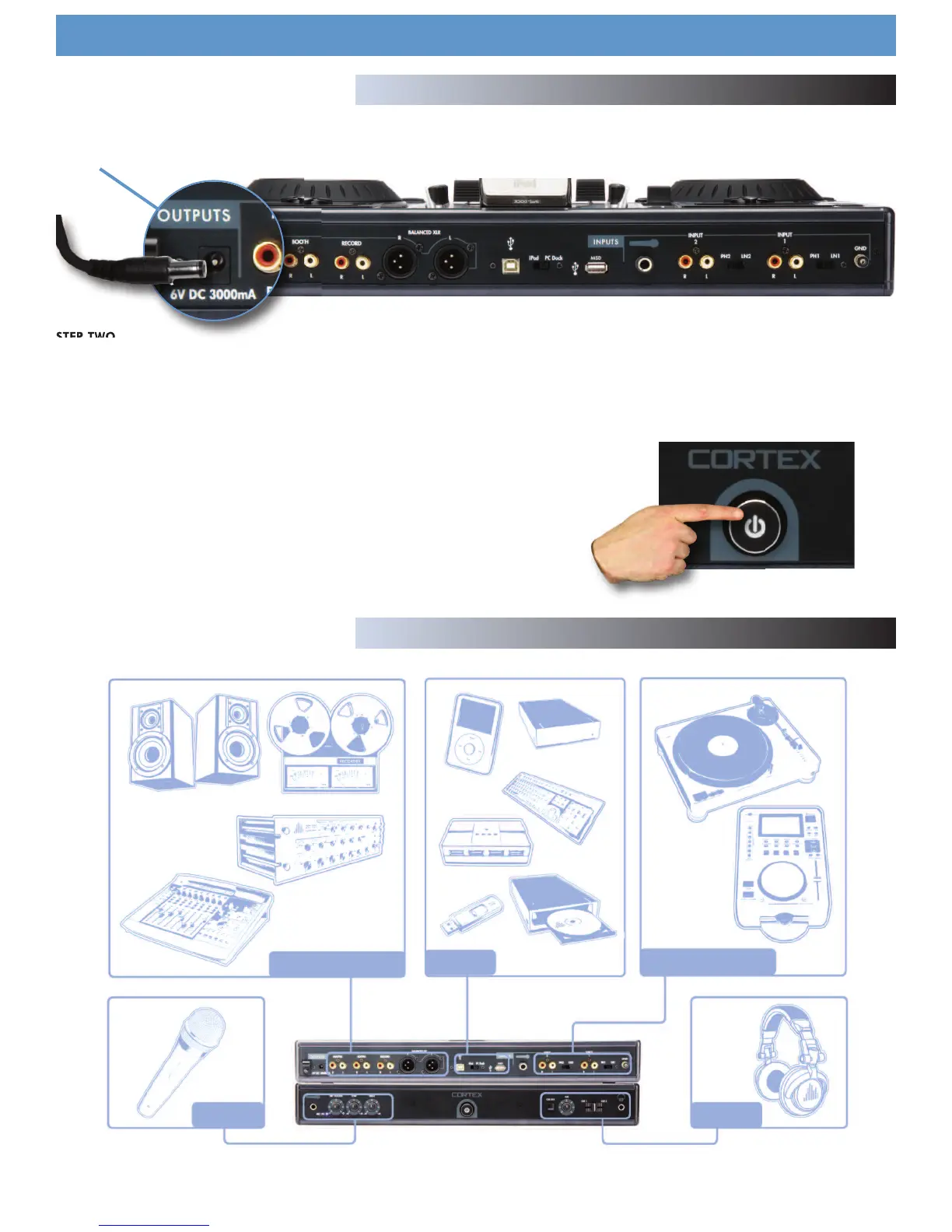
Connect the AC/DC adaptor to the DC Inlet, found on the rear of the unit. Fasten the Security Clamp (found directly below the DC Inlet jack) on top
of the cable, so that it is not possible for the cable to become dislodged.
STEP TWO
Connect either the XLR type (Balanced) audio output and/or the RCA type (Unbalanced) Audio Outputs to a suitable source (see diagram below). The
DMIX-600 features a wide variety of output choices depending on your requirements, all outputs can be used simultaneously.
STEP THREE
Connect your primary USB device to the port found in the middle of the rear panel. You may choose any driverless device that follows FAT32, NTFS,
or HFS+ file systems. You may also connect a powered (active) USB hub to augment the amount of avail-
able ports, giving you the advantage of
connecting either a USB keyboard or more USB storage devices (see diagram below).
STEP FOUR
Press the Power button located to the left of the front panel. The unit will take about 5 sec-
onds to boot up as well as detect any USB devices that are currently connected.
Using the DMIX-600
Preparing for Use
10
OUTPUTS USB INPUTS
MIC CUE
Connections


 To Next Page