EasyManua.ls Logo

Cosmo CRTD55 - User Manual

Cosmo CRTD55
2 pages
Print Icon
To Next Page IconTo Next Page
Loading...
COSMO GmbH
Brandstücken 31
22549 Hamburg
info@cosmo-info.de
www.cosmo-info.de
February 2020
V003
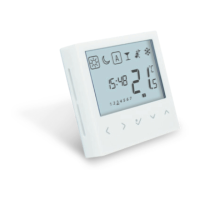
Digital Bezel Type Programmable
Wired Thermostat 230 V
Model: CRTD55
Quick Guide
INTRODUCTION
PRODUCT COMPLIANCE
SAFETY INFORMATION
BOX CONTENT
TERMINALS DESCRIPTION WIRING DIAGRAM
LCD ICON DESCRIPTION
The CRTD55 thermostat is a stylish and accurate programmable
flush mount digital room thermostat for Bezel 55. You can now
simply adjust your home temperature as desired in order to
create a comfortable home environment.
This product complies with the essential requirements and other
relevant provisions of Directives: EMC 2014/30/EU, LVD 2014/35/
EU and RoHS 2011/65/EU.
You can wire the thermostat directly to the CKL6230N wiring
centre or to an actuator (purchased separatly).
Use in accordance with the regulations. Indoor use only. Keep
your equipment completely dry. Disconnect your equipment
before cleaning it with a dry towel. The unit is to be used for the
control of room temperature inside the house.
Front case
Quick Guide
Rear case
2x fixing screws
TERMINAL DESCRIPTION
Switching Live (output)
CO Changeover; 0V for heating or 230V for
Cooling (input)
NSB 0V normal temp mode; 230V reduced temp
mode (output)
N Neutral Input
L Live Input
S1/S2 Floor sensor (optional)
1
15
16
8
9
10
17
2
3 4 5 6
11121314
7
1. BOX indicates which
mode is active
2. Standard temperature
3. Reduced temperature
4. Automatic
5. Party mode
6. Holiday mode
7. Frost protection
8. Temperature unit
9. Temporary override
indicator
10. Temperature indicator
11. Programs number
indicator
12. AM / PM
13. Day of the week
14. Floor sensor connected
15. Cool mode
16. Heat mode
17. Time indicator
BUTTON FUNCTIONS
BUTTON FUNCTION
- Move left to new mode or new settings
- Short press to return to the previous
screen when it is in user/installer setting
mode
- Long press to return to home display
without saving
Move right to new mode or new setting
- OK key: Short press to confirm selection
- Long press to direct return to home display
with saving during the period of setting
- Long press to enter Program /Clock /
Offset / HeatCool setting for user
- Increase or decrease Setpoint Temperature
- Increase or decrease Day, Clock, timer
(party/holiday)
ACTUATOR
CKL6230N WIRING CENTRE
ACTUATOR
E.G. HEAT
PUMP
OUTPUT TO
MULTIPLE
DEVICES
AC 230V
N
L
AC 230V
CKL6230N
N
L
T
T
N
N
L
L
ACTUATOR
E.G. HEAT
PUMP
OUTPUT TO
MULTIPLE
DEVICES
AC 230V
N
L
AC 230V
CKL6230N
N
L
T
T
N
N
L
L
Question and Answer IconNeed help?

Do you have a question about the Cosmo CRTD55 and is the answer not in the manual?

Cosmo CRTD55 Specifications

General IconGeneral
BrandCosmo
ModelCRTD55
CategoryThermostat
LanguageEnglish

Summary

Terminals Description

CO Terminal

Switching Live output terminal.

NSB Terminal

Changeover input for heating/cooling modes.

N Terminal

Neutral input terminal.

L Terminal

Live input terminal.

S1;S2 Terminals

Optional floor sensor input terminals.

Wiring Diagrams

CKL6230 N Wiring Centre Diagram

Wiring diagram for the CKL6230N wiring centre.

Actuator Wiring Diagram

Wiring diagram for an actuator.

LCD Icon Descriptions

Mode Indicator

Indicates the currently active operating mode.

Temperature Indicators

Shows standard, reduced, and current temperatures.

Operating Mode Icons

Icons for automatic, party, holiday, frost protection, cool, and heat modes.

Time and Unit Indicators

Displays temperature unit, AM/PM, day of week, and time.

Sensor and Override Indicators

Indicates floor sensor connection and temporary override status.

Program Indicator

Indicates the currently active program number.

Button Functions

Navigation and Return Functions

Handles left/right navigation, screen returns, and saving options.

Setpoint Adjustment

Increases or decreases temperature setpoints and other settings.

Mounting Instructions

Thermostat Mounting Steps

Step-by-step guide for physically installing the thermostat.

Setting Time and Date

Time Format Selection

Choose between 12-hour or 24-hour time format.

Setting Time and Date

Procedure for setting the current hour, minutes, and date.

Programming Features

Customizing Programs

Instructions for customizing operating programs via long press.

Operation Modes

Override Temperature

Temporarily override automatic temperature settings.

Manual Control

Manually set thermostat to comfort or economy mode.

Reset Function

Factory Reset Procedure

Guide to reset the thermostat to its factory default settings.