−5−
Component Names and Functions
No. Name Function
9
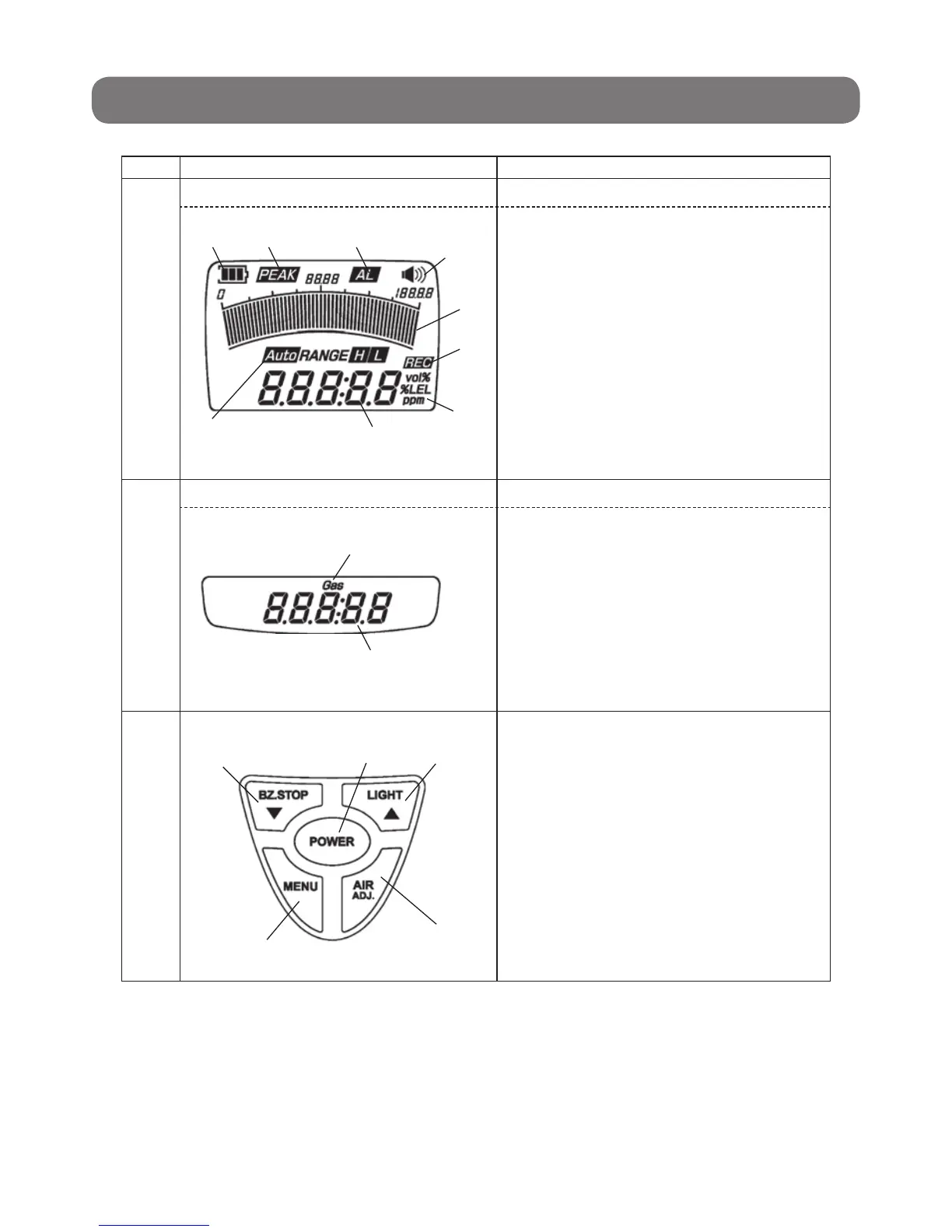
LCD main screen Displays gas concentration and a variety of messages.
A. Displays gas concentration.
B. Displays the unit of measurement.
C. Displays the remaining battery level.
D. Displays peak hold values if the peak hold
function is set.
E. Displays at the time of a gas alarm.
F. Indicates that the alarm buzzer sounds at the
time of a gas alarm.
G. Displays gas concentration in bar graph form.
H. Indicates that the Gas Detector is logging (saving
data in memory).
I. Displays the range of the bar graph.
10
LCD sub screen Displays gas concentration and messages.
J. Indicates time.
K. Displays a gas number confi rmed if the number
of detectable combustible gases is two or more.
11
Control panel a. Used to turn the Gas Detector ON and OFF
Used to change range selections in the gas
concentration screen.
b. Used for automatic zero calibration.
c. Used to turn ON the backlight.
d. Used to stop the alarm buzzer.
• Used to check gas numbers if the number of
detectable combustible gases is two or more
(with no alarm).
• Used to make an alarm point check with the
button continuously pressed.
e. Used to make function settings.
2. Component Names and Functions (continued from previous page)
C
I
D E
A
F
G
H
B
K
J
a
c
d
e
b


 To Next Page
 Loading...