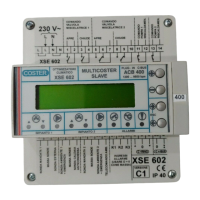
15
B 268 - XSE 602 C1 Eng.
22.11.10 AM REV. 02
We reserve the right to make changes witout notice
COSTER
7 d a y 1 M O N D A Y
2 4 H O U R 1
7 d a y 1 S U N D A Y
2 4 H O U R 1
21.9
⇓
⇓
21.
15
Choice of programme for each day of week :
24 HOUR 1…25 ; NORMAL 1...5;
SETBACK 1 - 2; FROSTPROT ; FLOW 1 - 2; OFF.
14.
2
H e a t i n g S e a s o n
F r 1 5 . 1 0 t o 1 5 . 0 4
21.20
Dates of start and end of heating season.
14.
6
H o w m a n y 2 4 h o u r
P r o g r a m m e s ? 1
21.1
Choice of number of 24-hour programmes
to be used (1…25).
Avoids scrolling unnecessary pages
14.
1
21.8
Choice of number of 7-day programmes to
be used (1- 2 ).
Avoids scrolling unnecessary pages
14.
2
H o w m a n y 7 d a y
P r o g r a m m e s ? 0
21. EVENTS & PERIODS
Rif. Display Description Notes Sect.
21.16
Choice of number of holiday periods to be used
(0...25)
Avoids scrolling unnecessary pages
14.
2
H o w m a n y H o li d a y
P e r i o d s ? 0
H o l i d a y P r o g H t g 1
F R O S T P R O T 6 . 0 c
21.17
Choice of programme for all the holiday periods
heating zone1:
7DAY1-2; 24HOUR1…25;
NORMAL 1 ... 5; SETBACK 1-2; FROSTPROT;
FLOW 1 - 2; OFF.
Appears only if in 21.
16 number is greater than 0
14.
3
H o l i d a y P r o g H t g 2
F R O S T P R O T 6 . 0 c
21.18
Choice of programme for all the holiday periods
heating zone 2:
7DAY1-2; 24HOUR1…25;
NORMAL 1...5; SETBACK 1-2; FROSTPROT; FLOW1
- 2; OFF.
Appears only if in 21.
16 number is greater than 0
14.
3
H o l 0 1 H t g : N O
F r - - . - - t o - - . - -
21.19
NO = period not used
1 = period used by heating zone 1
2 = period used by heating zone 2
1+2 = period used by heating zones 1 & 2
Dates of start and end of holiday period.
Further pages according choice in 21.
16.
14.
3
Appears only if in 21.16 number is greater than 0
D e s A n t i c T : 6 0 . 0 c
A c t A n t i c T : 5 8 . 0 c
22.6
Desired anticondensing temp.
Temp. measured by anticondensing detector B4.
15.
5
O u t s i d e T e m p
A c t u a l : – 2 . 0 c
22.5
Actual outside temp. measured by B2 or coming
via C- Ring .
15.
5
If outside detector B2 not connected & value comes
via C- Ring , Actual is replaced by C-Ring
D e s A m b T : 2 0 . 0 c
A c t A m b T : 2 0 . 5 c
22.1
Ambient T desired by mode in use - heating zone 1
Temp. measured by ambient detector B3.
15.
5
Valve and pump LEDs of heating zone 1 blink
D e s A m b T : 2 0 . 0 c
A c t A m b T : 2 0 . 5 c
22.2
Ambient T desired by mode in use - heating zone 2
Temp. measured by ambient detector B6.
15.
5
Valve and pump LEDs of heating zone 2 blink
D e s F l o w T : 8 0 . 0 c
A c t F l o w T : 8 0 . 0 c
22.3
Flow temp. desired by mode in use - heating zone 1
Temp. measured by flow detector B1
15.
5
Valve and pump LEDs of heating zone 1 blink
D e s F l o w T : 8 0 . 0 c
A c t F l o w T : 8 0 . 0 c
22.4
Flow temp. desired by mode in use - heating zone 2
Temp. measured by flow detector B5
15.
5
Valve and pump LEDs of heating zone 2 blink
S u m me r T i m e A U T
F r 2 9 . 0 3 t o 2 6 . 1 0
21.21
Dates of start and end of summer time period.
14.
6
22. MEAS&COUNT&CALC
Ref. Display Description Notes Sect.
D e g r e e - D a y s
2 0 : 0 0 0 0 A m b : 0 0 0 0
22.7
20: referred to fixed ambient temp. of 20 °C
Amb: referred to actual ambient temp. heat. zone 1
12.
13
Valve and pump LEDs of heating zone 1 blink
D e g r e e - D a y s
2 0 : 0 0 0 0 A m b : 0 0 0 0
22.8
20: referred to fixed ambient temp. of 20 °C
Amb: referred to actual ambient temp. heat. zone 2
12.
13
Valve and pump LEDs of heating zone 2 blink
P 1 E v e n t 1 0 6 . 0 0
N O R M A L 3 2 1 . 0 c
P 1 E v e n t 6 2 2 . 0 0
S E T B A C K 1 1 6 . 0 c
21.2
⇓
⇓
21.
7
Number of programme, number of event & start
time of period in programme.
Choice of type of mode to assign to period :
NORMAL 1...5 ; SETBACK 1 - 2 ; FROSTPROT;
FLOW 1 - 2; OFF.
Further groups of 6 pages ac-
cording choice in 21.
1
Max. 6 periods. To eliminate unused period
press + and – together: - - . - - appears.
The events must be in increasing order. Do
not leave - - . - - between programmed events.
14.
1


 To Next Page
 Loading...