EasyManua.ls Logo

Costway GOPLUS HW62039 - User Manual

Costway GOPLUS HW62039
3 pages
Print Icon
To Next Page IconTo Next Page
Loading...
www.costway.com
THIS INSTRUCTION BOOKLET CONTAINS IMPORTANT SAFETY INFORMATION. PLEASE READ AND KEEP FOR FUTURE REFERENCE.
Visit us: www.costway.com
Follow Costway
Please give us a chance to make it right and do better
Contact our friendly customer service department for help first.
Replacements for missing or damaged parts will be shipped ASAP!
USER’S MANUAL
Gaming Chair
HW62039
Question and Answer IconNeed help?

Do you have a question about the Costway GOPLUS HW62039 and is the answer not in the manual?

Summary

Users Manual - Gaming Chair HW62039

Contact and Preparation

Contact Us!

Information on how to contact customer service for assistance with the product.

Before You Start

Key instructions and recommendations before beginning the assembly process.

Parts and Assembly Guide

Parts Identification

List and visual representation of all components and hardware included with the chair.

Assembly Steps

Detailed, numbered instructions for assembling the gaming chair from start to finish.

Customer Appreciation

Overview

This document is a user manual for the Costway GoPlus Gaming Chair, model HW62039. It provides comprehensive instructions for assembly, usage, and maintenance, ensuring users can maximize their experience with the product. The manual emphasizes the importance of safety and proper handling throughout the chair's lifecycle.

Function Description

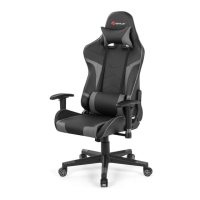
The Costway GoPlus Gaming Chair is designed to provide ergonomic support and comfort for users during extended periods of gaming or work. Its primary function is to offer a stable, adjustable, and comfortable seating solution that can adapt to various body types and preferences. The chair features a high backrest, adjustable armrests, and a sturdy base with casters, allowing for mobility and flexibility in different environments. The design aims to promote good posture and reduce fatigue, making it suitable for intense gaming sessions, office work, or casual use. The chair's aesthetic is typical of gaming chairs, featuring a sleek, modern design that often includes contrasting colors and angular lines, contributing to a dynamic and engaging user experience.

Usage Features

The gaming chair offers a range of features designed to enhance user comfort and adaptability. Before assembly, the manual advises users to read all instructions carefully, retain them for future reference, and separate and count all parts and hardware to ensure everything is present. It also recommends assembling the chair near its intended use location to avoid unnecessary movement once assembled. The chair should always be placed on a flat, steady, and stable surface to ensure safety and stability during use.

The assembly process is broken down into several steps, each illustrated with diagrams to guide the user. Key components include the backrest (A), seat cushion (B), armrests (C1, C2), mechanism (D), gas lift (E), five-star base (F), casters (G), and various screws and washers (H, J, K, I, L, M).

  1. Base Assembly: The first step involves attaching the casters (G) to the five-star base (F) and then inserting the gas lift (E) into the center of the base. This creates a mobile and height-adjustable foundation for the chair.
  2. Mechanism Attachment: The mechanism (D) is then attached to the underside of the seat cushion (B) using screws (J). This mechanism allows for tilt and height adjustments, providing customizable seating positions.
  3. Armrest Installation: The armrests (C1, C2) are secured to the seat cushion (B) using screws (J). The manual specifies left (M(L)) and right (M(R)) armrests, ensuring correct orientation.
  4. Backrest Attachment: The backrest (A) is then attached to the seat cushion assembly using screws (J) and washers (K). This step connects the main ergonomic support structure to the seat.
  5. Final Assembly: Once the backrest is secured, the entire upper assembly (seat, backrest, armrests) is placed onto the gas lift (E) previously installed in the five-star base. This completes the main assembly of the chair.
  6. Adjustments: The chair is designed with various adjustment capabilities. The gas lift allows for easy height adjustment, enabling users to find the optimal seating height relative to their desk or environment. The mechanism under the seat provides tilt functionality, allowing users to recline and lock the chair in a desired position. The armrests are also adjustable, typically in height, to support the user's arms and shoulders, reducing strain. These features collectively contribute to a highly customizable seating experience, crucial for long periods of use.

The manual also includes a "Before You Start" section, which emphasizes the importance of carefully reading all instructions, retaining them for future reference, and separating and counting all parts and hardware. It advises reading through each step carefully and following the proper order. The recommendation to assemble items near their intended use area helps prevent unnecessary movement of the product once assembled.

Maintenance Features

While the manual does not explicitly detail a dedicated "maintenance" section, it provides implicit guidance through its warnings and general advice.

  1. Careful Handling: The instruction to "read the warnings carefully" and "avoid kids get touch of small parts or plastic bag" implies a need for careful handling during assembly and general use, which contributes to the longevity of the product.
  2. Stable Placement: The instruction to "always place the product on a flat, steady and stable surface" is a key maintenance practice. This prevents undue stress on the chair's components, such as the base, casters, and gas lift, which could lead to premature wear or damage.
  3. Prompt Replacement of Parts: The manual states, "Replacements for missing or damaged parts will be shipped ASAP!" This indicates that Costway supports the product with replacement parts, which is a crucial aspect of long-term maintenance. Users are encouraged to contact customer service for help with missing or damaged parts, ensuring the chair can be kept in good working condition.
  4. Cleaning: Although not explicitly mentioned, typical maintenance for such a chair would involve regular cleaning of the upholstery and frame. This would likely include wiping surfaces with a damp cloth and mild cleaner, avoiding harsh chemicals that could damage the materials.
  5. Tightening Fasteners: Over time, screws and other fasteners may loosen with regular use. A good maintenance practice, though not explicitly stated, would be to periodically check and tighten all screws to ensure the chair remains stable and secure.

The manual also includes contact information for customer service (E-mail: US: cs.us@costway.com, UK: cs.uk@costway.com), encouraging users to reach out for assistance rather than returning the item. This proactive approach to customer support helps in addressing issues promptly, which can prevent minor problems from escalating into major damage, thereby extending the product's lifespan. The emphasis on customer satisfaction and support, including the offer of replacement parts, underscores Costway's commitment to product durability and user experience.

Costway GOPLUS HW62039 Specifications

General IconGeneral
Product NameCostway GOPLUS HW62039
CategoryIndoor Furnishing
ColorBlack
Weight Capacity265 lbs
Assembly RequiredYes

Related product manuals