(Top)
1
(Rear)
3
(Front)
2
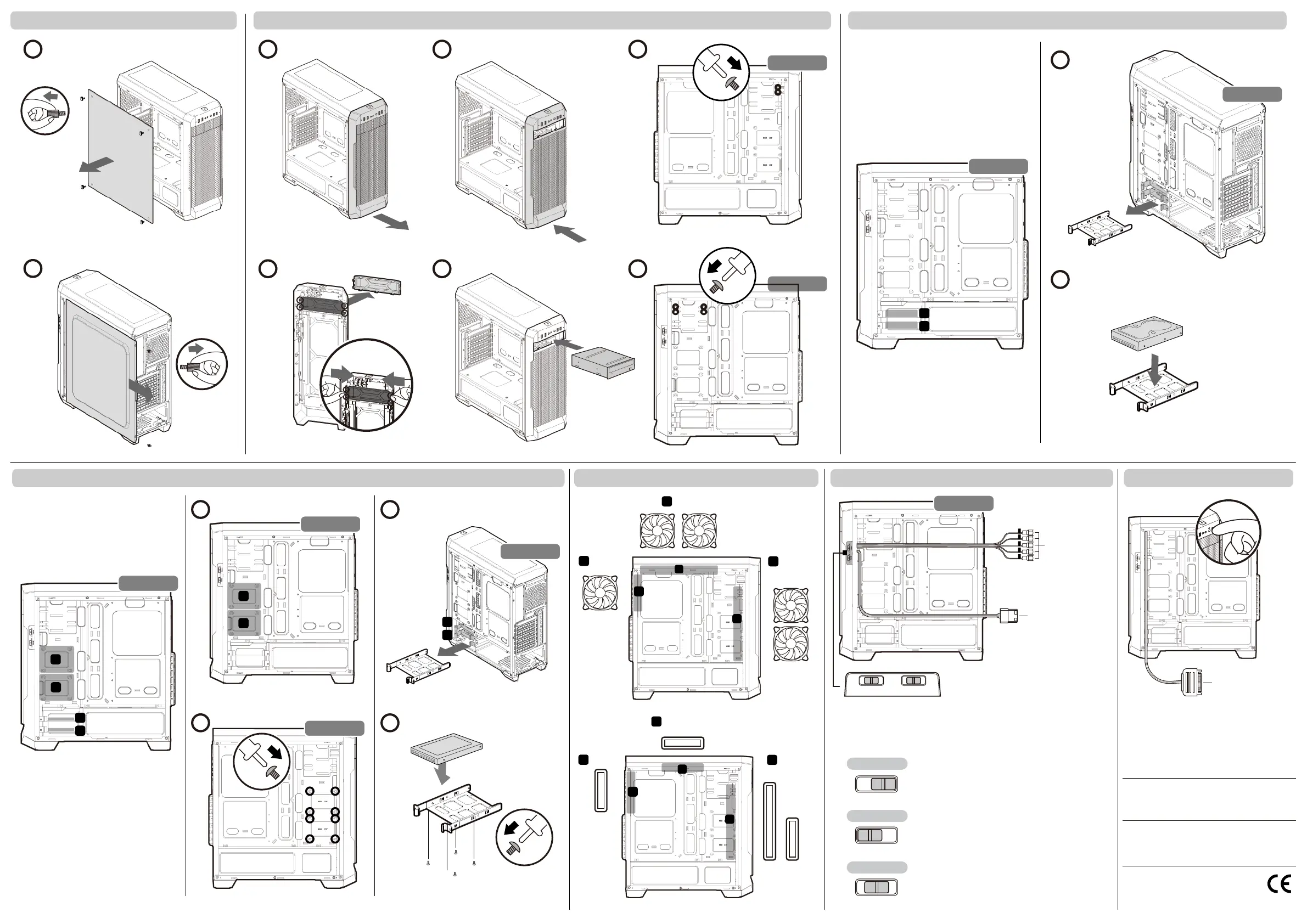
Installing water cooling radiators & cooling fans Switching fan speeds Controlling lighting modes
Fan Connectors
Removing side panels Installing the 5.25" device
Installing the 2.5" SSDs
Installing the 3.5" HDDs
1
2
1
2
3
4
5
6
1
2
2
1
3
1
(Top)
1
(Rear)
3
(Front)
2
3
1
1
2
RIGHT
RIGHT
3
4
RIGHT
LEFT
RIGHT
LEFT
1
2
1
2
RIGHT
RIGHT
1
2
3
4
RIGHT
2
2
FAN1 FAN2 FAN2 FAN2FAN1
L
FAN2
H L
FAN1
H
Fan Speeds Power Cable
RGB Strips Power Cable
※
Please don’t remove the RGB Strips Power Cable
from the PSU.
Fan Speeds Controller
FAN 1 – Connect 2 fans at the front
FAN 2 – Connect 2 fans on the top and 1 fan at rear
※Please connect both fan connectors and the fan speeds power cable at the same time.
L H
When switching to H, the fans run at high speed.
High Speed
L H
When switching to the mid, the fans stop running.
Stop
Low Speed
L H
When switching to L, the fans run at low speed.
Compucase Enterprise Co.,Ltd.
No. 225, Lane 54, An Ho Road Sec. 2 Tainan, Taiwan, R.O.C
Tel:+886-6-356-0606
Service E-Mail:service@cougargaming.com
COUGAR USA Technical Service
Tel: (833) 256-3778
Mail: rma@compucaseusa.com
https://cougargaming.com/support/contact/upload/
For more information, please visit
Compucase Enterprise Co.,Ltd.
All rights reserved.
www.cougargaming.com
Made in China


 To Previous Page