ENGLISH 10
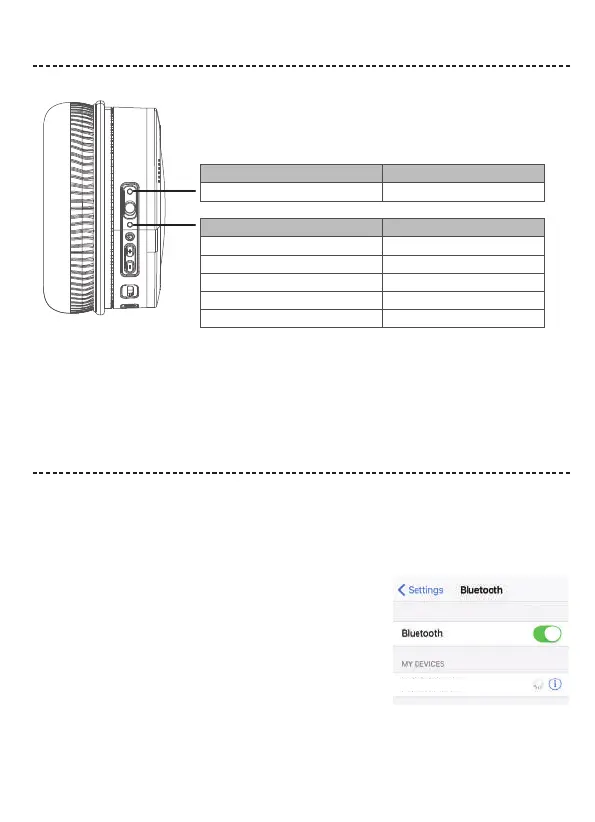
STATUS INDICATORS
BLUETOOTH CONNECTIONS
Connection method
You can connect your mobile device with your headphones using Bluetooth wireless technology.
Note: If connected to an Apple device, the device displays the headphone battery level near the upper right corner of the screen.
Solid green Noise cancellation ON
Indicator Light Display
Flashing blue and red alternately
Flashing red
Solid red
Solid blue
Flashing blue slowly
System status
Power on & In pairing mode
Low Battery
Charging in Process
Fully Charged
Paired
Indicator Light Display System status
Note: The devices must be within range (32.8 ft. or 9 m) and powered on.
Tip: Once powered on, the white LED flashes blue and red alternately.
Tip: Once paired, you hear “Paired” and see the indicator flash blue slowly.
Choose “E8” to connect
2. On your mobile device, enable the Bluetooth feature.
Tip: The Bluetooth feature is usually found in the Setting menu.
3. Select your headphones from the device list.
1.Turn on the
headphones
. If connecting for the first time, the headphone will
enter the pairing mode automatically after it is powered on.
E8


 To Next Page