Page - 13 SALES + SERVICE
CPIGP8AOPINST (866) 912-3469
WWW.CPISHINE.COM
WEEKLY CLEANING
Turn the machine off and unplug it.
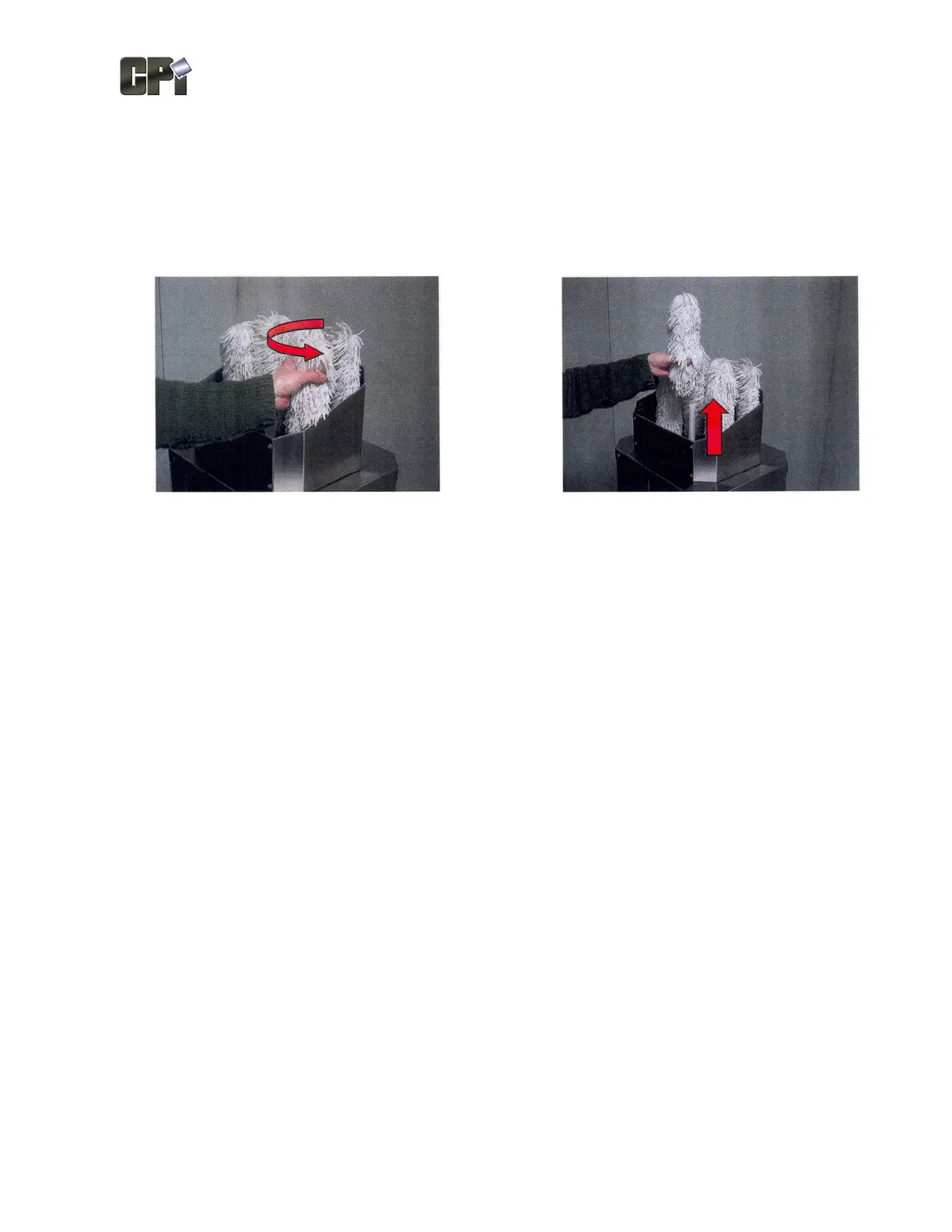
Remove the brushes as follows:
To clean the glass polisher, cool down the polisher and then remove the brushes. The
brushes must be hand washed. Place the brushes in a tub of warm water (max 30°C) using a
non-foaming, neutral detergent. Then wipe down the exterior stainless steel casing using a
damp cloth.
WARNING: do not place the glass drier in a container wi th water because it contains
electrical parts that could be damaged and cause electric shock to the operator once it is
switched back on.
Remove the brushes from the warm water and allow them to drip dry overnight before
replacing the brushes onto the glass polishing machine. To replace the brushes, ensure
the connecting slot (A) – shown on page 8, is inserted on the top of support (B) - matching the
colour of the brush to the support. If the brush is not properly fixed on the support, it will not
rotate once the machine is switched back on. To verify this, once the brush has been replaced
try to rotate it clockwise and then pull it gently upwards: if the brush does not come off it has
been placed correctly.
Then turn the machine back on and run for approx. 15 minutes to complete the drying of the
brushes.
To remove the brush from the support, rotate the brush in a
counter clockwise direction while gently pulling it upwards.
Remove the brush completely by slipping it off its support.


 To Next Page