EasyManua.ls Logo

CPI Talos T6 - User Manual

CPI Talos T6
18 pages
Print Icon
To Next Page IconTo Next Page
Loading...
V2.0 EN

Other manuals for CPI Talos T6

Question and Answer IconNeed help?

Do you have a question about the CPI Talos T6 and is the answer not in the manual?

Summary

Safety Instructions and Compliance

Intended Use

Describes the intended application and limitations of the note validator.

Protecting Persons and Equipment

Outlines critical safety warnings regarding electric shock and fire hazards.

Compliance and Emissions

Lists safety standards, directives, and FCC compliance applicable to the validator.

About This Installation Guide

Text Conventions

Explains symbols used in the guide for safety messages and notes.

Additional Helpful Documents

Provides instructions for locating configuration coupons and other resources.

About Talos T6;T8 Note Validator

Note Validation Process

Details the step-by-step process the validator uses to accept or reject notes.

Specifications

Lists key technical specifications including voltage, wattage, and operating conditions.

Installation

Unpacking the Note Validator

Instructions for unpacking and inspecting the note validator for damage.

Mounting the Note Validator

Guidance on physically installing the note validator into a host machine.

Setup

Programming with Configuration Coupon

Steps to program the note validator using a configuration coupon and interpret LED feedback.

Enabling Notes and Vend Coupons

Instructions for enabling/disabling specific notes or vend coupons using the configuration button.

Interfaces

Interface Options for the Note Validator

Details available interface types and compatible power harnesses for connecting the validator.

Cleaning

Recommended Cleaning Aids

Lists approved materials for cleaning the note validator safely.

Cleaning Procedures

Step-by-step instructions for safely cleaning the note validator's internal components.

Troubleshooting

Conditions and Recovery Steps

Identifies common operational issues and provides steps to resolve them.

Bezel LED Error Codes and Recovery

Explains how to interpret LED error codes and the corresponding recovery actions.

Pinout Information

30-Pin Connector Pinout

Detailed pin assignments for the 30-pin connector on different voltage models.

Power Harnesses

Lists part numbers and power specifications for available interface harnesses.

9-Pin Cable Connector Assignment

Details the pinout for the 9-pin cable, noting legacy inputs.

Customer Supplied Cables

Information on AMP connectors and recommended wire gauge for cables.

Disclaimer

Owners Responsibility

CPI Responsibility

Technical Support

Tell Us How We Are Doing

Overview

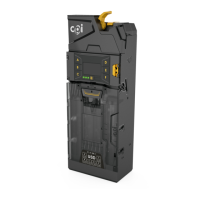
The Talos™ T6/T8 Note Validator is a device designed for validating and accepting banknotes in host machines such as vending machines and kiosks. It is built to fit into standard note validator openings provided by host machine manufacturers. The device is designed for efficient and secure note processing, offering various interface options and robust validation capabilities.

Function Description:

The note validator performs a series of processes to validate and accept or reject banknotes. When a note is inserted, the validator first senses the note and prepares its drive motor. Drive belts then pull the note into the machine, where internal sensors scan it to determine its value. The note is held in escrow while its authenticity is validated. If the note is successfully validated, credit is applied, and the note is stacked in the cassette. If the note is not validated, it is returned to the customer. The device is designed for lengthwise, 4-way note insertion (face up/down, either direction).

Important Technical Specifications:

  • Input Voltage: The Talos™ T6/T8 supports multiple input voltages: 115 VAC, 24 VAC, and 12 VDC.
  • Wattage: The maximum wattage is 48 W.
  • Temperature Range:
    • Operating temperature: -15° C to 60° C (5° F to 140° F)
    • Shipping and storage temperature: -40° C to 70° C (-40° F to 158° F)
  • Relative Humidity: 85% relative humidity (non-condensing) with a maximum relative humidity of 50% at 60° C (140° F).
  • Power Consumption:
    • At idle: 5 W
    • In acceptance mode: 10 W
    • With a full stack in the note magazine: 50 W maximum
    • When using specific interfaces (MDB, EBDS, NISR, vending/gaming pulse interfaces): 48 W
  • Note Acceptance Rate: 95% or greater at nominal conditions.
  • Transaction Speed: Approximately 4 seconds from note insertion to completed note stacking.
  • Escrow: The device can hold 1 note in escrow.
  • Interfaces: The note validator supports several interface options, including:
    • Multi-Drop Bus (MDB)
    • Extended Bi-Directional Serial (EBDS)
    • Non-Isolated Serial (NISR)
    • Vending and gaming pulse interfaces
    • RS232 (with a specific cable)

Usage Features:

  • Installation: The device is designed for straightforward installation into host machines. It can be mounted on existing studs provided by OEMs. Some machines may require additional brackets or faceplates.
  • Configuration: The note validator can be programmed using a configuration coupon. This involves removing the note magazine, pressing a configuration button, reattaching the magazine, and inserting the coupon. The bezel LEDs flash to indicate the success or failure of the programming.
  • Enabling Notes and Vend Coupons: Similar to programming, notes and vend coupons can be enabled or disabled by entering configuration mode and inserting the desired note or coupon. The bezel LEDs provide feedback on the outcome.
  • Troubleshooting: The device includes bezel LED error flash codes to help diagnose issues. These codes indicate conditions such as no power, blocked note path, issues with other vending components, or a full note stacker. Recovery steps are provided for each error code.
  • Interface Harnesses: Various harnesses are available to support different interfaces, connecting the note validator to the machine controller or coin changer. Pinout information for 30-pin, 9-pin, and 18-pin connectors is provided for customer-supplied cables.

Maintenance Features:

  • Cleaning: The note validator can be cleaned while mounted in the host machine. Cleaning involves removing power, unlatching and removing the note magazine, unlatching and removing the lower housing assembly, and then cleaning the note path with a soft cloth.
  • Recommended Cleaning Aids: A soft cloth, which may be moistened with a mild, non-abrasive, and non-petroleum-based cleaner. Flammable cleaners should never be used due to the risk of fire.
  • Safety Precautions:
    • Electric Shock: Always ensure the host machine power is OFF before installing, maintaining, or cleaning the note validator to prevent serious injury or death.
    • Fire Risk: Never use flammable cleaners.
  • Modular Design: The Talos™ note validator is described as modular and backwards compatible, suggesting ease of component replacement and upgrades.

CPI Talos T6 Specifications

General IconGeneral
BrandCPI
ModelTalos T6
CategoryCash Counters & Coin Sorters
LanguageEnglish

Related product manuals