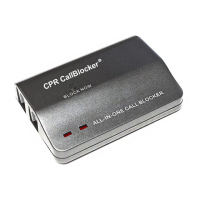
PROGRAMMING
CODES
Blocking all “International” Callers
1. To Turn On: Get a dial tone and input
* * 7 # * #
2. To Turn Off : Get a dial tone and input * * 6 # * #
You will hear a ‘beep’ after each # to conrm success.
Blocking all IP Dialling systems (skype / overseas nuisance call centres)
1. To Turn On: Get a dial tone and input
* * 7 # 6*#
2. To Turn Off : Get a dial tone and input * * 6 # 6*#
You will hear a ‘beep’ after each # to conrm success.
Blocking all “0” type calls (Single digit spoof callers)
1. To Turn On: Get a dial tone and input
* * 7 # 0#
2. To Turn Off : Get a dial tone and input * * 6 # 0#
You will hear a ‘beep’ after each # to conrm success.
Resetting the Call Blocker back to factory settings
1. Get a dial tone and input
** 1 # * 1 #
You will hear a ‘beep’ after each # to conrm success.
Note: Three
"Beeps” indicated that an error has occurred - Either a number has been
entered incorrectly or the function is already ON.
Blocking all “International” Callers
1. To Turn On: Get a dial tone and input
* * 7 # * #
2. To Turn Off : Get a dial tone and input * * 6 # * #
You will hear a ‘beep’ after each # to conrm success.
Blocking all IP Dialling systems (skype / overseas nuisance call centres)
1. To Turn On: Get a dial tone and input
* * 7 # 6*#
2. To Turn Off : Get a dial tone and input * * 6 # 6*#
You will hear a ‘beep’ after each # to conrm success.
Blocking all “0” type calls (Single digit spoof callers)
1. To Turn On: Get a dial tone and input
* * 7 # 0#
2. To Turn Off : Get a dial tone and input * * 6 # 0#
You will hear a ‘beep’ after each # to conrm success.
Resetting the Call Blocker back to factory settings
1. Get a dial tone and input
** 1 # * 1 #
You will hear a ‘beep’ after each # to conrm success.
Note: Three
"Beeps” indicated that an error has occurred - Either a number has been
entered incorrectly or the function is already ON.
6
7
Q. Will the CPR Call Blocker work on my broadband line?
A. The CPR Call Blocker will work happily alongside your broadband connection - just
unplug your telephone and plug into Call Blocker.
Q. How much power does the CPR Call Blocker use?
A. The CPR Call Blocker uses only the power from your telephone line which is of no cost
to you!
Q. Which network providers does the CPR Call Blocker support?
A. The CPR Call Blocker will work on standard domestic telephone lines from all the
main telephone providers.
Q. Do I need caller ID for this product to work?
A. Yes. Caller ID should be enabled on your telephone line for the product to work
effectively. Caller ID Display is available free for BT customers
Q. Can I use any telephone with the CPR Call Blocker?
A. The CPR Call Blocker will work with a wide range of modern telephone equipment -
cordless DECT phones, cordless analogue phones.
Q. Can I use the CPR Call Blocker with extension telephone sockets?
A. The CPR Call Blocker is designed to work on one telephone socket. If you wish to
have several phones around the house it is best to use a DECT phone with multiple
cordless handsets
Q. Will the CPR Call Blocker work on my broadband line?
A. The CPR Call Blocker will work happily alongside your broadband connection - just
unplug your telephone and plug into Call Blocker.
Q. How much power does the CPR Call Blocker use?
A. The CPR Call Blocker uses only the power from your telephone line which is of no cost
to you!
Q. Which network providers does the CPR Call Blocker support?
A. The CPR Call Blocker will work on standard domestic telephone lines from all the
main telephone providers.
Q. Do I need caller ID for this product to work?
A. Yes. Caller ID should be enabled on your telephone line for the product to work
effectively. Caller ID Display is available free for BT customers
Q. Can I use any telephone with the CPR Call Blocker?
A. The CPR Call Blocker will work with a wide range of modern telephone equipment -
cordless DECT phones, cordless analogue phones.
Q. Can I use the CPR Call Blocker with extension telephone sockets?
A. The CPR Call Blocker is designed to work on one telephone socket. If you wish to
have several phones around the house it is best to use a DECT phone with multiple
cordless handsets



 To Next Page
 Loading...