
 Need help?
Do you have a question about the CPR Guardian III and is the answer not in the manual?
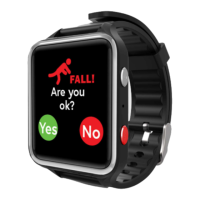
Device feature for detecting and alerting on falls.
Emergency button for immediate assistance.
Tracks the wearer's location for safety.
Monitors the wearer's heart rate.
Enables making and receiving calls.
Monitors wearer's body temperature.
Overview of the device's features and components.
Guide to setting up and managing the SIM card.
Lists all items included in the product packaging.
Instructions for optimal battery performance and charging.
Step-by-step guide for connecting the watch to the companion app.
Procedure for adding contacts to the watch's phonebook.
Instructions on how to initiate a call to the watch.
How to take and view heart rate readings.
Steps to track the wearer's real-time location.
Guide to setting daily step count targets.
Process for managing multiple devices within the app.
Instructions for removing a paired watch from the app.
How to enable and configure fall detection.
Creating virtual boundaries for location alerts.
Switching between automatic and manual operating modes.
Viewing historical location tracking data.
Displaying and interpreting heart rate data trends.
Displaying and interpreting temperature data trends.
Steps to initiate a voice call from the watch.
Procedure for making an emergency SOS call.
How to record and send voice messages.
Manual steps to measure heart rate on the watch.
Customizing the watch's display.
Instructions for connecting the watch to a power source.
Further details on watch functions and operation.
Important safety warnings and product warranty information.
 General
| Cellular Connectivity | Yes |
|---|---|
| GPS | Yes |
| Fall Detection | Yes |
| Heart Rate Monitoring | Yes |
| Water Resistance | IP67 |
| Emergency SOS Button | Yes |
| Two-Way Communication | Yes |
| Battery Life | Up to 48 hours |
| Display | 1.3-inch TFT |
| Connectivity | 4G LTE, Wi-Fi |
| Compatibility | Android and iOS |
| Sensors | Heart Rate Sensor, Accelerometer |

 To Next Page

