6
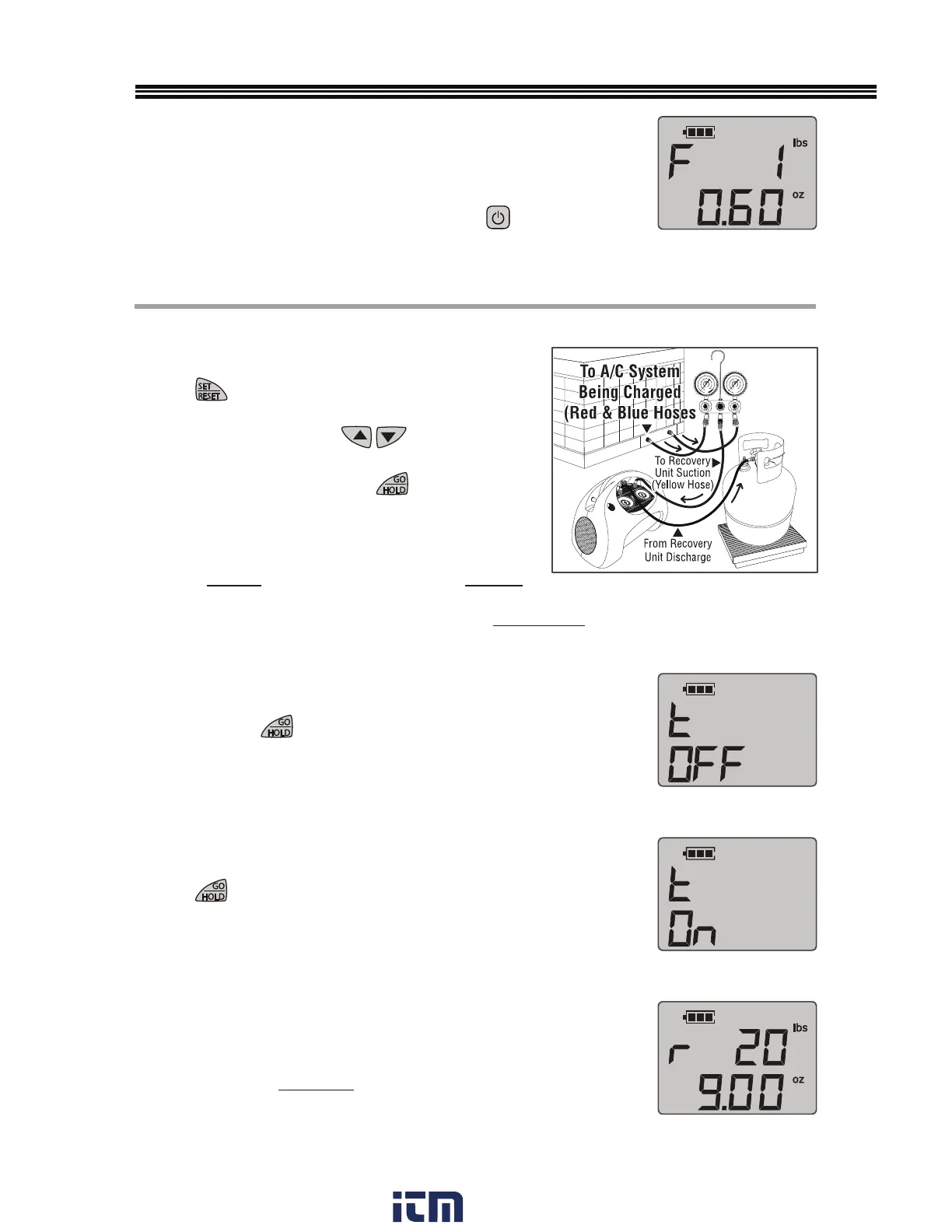
DO NOT PLACE TANK ON SCALE (AT THIS TIME)
1. Connect equipment per DIAGRAM B (RECOVER)
2.
Press
to scroll through menu and choose
Recovery “rEC”.
3. For tank you will use, press
to input tank
maximum refrigerant weight capacity stamped on the tank
collar (0.8 X WC + TW), then press
.
• WC = Water Capacity (weight);
• TW = Tank Weight (of empty tank)
CAUTION: DO NOT PLACE TANK ON PLATFORM BEFORE
STEP 5. DOING SO COULD LEAD TO OVERFILLING THE REFRIGERANT TANK. DANGER - THE
RECOVERY TANK CONTAINS LIQUID REFRIGERANT. OVERFILLING OF THE RECOVERY TANK MAY
CAUSE A VIOLENT EXPLOSION RESULTING IN SEVERE INJURY OR EVEN DEATH.
4. TANK OFF
When “t OFF” appears (See Figure R-6) ensure tank is NOT
on scale, press
.
5. TANK ON
When “t ON” (Figure R-7) appears, place tank on scale,
press
, open valves and turn ON Recovery Machine (follow
manufacturer’s instructions) to start recovery.
6.
REMAINING CAPACITY OF TANK
Display will show “r” (Figure R-8) indicating recovery in process,
alongside the remaining tank refrigerant weight capacity (until full.)
Display will count backwards from remaining tank capacity (indicating
decreasing capacity of tank)
CHARGE MODE (CONT’D)
7.When programmed charge amount (weight) has been reached, the
screen will flash a large “F” (FINAL) (Figure C-7). Quickly close tank
and/or manifold valves.
8. SHUT DOWN -
When CHARGE function done, turn off recover
y machine,
close valves, remove cylinder from platform. Press
to turn scale OFF.
DIAGRAM B (RECOVER)
RECOVER MODE (“rEC”)
Fig. C-7
Fig. R-7
Fig. R-6
Fig. R-8
(Example Weight Shown)
(Example Weight Shown)
w ww. . com
information@itm.com1.800.561.8187


 To Next Page