Laser Show System
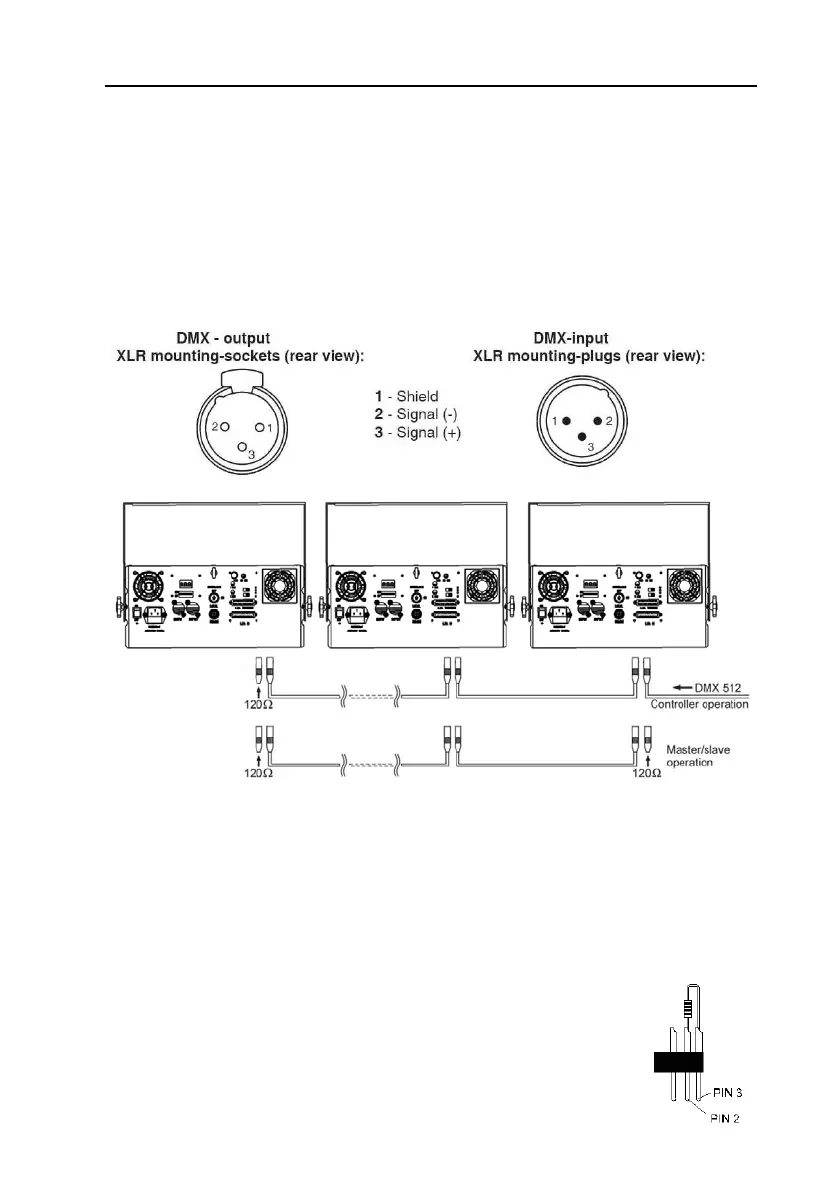
5.2 DMX-512 connection/connection between fixtures
z The fixture is equipped with 3-pin XLR sockets for DMX input and output. The
sockets are wired in parallel. Only use a shielded twisted-pair cable designed
for 3-pin XLR-plugs and connectors in order to connect the controller with the
fixture or one fixture with another.
Occupation of the XLR-connection:
Building a serial DMX-chain:
z If you are using the standard DMX-controllers, you can connect the DMX-output
of the controller directly with the DMX-input of the first fixture in the DMX-chain.
If you wish to connect DMX-controllers with other XLR-outputs, you need to use
adapter cables.
z Connect the DMX-output of the first fixture in the DMX-chain with the
DMX-input of the next fixture. Always connect output with the input of the next
fixture until all fixtures are connected.
Caution: At the laser fixture, the DMX-cable has to terminated
with a terminator. Solder a 120 Ohm resistor between Signal (-)
and Signal (+) into a 3-pin XLR-plug and plug and plug it in the
DMX-output of the last fixture.
6



 To Next Page