USER MANUAL
17
Operation
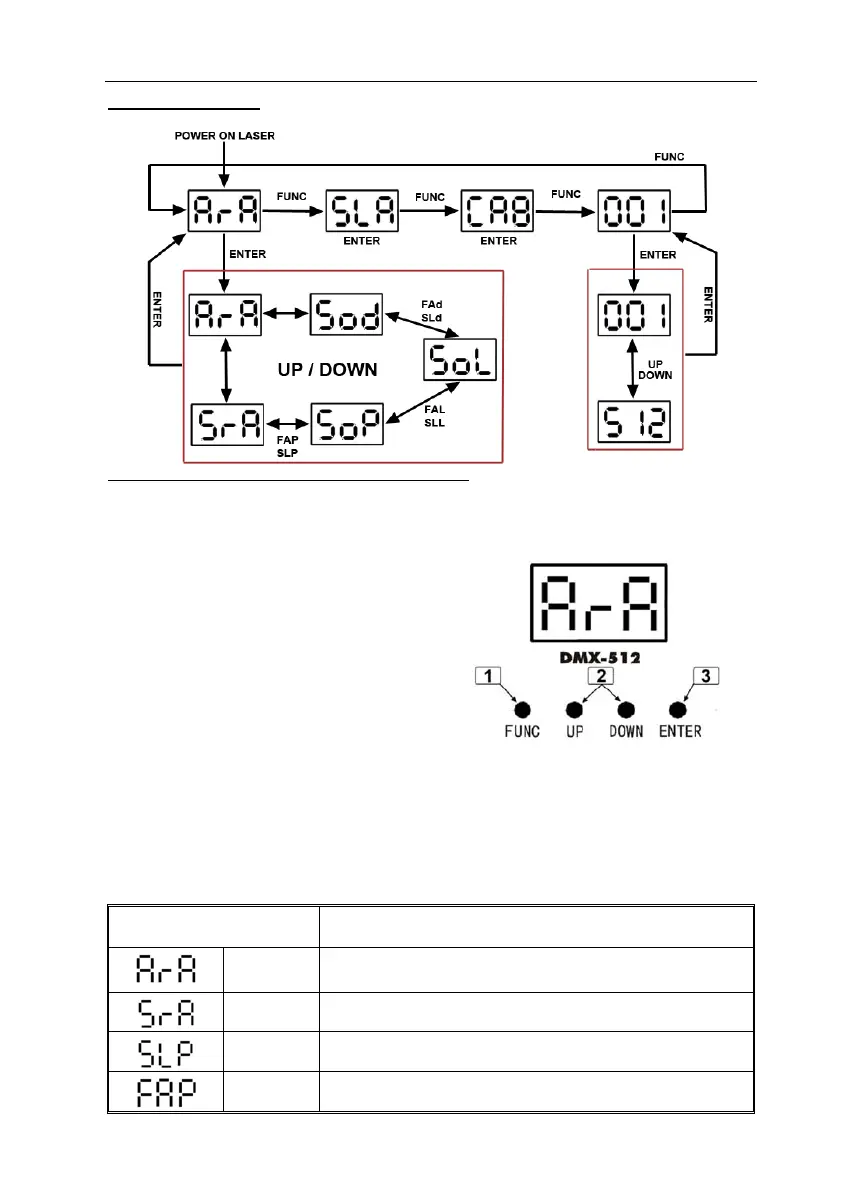
Stand Alone Preprogram Laser Show
z Press FUNC to enter MODE OPTION.
z Till to LED panel shows either one of ArA, SrA, FAP, SLP, SoP, FAL, SLL,
SoL, FAd, SLd, Sod.
z Press UP or DOWN to select your
favorite Stand Alone mode as above.
z Press ENTER to confirm the setting.
The laser is working in stand alone. Each
time when you turn on your laser, you will
have this confirmed laser show.
In the MODE OPTION setting, the stand alone laser show that you are going to
choose is flashing. Press UP or DOWN to change stand alone laser show, you will
have 11 different stand alone preprogrammed laser show. Their DISPLAY and
EFFECT are listed below:
DISPALY STAND ALONE MODE PREPROGRAM EFFECT
ARA Auto Running Random Effect
SRS Sound Activated Random Effect
SLP
Slow Moving Patterns Effect
FAP
Fast Moving Patterns Effect



 To Next Page